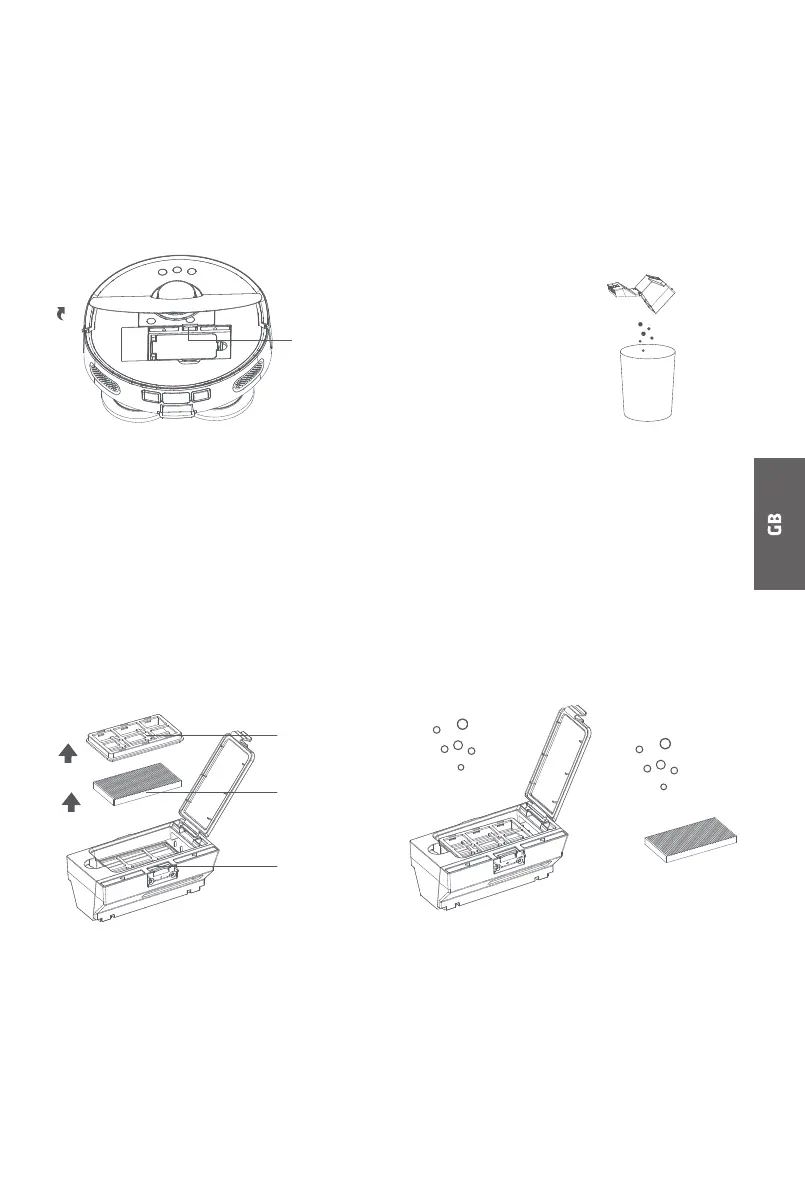
DISMOUNTING AND MOUNTING OF DUST BOX AND FILTER
Step 1: Dismount the dust box.
Lift the top cover plate, press the
dust box dismounting button and
dismount the dust box.
Step 2: Pour the waste from the dust box.
Open the dust box release buckle, pour
the waste in the dust box into the
waste bin and clean the unreachable
positions with the cleaning brush.
Step 3: Dismount the filter.
You may decide to clean the filter or
not. If you decide to clean the filter,
dismount the filter holder and then
the filter as instructed in the figure
below, clean them with the cleaning
tool and finally mount them correctly
or replace the old filter with a new one.
Step 4: Flush the dust box.
Flush the dust box or the filter with
clean water and have it dried in the
sun before continuing use, to avoid
a bad smell from dust caking.
Dust box
dismounting
button
Filter screen
Filter
Filter holder
17



 To Next Page