PRODUCT INTRODUCTION
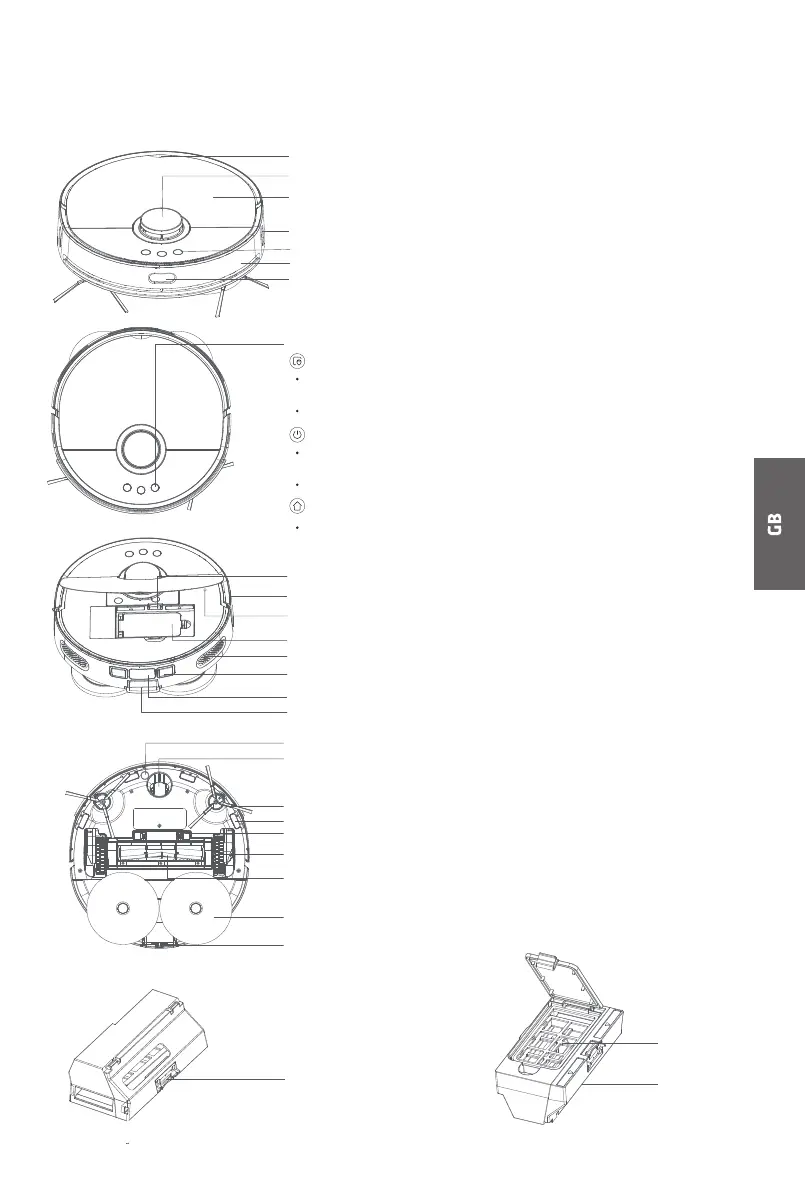
Cover plate buckle location
Laser radar sensor
Panel
Infrared receiving sensor
Function buttons
Bumper
Infrared window sensor
Dust box dismounting button
along-wall motion sensor
Reset button
Dust box
Air outlet
Charging contact (×2)
Infrared receiving sensor
Dust collection port
Carpet sensor
omni-directional wheel
Side brush
Cli sensor (4)
Roller brush box release button
Driving wheel (2)
Roller brush
Mop (2)
Directional wheel
MAIN BODY
Dust box
Partial cleaning button
If it is short pressed, the main body will get recharged automati-
cally after partial cleaning.
If short pressed in operation, the device will pause.
ON/OFF button
If it is short pressed, the device will get recharged automatically
after overall cleaning.
If it is long pressed, the device will get powered o.
Charging button
If it is short pressed in operation, the device will get back to
charge.
Function buttons
Dust box release buckle
Dust box filter
screen Dust inlet
7



 To Next Page