APP CONNECTION
Smart Life
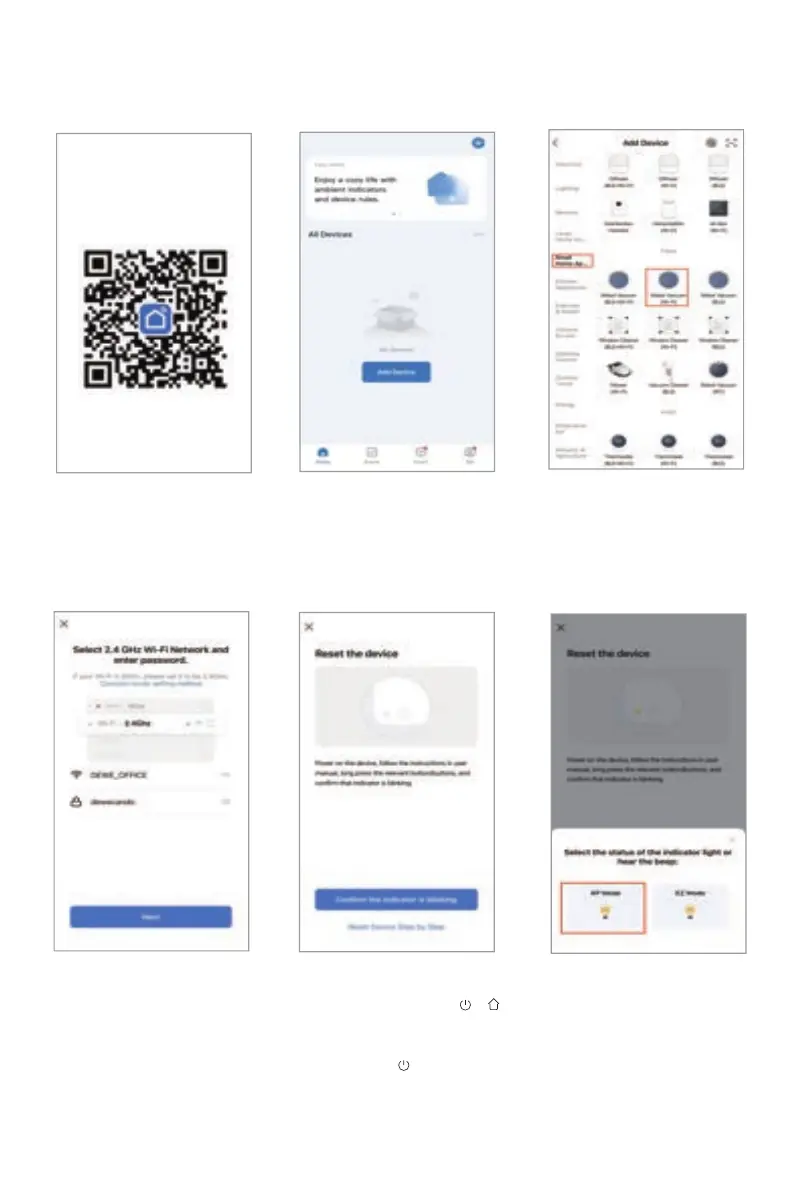
1. Scan the QR code to
download the “Smart
Life” APP. Or search
for the "Smart Life"
APP in APP stores.
2. Click "Add Device", or
the "+" sign in the
upper right corner.
3. Select "Small Home
Appliances", then
click "Robot Vacuum
(Wi-Fi)".
4. Please make sure the
mobile phone is
connected to the
2.4GHz Wi-Fi network,
enter the Wi-Fi name
and password to log in,
then click "Next".
5. Please confirm the device is turned
on, press and hold " + " for 3
seconds at the same time, you will
hear the voice prompt "Wi-Fi has
reset", then start to flash, the
device is ready for connection, click
"Confirm the indicator is blinking".
6. Select “AP Mode”.
10



 To Next Page