Rel. 03
51
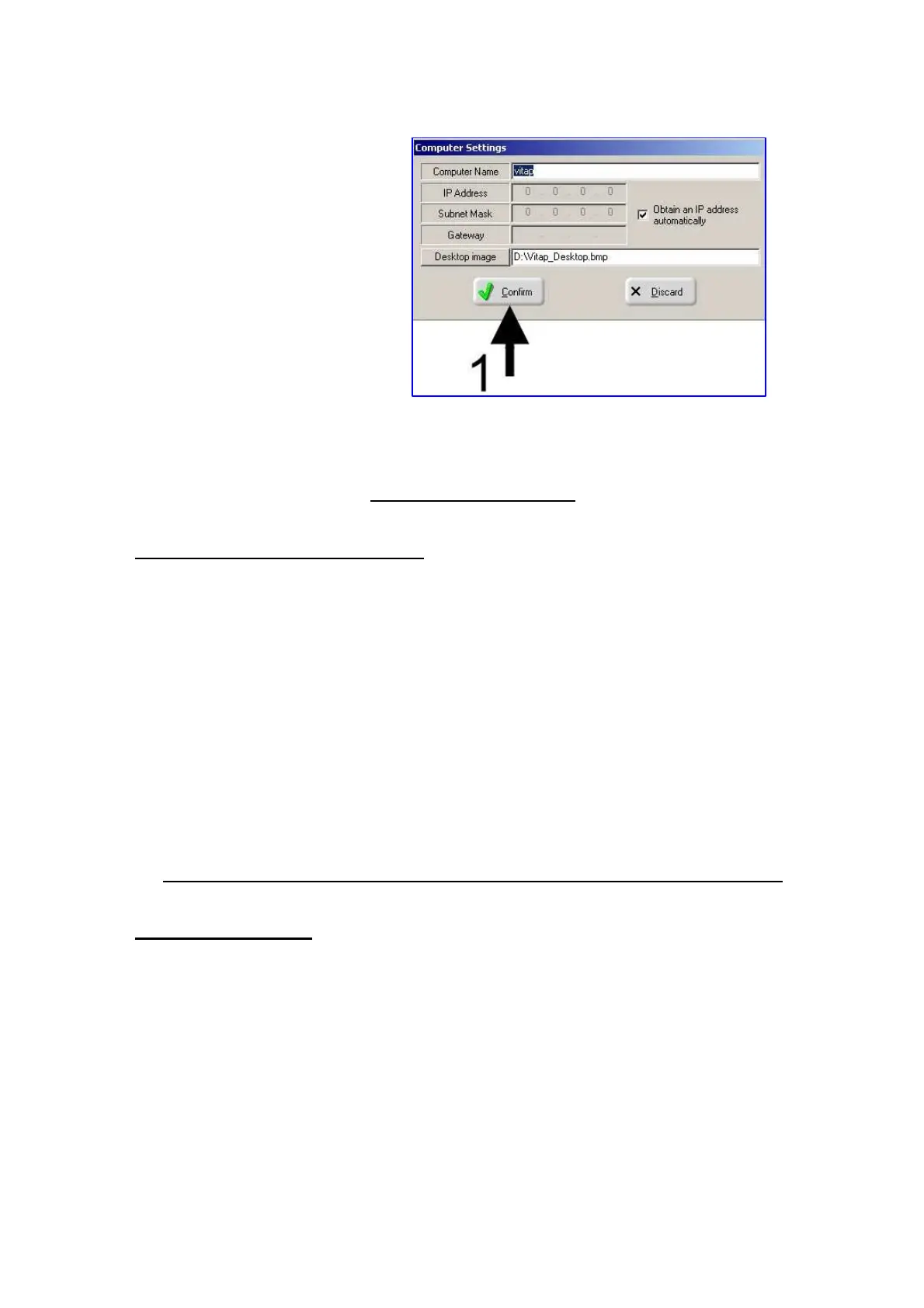
2) Modify the required data
3) Press the button 1
CAP. 8 WORKING CYCLE
8.1 DESCRIPTION OF WORKING CYCLE
The machine working cycle can be summarised as follows:
If the length of the side to be worked is less than the half of the plane:
1) send the programme to the machine following the procedure in Chapter 7.5
2) press “Start” on the “Joblist”
3) place the mobile on the left shoulder panel see chapter 6.2
4) support the panel, to support front
5) press the pedal to lock the panel
6) press the "start cycle" on the control panel
7) the machine starts the panel processing
8) the end of the production process the panel is returned to the starting position
9) press the pedal to unlock the panel
10) after processing last panel, press “Stop” on the “Joblist”
CAP. 9 MAINTENANCE AND RECOMMENDATIONS FOR GOOD FUNCTIONING
9.1 DAILY MAINTENANCE
ALL MAINTENANCE OPERATIONS HAVE TO BE CARRIED OUT BY SKILLED PERSONNEL.
- Always use tools in compliance with the specifications reported in Chapter 2.3
- Make sure that tools are always sharpened


 To Next Page