Items Description
Items Description
The values input in printing program revert the previous
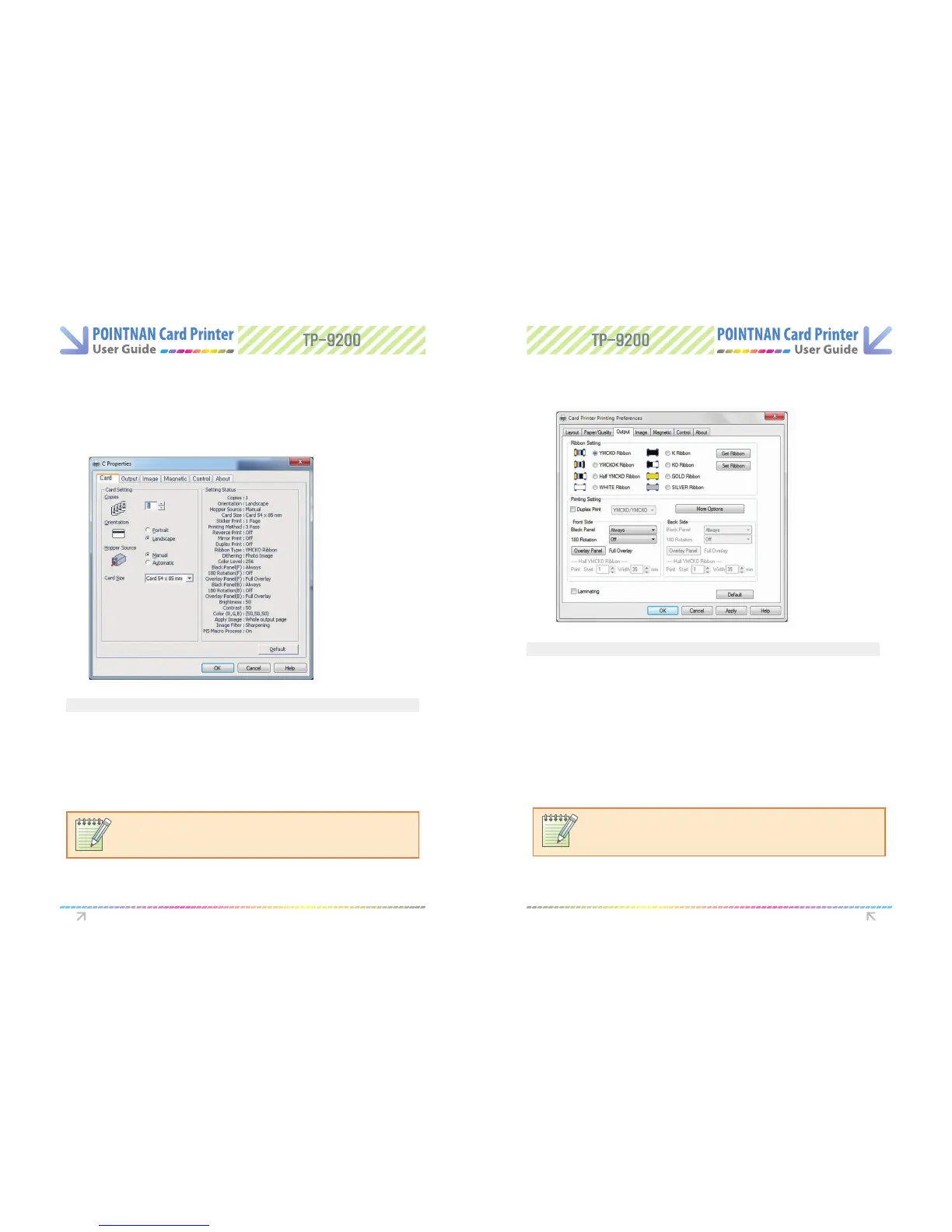
Card Tab Output Tab
Opening Printing Preferences on Application Software
NOTE:
Please refer to card specication of page 63 if unsure.
NOTE:
For all Monochrome and Black/Overlay (KO) ribbons, you will need to set the rib-
bon manually.
- Copies Sets the number of copies : 1 to 999.
- Orientation Sets the card orientation.
- Hopper Source Sets the source of the card supply in printer.
- Card Size Sets the size of card.
- Ribbon Type Sets the type of ribbon to be used
- Duplex Print prints the contents of a document on both sides of the card
- Black Panel, Select the K panel for printing black text and black images included
in the design
-180 Rotation will print the contents of the output data upside down on the card
- Overlay Panel option sets up the overlay panel for protecting the printed card.
Options include : Full Overlay/No Overlay/Selected Area/Use Image File/Smart card
ISO/Smart card AFNOR/Magnetic card
Printer Driver Settings Printer Driver Settings



 To Next Page