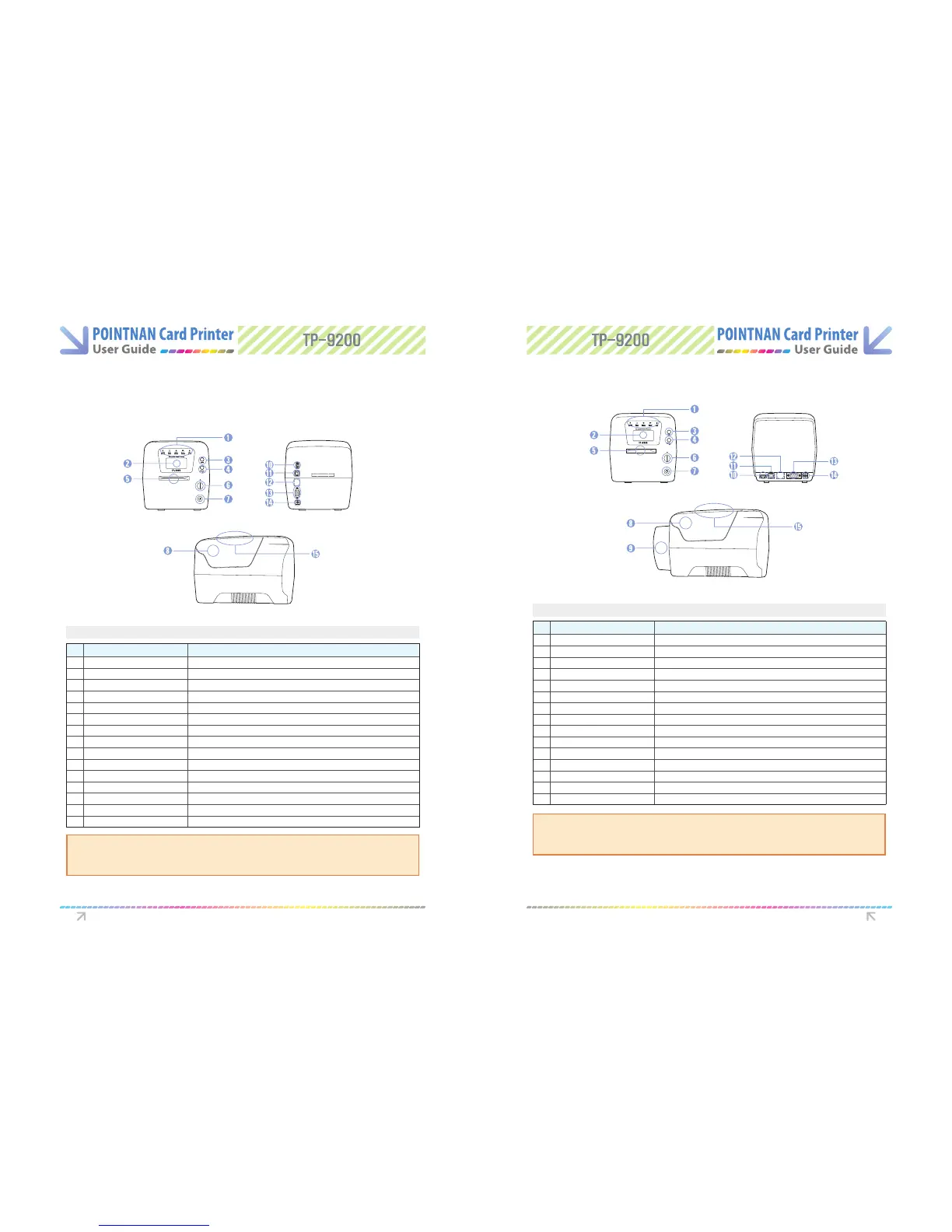
1.3 Printer Features
TP-9000 (Manual Feeding, Single-side Printing)
TP-9000 (Manual Feeding, Dual-side Printing)
Even though we have three dierent models of TP-9xxx series, since there is no big
dierence in operating them, user manual is designed for TP-9200 Dual Sided as
main reference.
Even though we have three dierent models of TP-9xxx series, since there is no big
dierence in operating them, user manual is designed for TP-9200 Dual Sided as
main reference.
Front
Front
Rear
Rear
Side
Side
Features Description
Features Description
No Name Description
1
2
3
4
5
6
7
8
9
10
11
12
13
14
15
LED Display
LCD Display
Card Eject Button
Ribbon Set Button
Single Feed Slot
Mobile Chip Slot
Power Button
Printer Lid
Flipper
USB Socket
USB Port
Ethernet Port
RS232C Port
Power Socket
External RF
LED shows the status of printer
LCD panel displays the status of printer
Button for card eject from printer inside
Button for replacing or repositioning ribbon
One by one manual feed and Cleaning card slot
Mobile chip socket (Optional)
Power on and o
Open the lid to load a cleaning roller and a ribbon
Automatic Dual Side Printing (Optional)
Used for memory stick HUB
Used for connecting USB cable between a PC and Card Printer
Used for connecting USB cable between a PC and Card Printer
Used for connecting USB cable between a PC and Card Printer
Used for supplying power
External RF Card Read/Write Station (Optional)
No Name Description
1
2
3
4
5
6
7
8
9
10
11
12
13
14
15
LED Display
LCD Display
Card Eject Button
Ribbon Set Button
Single Feed Slot
Mobile Chip Slot
Power Button
Printer Lid
Flipper
USB Socket
USB Port
Ethernet Port
RS232C Port
Power Socket
External RF
LED shows the status of printer
LCD panel displays the status of printer
Button for card eject from printer inside
Button for replacing or repositioning ribbon
One by one manual feed and Cleaning card slot
Mobile chip socket (Optional)
Power on and o
Open the lid to load a cleaning roller and a ribbon
Automatic Dual Side Printing (Optional)
Used for memory stick HUB
Used for connecting USB cable between a PC and Card Printer
Used for connecting USB cable between a PC and Card Printer
Used for connecting USB cable between a PC and Card Printer
Used for supplying power
External RF Card Read/Write Station (Optional)
Getting Started Getting Started



 To Next Page