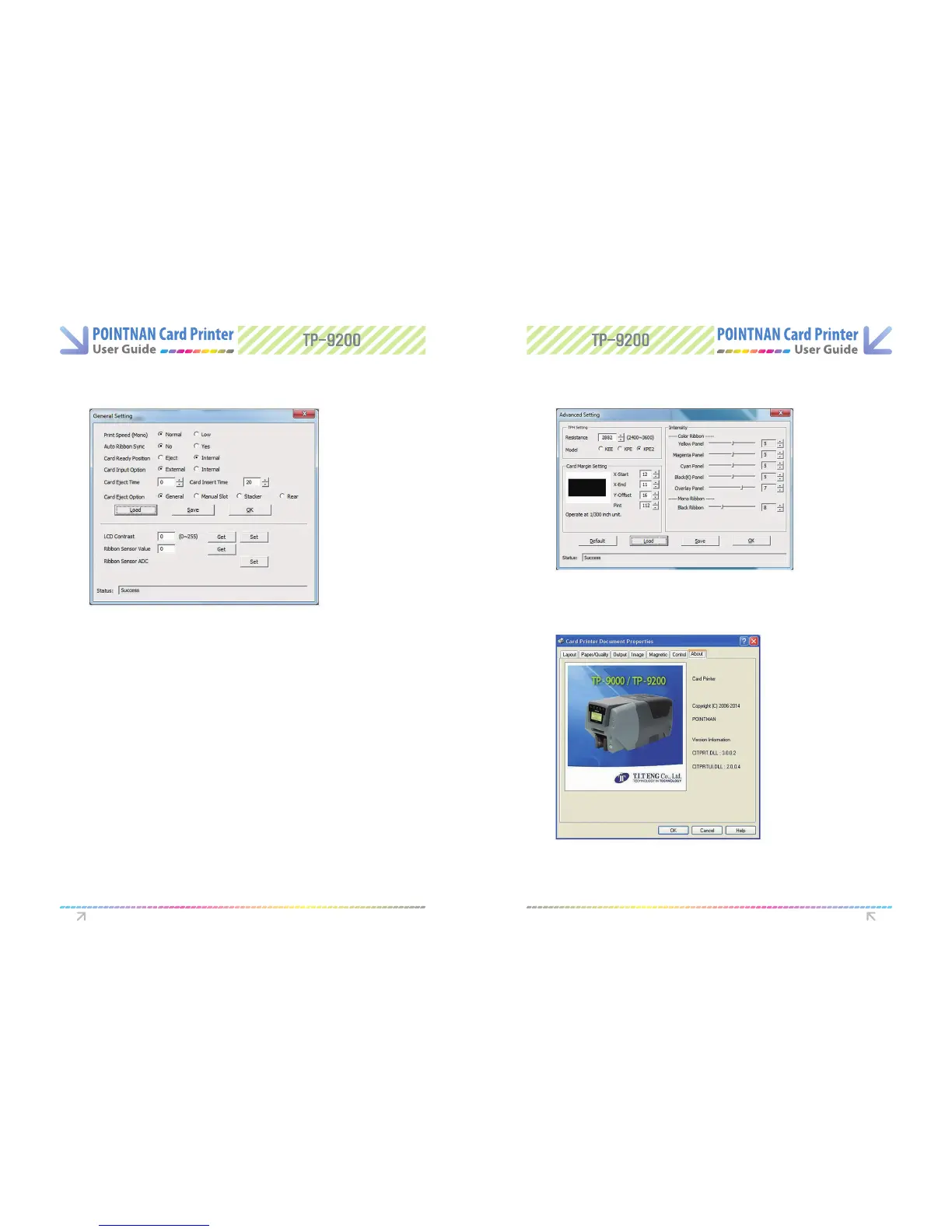
General Setting Tab Advanced Setting Tab
- Printing Speed - Mono
- Auto ribbon Sync - Color ribbon will be synchronized whenever lid is closed
- Card Ready Position -On initializing card can be situated inside printer or in feed
hopper
- Card input option - For TP-9000 only, On initializing card can be situated inside
printer or in feed slot.
- Card Eject time - For the TP-9000, Card eject time for batch printing.
- Card Insert time - For the TP-9000, Card insert time for batch printing.
- Card Ejection Option
1) General : from hopper to stacker (TP-9200) form manual slot to manual slot
(TP-9200 and TP-9000)
2) Manual Slot : Always out to manual slot (TP-9200)
3) Stacker : Always out to Stacker (TP-9200)
4) Rear : Always out to Rear (TP-9200 and TP-9000)
- TPH Resistance, Change the printhead resistance here
- Card Margin Setting, Osets, default as above.
(Note : Do not adjust these settings, they are critical to the printer operation)
- Intensity, Adjusts the darkness of the printed card.
- The “About” tab shows information about the driver, If you click on the picture,
Card Printer website will open via your internet browser .
Printer Driver Settings Printer Driver Settings



 To Next Page