ENGLISH
13
Chapter 1 Introducing the LCD TV
OK
POWER
EXIT
MENU
S.MODE P.MODE
FAV.CH
SLEEP
SWAP PIPFREEZE
P.SIZE
12
3
4
5
6
7
89
JUMP
ENT
0
VOL.
CH.
INFO
SOURCE
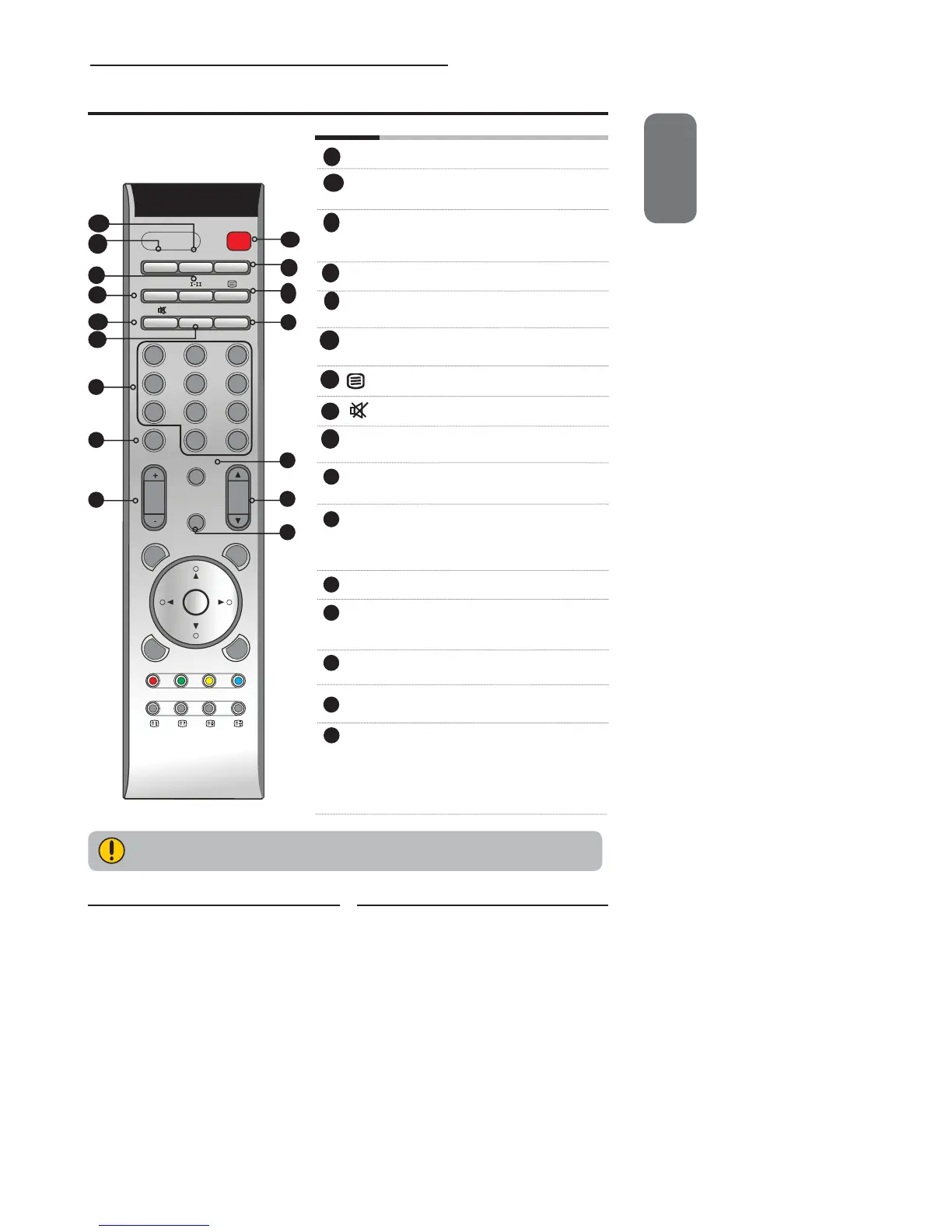
Your Remote Control
POWER Turns the LCD TV on and off.
SWAP Swaps between the main and sub
window in PIP/POP mode.
FREEZE Pressing FREEZE to freeze the current
picture, press again to restore the
picture.
PIP Turns PIP/POP on and off.
I-II Cycles through the TV sound options
(NICAN) : MONO/DUAL/STEREO
FAV.CH Pressing FAV.CH displays favorite
channels.
Turns on and off the Teletext function.
Mutes and restores the audio
SLEEP Cycles through the LCD TV sleep timer:
OFF/30/60/90/120 mins
P. S I Z E Cycles through Widescreen mode
settings :NORMAL /FULL/WIDE/ZOOM
0-9/ENT Pressing a number selects a channel.
Following selection, pressing ENT
activates the channel, or channel
activates automatically in 3 seconds.
JUMP Returns to previously selected channel.
INFO Pressing once displays a variety of
information such as the current channel
and the input source.
VOL.+- Increases and decreases volume.
CH.▲▼ Scans up and down the channels.
SOURCE Pressing SOURCE displays the source
list, use ▲▼ to select the video
equipment connected to the video
inputs of your LCD TV : TV/VIDEO1/
VIDEO2/VIDEO3/VIDEO4/VIDEO5/
VIDEO6/VIDEO7/COMPUTER
1
2
3
4
5
6
7
8
9
10
2
6
11
7
8
9
13
14
11
12
15
10
11
12
13
14
4
3
5
15
16
16
Not all regions support Teletext. Please check with your cable or satellite company.


 To Next Page
 Loading...










