POD: it allows you to reverse the function of the “Up” and “Down”
buttons in order to mount the control panel on the left or right on the
bike handlebar.
POD
RIGHT
LEFT
4.5- ALARMS
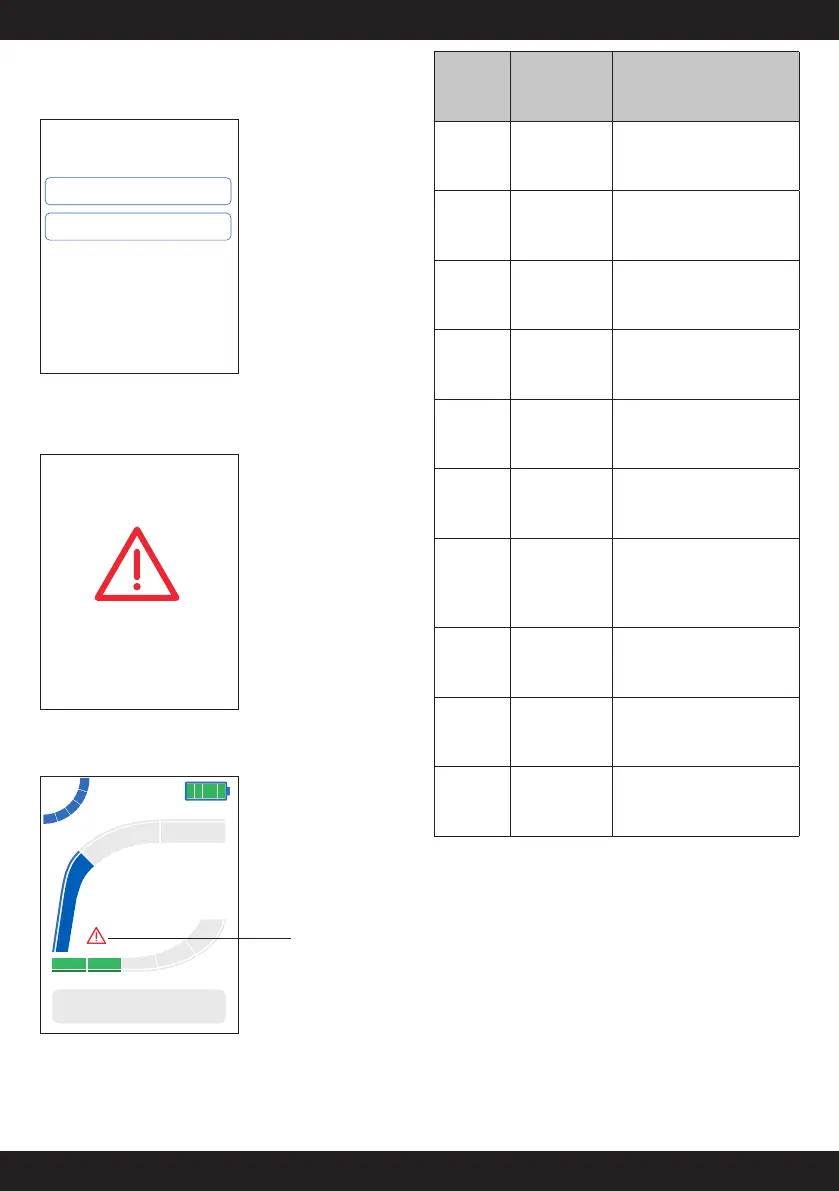
While using the bike, an anomaly is displayed with a warning indicating
the relative error code:
ALARM
alarm code
25
By pressing any button, the warning disappears, and the triangle icon will
appear on the main screen:
23.4
Km/h
234
TRIP Km
Dynamic
100%
Anomaly alarm
In the menu under “Diagnostic” you can see the last eight alarms detected
and reset them. By resetting them, the triangle icon will also disappear
from the main screen.
Alarm
Code
Description
Corrective actions
Corrective
actions
Motor anomaly
Turn the bike off and on again,
if the problem persists, contact
Support
11
Temporary
motor anomaly
Wait for the motor to cool down,
if the problem persists, contact
Support
13
Battery
overvoltage
Turn the bike off and on again,
if the problem persists, contact
Support
14
Battery
undervoltage
Turn the bike off and on again,
if the problem persists, contact
Support
16
25
Cyclist torque
anomaly
detection
Turn the bike off and on again,
if the problem persists, contact
Support
18
22
Battery
communication
error
Check the connection between
the battery and the motor
19
Sensor anomaly
on wheel
Check the position of the magnet
and speed sensor on the rear
wheel. Check the sensor electrical
connections
20
21
26
Communication
error with the
display
Check the connection cable
between the display and the
motor
23
Battery 1
temperature
anomaly
Cool down the battery, decrease
the motor assistance level
24
Battery 2
temperature
anomaly
Cool down the battery, decrease
the motor assistance level


 To Next Page