45
Memory channel storage
Under CH mode, input frequency and other parameters (such as CTCSS/DCS,
offset frequency, offset direction, etc). Press [
]rst,thenpress[
]
key, the channel No. for storage will be displayed at the right of the screen.
Press [
] / [
] key to select the desired channel for storage, and then
press [
]keytonishthestorage.
If the channel is blinking, means radio has stored frequency, if isn’t blinking,
the current channel is null, without any frequency message.
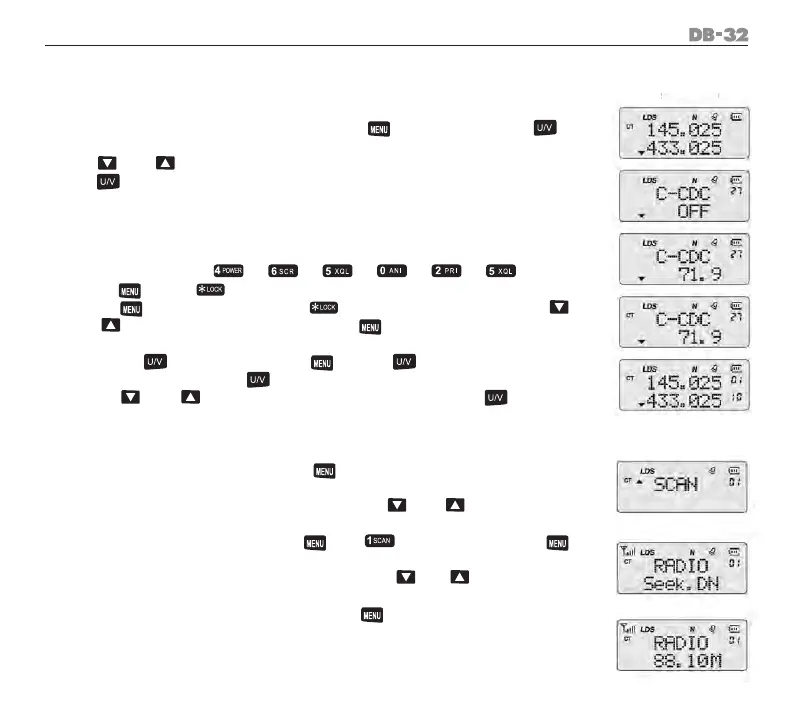
Example; input frequency: 465.025 T/R CDCSS 71.9 store in CH 9.
Operation:
Input the NO. like: [ ] [ ] [ ] [ ] [ ] [ ]
Press [
] and [
] keys again.
Press [
]keytoconrm,use[
] key to choose 67.0, press [
] / [
]keytoselect71.9,conrmby[
] key. “CT” is displaying at
the right of LCD
Re-press [
] key to exit. Use [
] and [
] key, then input 010
directlyandconrm by [
] key to complete channle store. Also can
press [
] / [
]keytoselectNo.10andconrmby[
] key to
complete channle storage.
Radio receiver setting
Open: When radio standbys, press [
] with [MONI] keys, radio receiver
is working.
Input directly four broadcasting no. or press [
] / [
] key to select
the broadcast channel (step is 100K).
Under radio receiver mode, press [
] + [ ] keys, then repress [
] key, radio scans all the radio receiver memories. Radio stops scanning
when there has radio receiver frequency. Press [
] / [
] key to select
the scan direction.
OFF: Under radio receiver mode, press [
] and [MONI] keys, radio
receiver is off.
1.
2.
3.
4.
1.
2.
3.
4.



 To Next Page