EasyManua.ls Logo

Poly Savi 8210 Office - User Manual

Poly Savi 8210 Office
21 pages
Print Icon
To Next Page IconTo Next Page
Loading...
Savi 8210/8220 Office
Wireless DECT headset system for
computer, desk phone and mobile
User Guide
Question and Answer IconNeed help?

Do you have a question about the Poly Savi 8210 Office and is the answer not in the manual?

Summary

Hook up system

Desk Phone Connection Options

Instructions for connecting the headset system to various desk phone configurations.

Fit and charge

Customize Headset Fit

Instructions for adjusting the headband and boom for optimal fit and comfort.

Charge Your Headset

Procedure for charging the headset and information on charging times and indicators.

Software Management

Pair your headset

The basics

Headset Controls Overview

Description of the buttons and features on the headset for call management and functions.

Make, Answer, End Calls

How to initiate, receive, and conclude calls using the base or headset.

Call Management Features

Adjust Volume Levels

How to adjust headset, desk phone, and base ringtone volumes.

Mute and Unmute

Procedure to mute and unmute the headset during a call.

Set up a conference call

More Features

Subscription Management

Troubleshooting

Headset Audio Issues

Solutions for common problems like no dial tone, static, distorted sound, or echo.

Troubleshooting by Device

Desk Phone Connection Issues

Troubleshooting steps for headset connection and functionality with desk phones.

Mobile Phone Pairing Issues

Resolving problems with pairing, auto-reconnect, and call handling with mobile phones.

Softphone Dialling Issues

Addressing problems with softphone dialling, call control, and audio connections.

PC and Softphone Troubleshooting

PC Audio Input;Output Issues

Resolving problems with PC speakers not receiving audio or no PC audio connection.

Summary

Hook up system

Desk Phone Connection Options

Instructions for connecting the headset system to various desk phone configurations.

Fit and charge

Customize Headset Fit

Instructions for adjusting the headband and boom for optimal fit and comfort.

Charge Your Headset

Procedure for charging the headset and information on charging times and indicators.

Software Management

Pair your headset

The basics

Headset Controls Overview

Description of the buttons and features on the headset for call management and functions.

Make, Answer, End Calls

How to initiate, receive, and conclude calls using the base or headset.

Call Management Features

Adjust Volume Levels

How to adjust headset, desk phone, and base ringtone volumes.

Mute and Unmute

Procedure to mute and unmute the headset during a call.

Set up a conference call

More Features

Subscription Management

Troubleshooting

Headset Audio Issues

Solutions for common problems like no dial tone, static, distorted sound, or echo.

Troubleshooting by Device

Desk Phone Connection Issues

Troubleshooting steps for headset connection and functionality with desk phones.

Mobile Phone Pairing Issues

Resolving problems with pairing, auto-reconnect, and call handling with mobile phones.

Softphone Dialling Issues

Addressing problems with softphone dialling, call control, and audio connections.

PC and Softphone Troubleshooting

PC Audio Input;Output Issues

Resolving problems with PC speakers not receiving audio or no PC audio connection.

Overview

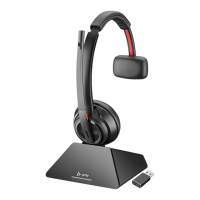
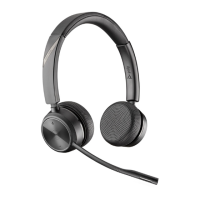
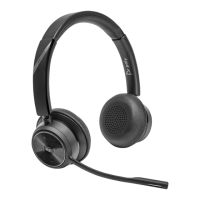
The provided manual describes the Poly Savi 8210/8220 Office Wireless DECT Headset System, a comprehensive communication solution designed for use with computers, desk phones, and mobile devices. This system offers a versatile and secure way to manage calls and audio across multiple platforms, catering to the needs of modern office environments.

Function Description

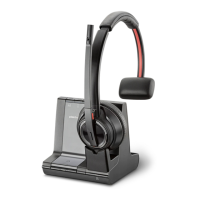
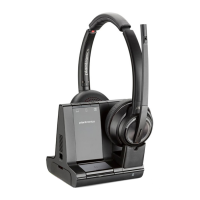
The Poly Savi 8210/8220 Office system primarily functions as a wireless DECT headset system, enabling users to make, answer, and end calls from their computer, desk phone, or mobile phone with a single headset. The core components include a base unit and a headset. The base unit acts as a central hub, connecting to various devices and managing audio channels, while the headset provides the wireless audio interface for the user.

A key feature of this system is its DECT Enhanced Security, which ensures secure communication by incorporating the latest recommendations from the DECT Forum and ETSI. This includes robust registration, authentication, authorization, and encryption procedures, protecting against known vulnerabilities. The base unit is marked with a DECT Forum security logo, indicating its compliance with these enhanced security standards.

The system supports multiple audio modes, including wideband stereo (default), wideband (high-quality telephony), and multimedia (high-quality listening), allowing users to optimize audio quality based on their activity. It also includes Active Noise Canceling (ANC) on the headset, which reduces external noise and enhances music and sound quality, contributing to a more focused and clear audio experience.

For call management, the system offers seamless switching between different phone lines/audio channels (computer, mobile, desk phone) via dedicated buttons on the base. It also supports advanced call features such as answering a second call, rejecting mobile calls, and initiating conference calls with up to three additional headsets.

Usage Features

The Poly Savi 8210/8220 Office system is designed for ease of use and flexibility across various communication scenarios.

Setup and Connectivity:

  • Hook up system: The manual provides detailed diagrams and instructions for connecting the base unit to a computer, desk phone, and mobile phone. Different desk phone setups are covered, including those with dedicated headset ports, standard desk phones, and those using Electronic Hookswitch (EHS) cables or HL10 lifters for remote call control.
  • Pairing: The base and headset are automatically paired/subscribed out of the box. For mobile phone connectivity, the base features a Bluetooth pairing button. Once paired, the base automatically connects to the mobile phone when it's in range, with an option for manual connection/disconnection.
  • Positioning the Base: Recommendations are provided for optimal base placement, suggesting a minimum separation of 6 inches from the desk phone and 12 inches from the computer to prevent noise and interference.

Headset Controls and Comfort:

  • Adjustable Headband and Boom: The headset is designed for comfort, with an adjustable headband and a flexible boom that can be positioned for optimum audio quality, approximately two finger widths from the corner of the mouth.
  • Intuitive Controls: The headset features a volume wheel for easy audio adjustment, a Call/Teams button for placing/answering/ending calls and interacting with Microsoft Teams, a Mute button, and a Power button. The ANC function can also be toggled on/off directly from the headset.
  • Voice Prompts: The headset provides voice prompts for battery status and other notifications, enhancing user awareness.

Call Management:

  • Making and Answering Calls: Users can initiate calls by tapping an Audio button on the base and dialing from their softphone, mobile, or desk phone. Calls can be answered or ended by tapping either the base Audio button or the headset Call button.
  • Volume Control: Independent volume controls are available for headset listening, desk phone speaking, desk phone listening, and base ringtone, allowing for fine-tuning of audio levels.
  • Mute Functionality: The headset Mute button allows users to mute their microphone during a call, with the active base button turning red to indicate mute status.
  • Transferring Mobile Audio: Mobile calls can be seamlessly transferred between the headset and the mobile phone.
  • Audio Streaming: The system supports streaming audio from a computer or mobile device by selecting the appropriate base Audio button.
  • Conference Calls: The system facilitates mini conference calls by combining audio from any two devices. It also supports setting up conference calls with up to three additional Savi headsets, either automatically or manually.

Customization and Advanced Features:

  • Poly Lens Desktop App: This software allows users to customize device behavior, advanced settings, and options, including changing voice prompt language, optimizing audio quality, setting target phones for softphone interaction, and managing auto-connect features.
  • Range Settings: Users can adjust the wireless range (High, Medium, Low) to improve PC audio quality, manage user density, or restrict user range.
  • Limit Office Noise: A feature to limit nearby conversation transmission during calls can be customized via the Poly Lens Desktop App.

Maintenance Features

The Poly Savi 8210/8220 Office system incorporates features and guidelines to ensure its longevity and optimal performance.

Charging and Battery Management:

  • Headset Charging: The headset charges in the base cradle, with a charging LED indicating status (flashing green for charging, solid green for fully charged). A full charge takes 3 hours, providing up to 13 hours of talk time.
  • Battery Status Indicators: Users can check headset battery status through voice prompts, by pressing the base subscription button (which illuminates base Audio buttons in different colors to indicate battery levels), or by viewing the status in the Poly Lens Desktop App.

Software and Firmware Updates:

  • Poly Lens Desktop App: This application is crucial for keeping the device's firmware and software up-to-date. Regular updates improve performance and introduce new features, ensuring the system remains current and functional.

Troubleshooting and Support:

  • Comprehensive Troubleshooting Guide: The manual includes a detailed troubleshooting section addressing common issues related to the headset, desk phone, mobile phone, and softphone. This covers problems such as no dial tone, static, distorted sound, echo, pairing issues, and audio connection problems.
  • Configuration Adjustments: Solutions often involve adjusting configuration switches on the base, checking cable connections, repositioning the base, or adjusting volume controls on the headset, base, or computer.
  • Subscription Management: Instructions are provided for manual secure subscription of a new headset to the base, as well as disabling over-the-air subscription in multi-shift environments.
  • Support Resources: The manual directs users to poly.com/support for additional help, ensuring access to further assistance if needed.

By integrating these functional, usage, and maintenance features, the Poly Savi 8210/8220 Office system provides a robust, secure, and user-friendly communication tool for diverse professional settings.

Poly Savi 8210 Office Specifications

General IconGeneral
TypeWireless
Wearing StyleOver-the-ear
ConnectivityDECT
Wireless TechnologyDECT 6.0
Talk TimeUp to 13 hours
Standby TimeUp to 50 hours
DECT Security CertificationYes
Voice PromptsYes
Noise CancellationYes (Active Noise Cancellation)
MicrophoneNoise-canceling microphone
Conference CallsYes
CompatibilityDesk phones, softphones, and mobile devices
Headset ControlsCall answer/end, volume, mute
Wireless RangeUp to 590 ft / 180 m

Related product manuals