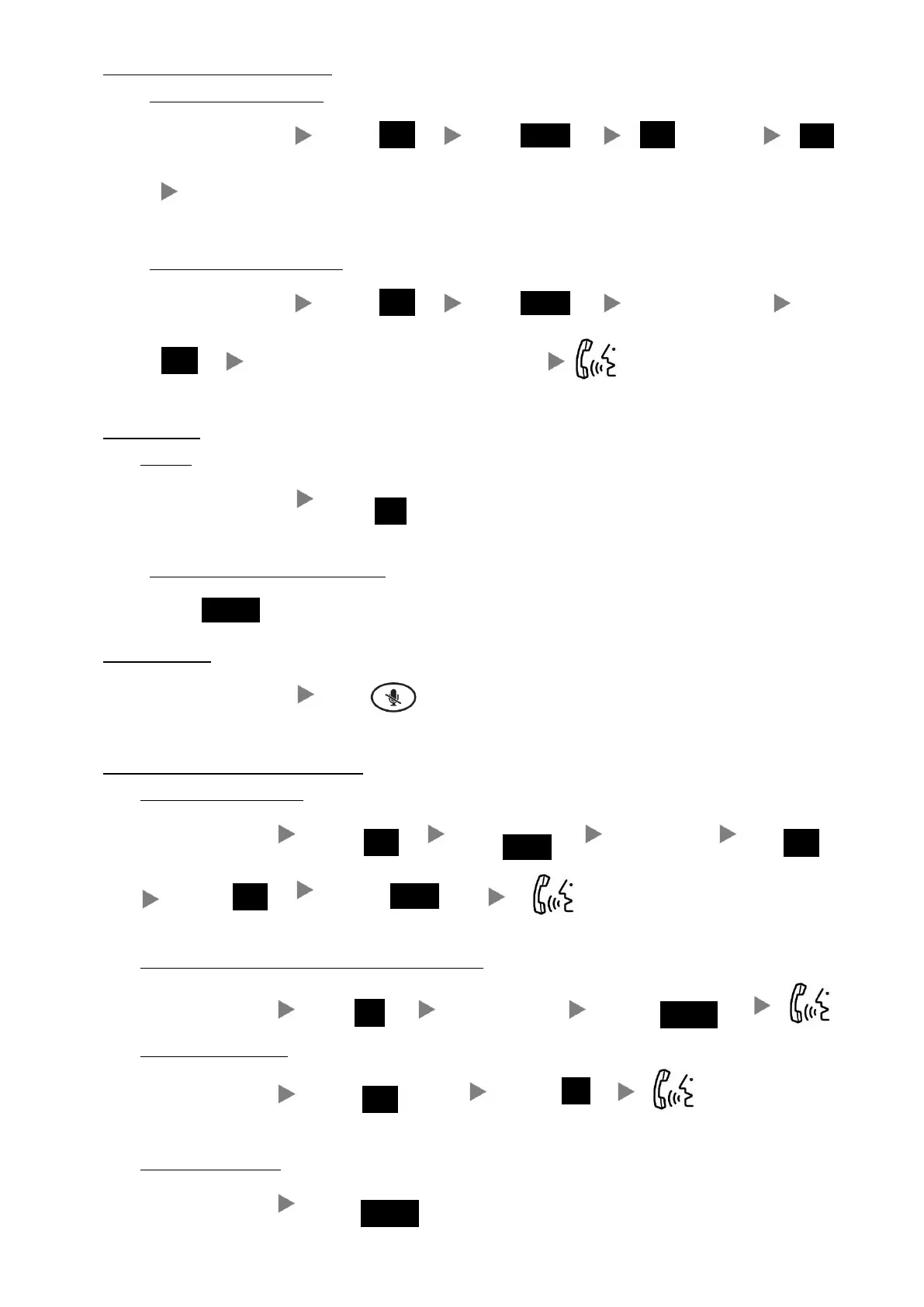
4. Transferring a Call / Call Transfer
i. Blind / Unattended Transfer
During conservation Press Press (twice)
Dial Extension No.
ii. Supervised / Attended Transfer
During conservation Press Press Dial Extension No.
Confirm with 3
rd
party about the call transfer
5. Holding a Call
i. To Hold
During a conservation Press
ii. To Retrieve a call (Call Hold retrieve)
Press
6. Mute / Un-Mute
During Conversation Press
7. Making a conference (Conference Call)
i. To Establish a Conference
During conservation Press Press Dial to 3
rd
Party
Press
Press
ii. To Leave a conference and talk to the one of the party
During a conference Press Press (Up/Down) Press
iii. To resume a conference
(twice) Press
During conversation Press
iv. To Leave a conference
During a conference Press
(Rest of the parties will be in conversation, until they hang-up)











 To Previous Page