SoundPoint
®
IP 501 Quick Start Guide
SoundPoint
®
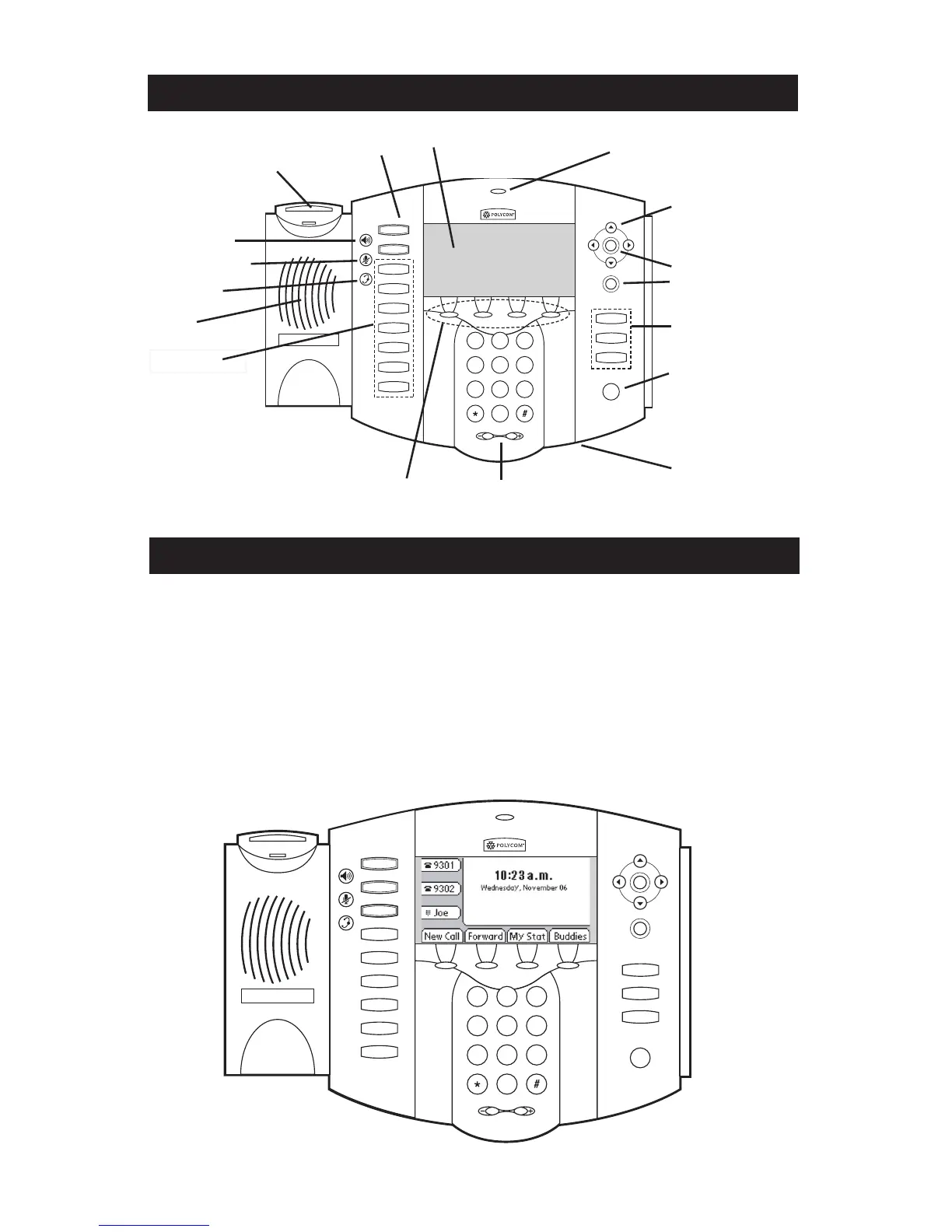
IP 501 Features and Functions
Line Keys
Hookswitch
Speaker
Feature Keys
Hold Key
Volume Keys
Handsfree Microphone
Speakerphone
Headset Key
Microphone Mute
Feature Keys
Delete Key
Select Key
Display Control Keys
Call/Message Indicator
SoundPoint
®
IP 501 Start Up
The SoundPoint
®
IP 501 telephone starts
up as soon as power is applied. Several
verification steps follow (depending on
how the telephone has been configured by
your System Administrator):
1. Obtain network settings (DHCP, SNTP,
etc.).
2. Load Configurable Applications and
Services.
3. Load main software.
The SoundPoint
®
IP 501 is ready to use
when a screen similar to below appears.
For further instructions on how to use your
new SoundPoint
®
IP 501, please consult
the User Guide for the particular software
running on the telephone.
Context-sensitive Soft Keys
Large Graphical Display










 To Previous Page