EasyManua.ls Logo

POMCube iCAN NetZero Plus Series - Page 17

Default Icon
63 pages
Print Icon
To Next Page IconTo Next Page
To Previous Page IconTo Previous Page
Loading...
13
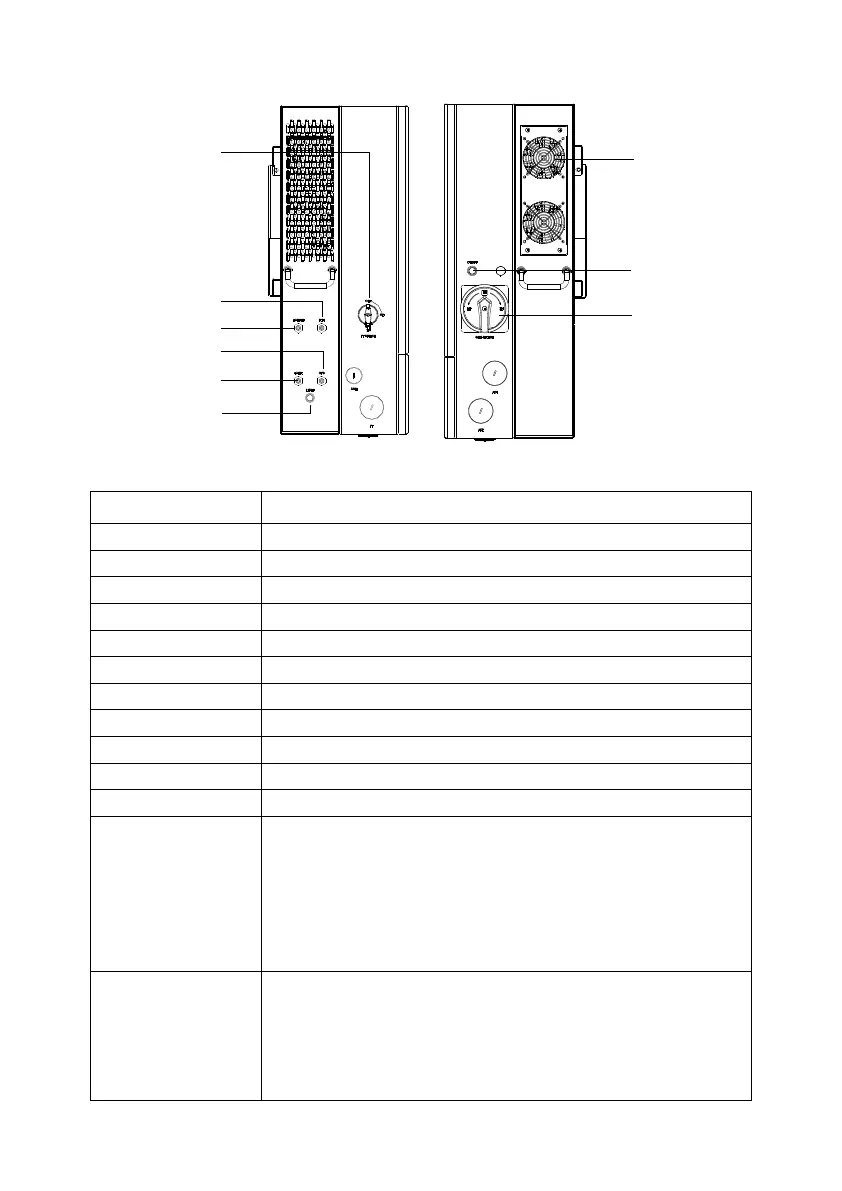
Universal PCS Parts and Features
Parts & Features
Notes
PV Switch
Connect/Disconnect the PV input
Grid Switch
Connect/Disconnect the grid output
On/Off Button
Power on/off the system
Reset Button
Reset the Wi-Fi network
Wi-Fi Antenna
-
4G Main Antenna
-
4G DIV Antenna
-
GPS Antenna
-
Wiring Box
-
Sealed Cap
-
Fan
-
Network
Indicator
Solid Red: Energy management unit startup in progress
Blinking Red: Ready for network connection
Blinking Green: Wi-Fi network and password detected,
or Ethernet cable detected, connecting to router
Solid White: Connecting to the Internet
Solid Green: Internet connected successfully
Status Indicator
Blinking Blue: System updating
Blinking Red: Communication fault between energy
management unit and battery system/inverter unit/PV
unit
Solid Red: Energy management unit internal

Fan
4G Main Antenna
PV Switch
Grid Switch
ON/Off Button
Switch
Wi-Fi Antenna
Reset Button
Wiring Box
4G DIV Antenna
Box
GPS Antenna

Related product manuals