8
PORA ELECTRIC MACHINERY CO.,LTD.
Taper Tension Controller
1. Control Descriptions
Before Use
ltz
32.5
L
7
FRXQW
FQW
pY
(
ڪڰگ
ڮگڜڭگ
ڮۏۀۋڱ
ڞڪڰکگ
%"5"
uwu
ڨڜکڰ
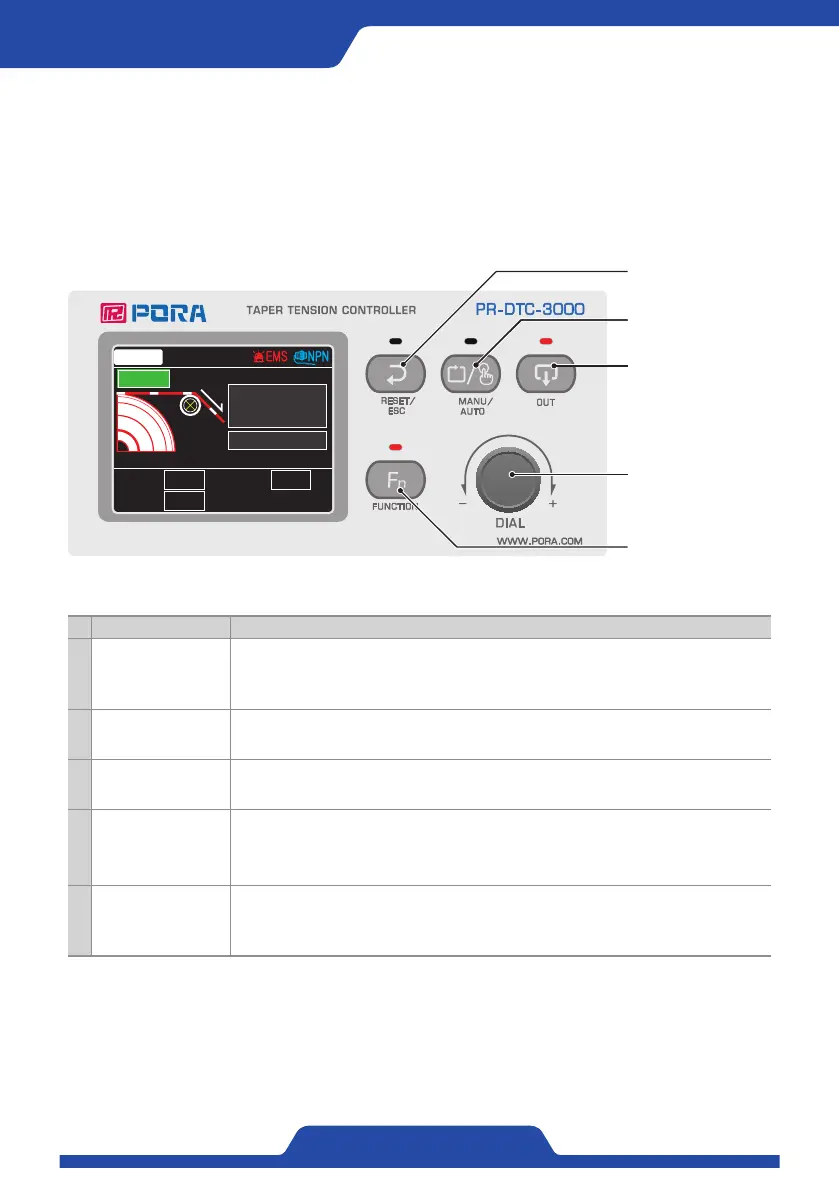
4. DIAL Button
5. FUNCTION Button
3. OUT Button
2. MANU/AUTO Button
1. RESET/ESC Button
Category Descriptions
1 RESET / ESC Button
-Press long (auto/manual mode): The controller is reset to the saved initial value.
- Press once (setup mode): It operates as an ESC button, and performs the function to cancel the
settings or shift to the exit menu.
2 MANU/AUTO Button It switches between manual mode and auto mode.
3 OUT Button Every time it is pressed, output is turned on or off.
4 DIAL Button
Dial: It is used to change various values.
-Press long (manual mode): It lets the user enter the setup menu.
- Press once (setup mode): It operates as an enter button, and performs the function to select an
item or save the settings.
5 FUNCTION Button
-Press long (manual mode): It enables selection of fabric information (data 0 to 9)
- Press once (auto/manual mode): It enables setup of the starting voltage and the number of
revolutions. Whenever it is pressed, the starting voltage and the number of revolutions are
activated to configurable state.


 To Next Page