Operating Instructions
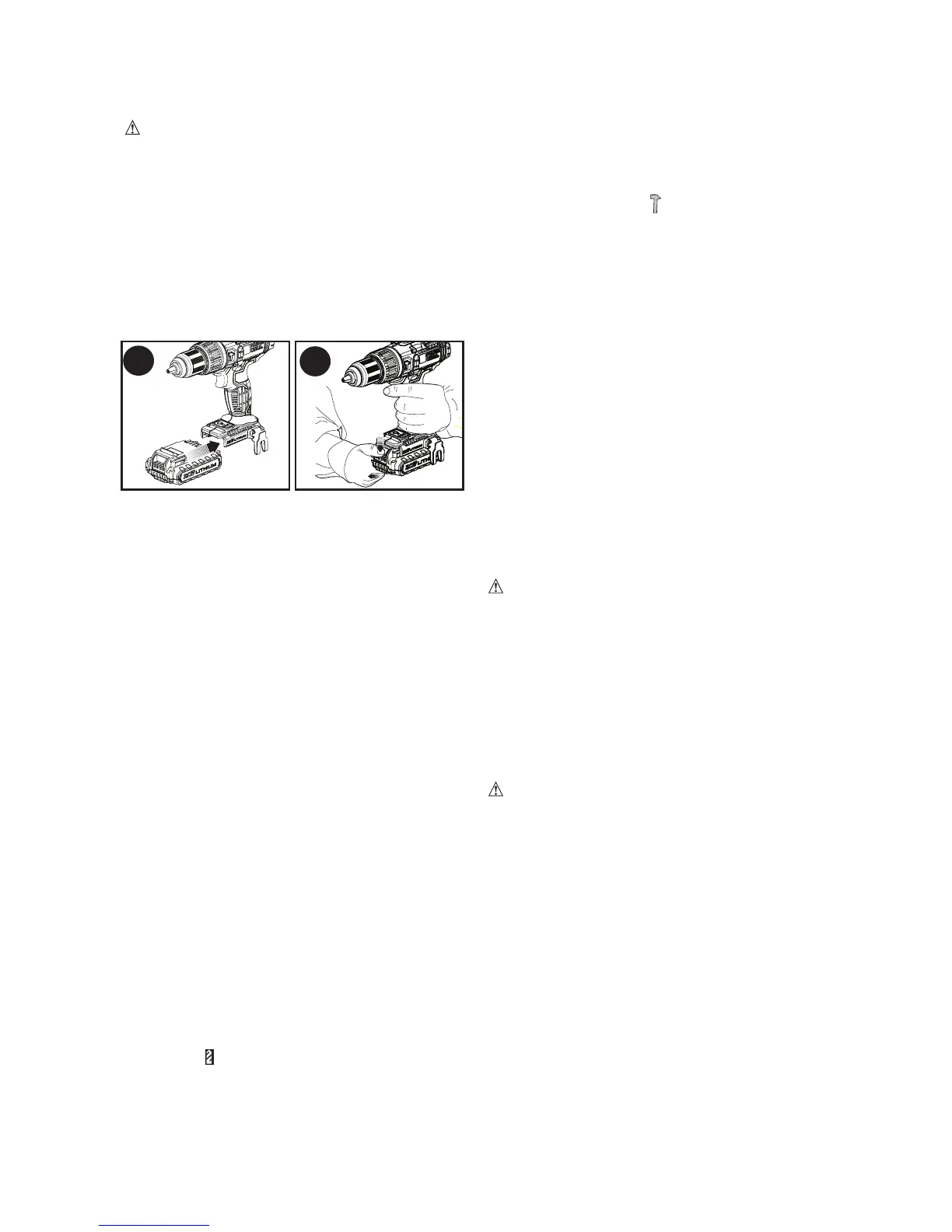
Installing and Removing the
Battery Pack From the Tool
CAUTION: Make certain the lock-off
button is engaged to prevent switch actuation
before removing or installing battery.
TO INSTALL BATTERY PACK: Insert
batterypack(7)firmlyintotooluntilan
audible click is heard as shown in Figure
B. Ensure battery pack is fully seated and
fully latched into position.
TO REMOVE BATTERY PACK: Depress
thebatteryreleasebutton(8)asshownin
Figure C and pull battery pack out of tool.
Trigger Switch & Forward/
Reverse Button
The drill is turned ON and OFF by pulling
andreleasingthetriggerswitch(1).The
farther the trigger is depressed, the higher
the speed of the drill.
• Aforward/reversecontrolbutton(2)
determines the rotational direction of the
tool and also serves as a lock off button.
• Toselectforwardrotation,releasethe
triggerswitchanddepresstheforward/
reverse control button on the right side
of the tool.
• Toselectreverse,depresstheforward/
reverse control button on the left side of
the tool.
• Thecenterpositionofthecontrolbutton
locks the tool in the off position. When
changing the position of the control
button, be sure the trigger is released.
Adjusting Torque Control
Thistoolisfittedwithatorqueadjustment
collar(3)toselecttheoperatingmodeand
to set the torque for tightening screws.
Large screws and hard workpiece materials
require a higher torquesettingthan small
screws and soft workpiece materials.
• Fordrillinginwood,metalandplastics,
set the collar to the drilling position
symbol
• Forscrewdriving,setthecollartothe
desired setting. If you do not yet know the
appropriate setting, proceed as follows:
• Setthecollartothelowesttorquesetting.
• Tightenthefirstscrew.
• Iftheclutchratchetsbeforethedesired
result is achieved, increase the collar
setting and continue tightening the screw.
Repeat until you reach the correct setting.
Use this setting for the remaining screws.
Hammer Action
Your drill has hammer action which is
engagedbytwistingthetorquecollarto
the hammer symbol . Use hammer
action when drilling in masonry.
Dual Range Gearing
The dual range feature of your drill allows
you to shift gears for greater versatility.
• Toselectlowspeed,hightorquesetting
(position1),turntooloffandpermitto
stop. Slide dual range gear selector (4)
away from the chuck.
• Toselectthehighspeed,lowtorque
setting(position2),turntooloffand
permit to stop.
Slide gear shifter button
back toward the chuck.
NOTE: Do not change gears when tool is
running. If you are having trouble changing
gears, make sure that the dual range gear
button is either completely pushed forward
or completely pushed back.
Keyless Chuck
WARNING: Make certain the battery
pack is removed to prevent tool actuation
before installing or removing accessories.
To insert a drill bit or other accessory:
1.Graspthechuck(5)androtateitinthe
counterclockwise direction, as viewed
from the chuck end.
2.Insertthebitorotheraccessoryfully
into the chuck, and tighten securely
by rotating the chuck in the clockwise
direction as viewed from the chuck end.
WARNING: Do not attempt to tighten
orloosendrillbits(oranyotheraccessory)
by gripping the front part of the chuck and
turning the tool on. Damage to the chuck
and personal injury may occur when
changing accessories.
Screw Driving
• Fordrivingfasteners,theforward/reverse
button should be pushed to the left.
• Usereverse(buttonpushedtotheright)
for removing fasteners.
NOTE: When moving from forward to
reverse, or vice versa, always release
the trigger switch first.
Drilling
•Usesharpdrillbitsonly.
•Supportandsecureworkproperly,as
instructed in the Safety Instructions.
•Useappropriateandrequiredsafety
equipment,asinstructedintheSafety
Instructions.
8
B
C



 To Next Page