10
OPERATING INSTRUCTIONS
INSTALLING AND REMOVING THE BATTERY
PACK FROM THE TOOL
WARNING:
Make certain the trigger lock-off
button is engaged to prevent switch actuation before
removing or installing battery.
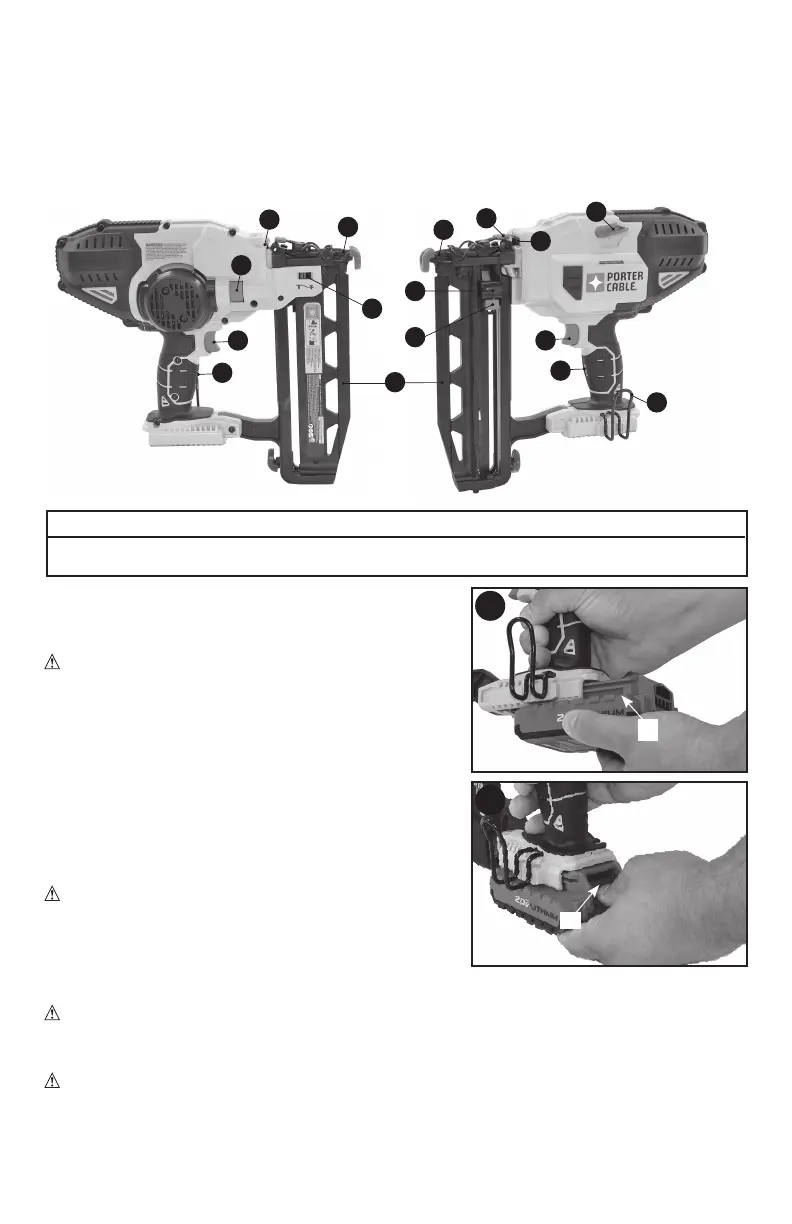
TO INSTALL BATTERY PACK: Insert battery pack
(B1) firmly into tool until an audible click is heard
as shown in Figure B. Ensure battery pack is fully
seated and fully latched into position.
TO REMOVE BATTERY PACK: Depress the
battery release button (C1) as shown in Figure C
and pull battery pack out of tool.
OPERATION
WARNING: Read the section titled Nailer
Safety Warnings at the beginning of this manual.
Always wear eye and ear protection when operating
this tool. Keep the nailer pointed away from yourself
and others. For safe operation, complete the following
procedures and checks before each use of the nailer.
WARNING: To reduce the risk of personal injury, disconnect battery pack from tool
and engage trigger lock-off before performing maintenance, clearing a jammed nails,
leaving work area, moving tool to another location or handing the tool to another person.
WARNING:
Always wear proper eye [ANSI Z87.1 (CAN/CSA Z94.3)] and ANSI
S12.6 (S3.19) hearing protection when operating tool.
FUNCTIONAL DESCRIPTION
Figure A
1. Trigger Switch
2. Trigger Lock-Off switch
3. Depth adjustment wheel
4. Depth adjustment indicator
5. Worklights/low battery/jam/stall indicator
6. Stall release lever
7. Jam clearing latch
8. Contact trip
9. Magazine
10. Pusher latch
11. Hang hook
12. Pusher latch release
6
5
This product uses the batteries and chargers listed below.
20V Max* Lithium-Ion Batteries: PCC680L, PCC681L, PCC685L, PCC682L
20V Max* Lithium-Ion Chargers: PCC690L, PCC691L, PCC695L, PCC692L
1
7
11
3
B
C
2
4
B1
C1
5
9
10
8
8
1
2
12



 To Next Page