Chapter 4 Command Description
4.1 XP8200 Command Set
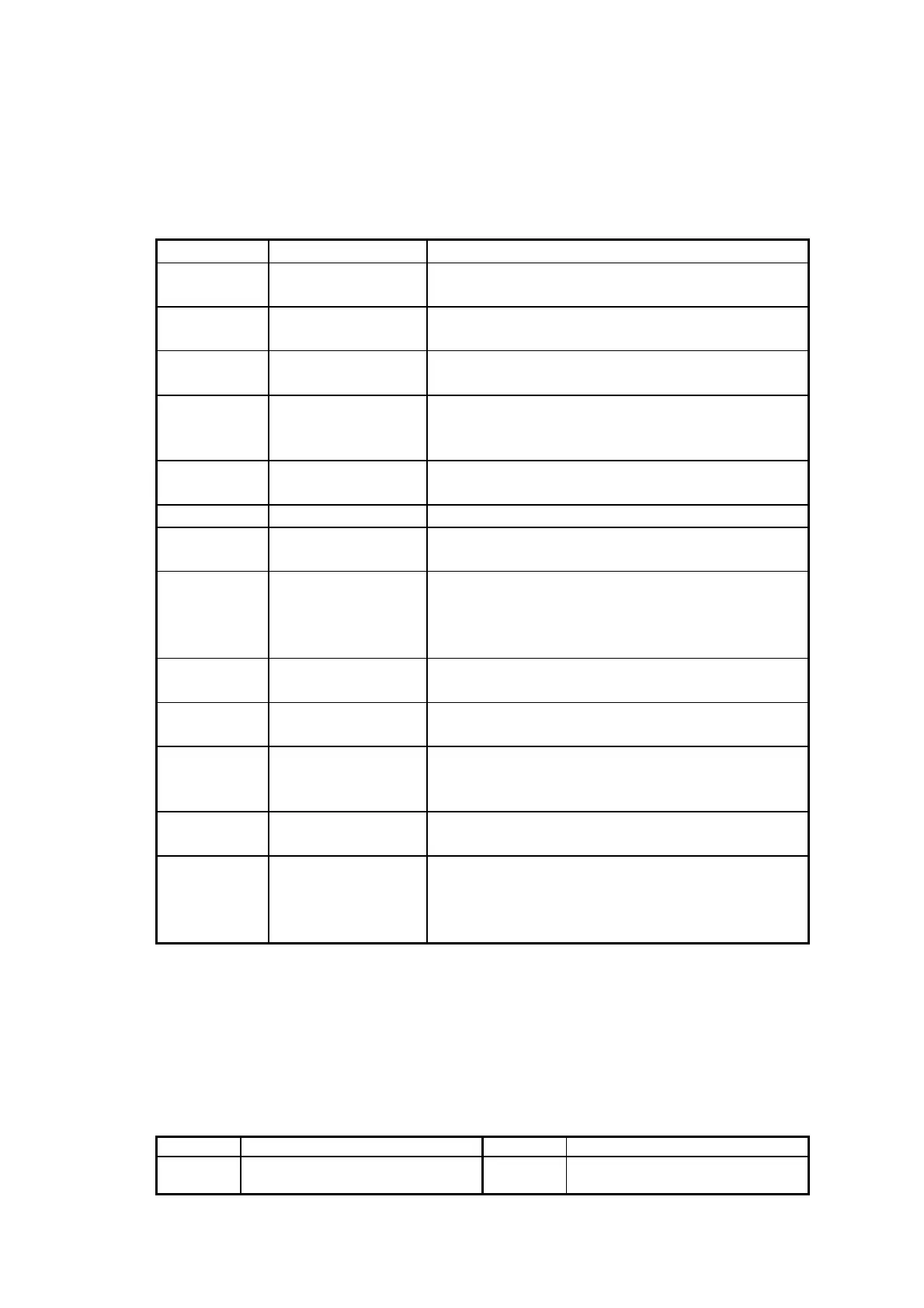
4.1.1 LD220 Command Mode
Command Hex Function Description
HT 09 Move cursor right (Only valid in overwrite
mode)
BS 08 Move cursor left (Only valid in overwrite
mode)
CR 0D Move cursor to left-most position
(Only valid in overwrite mode)
ESC @ 1B 40 Initialize customer display to initial state,
clears display buffer, set display mode to shift
and sets current display row to upper row
ESC U 1B 55 Select upper row as current row (Initial
default)
ESC D 1B 44 Select lower row as current row
ESC A n 1B 41 n Sets customer display disable or enable
n=D, Disable ; n=E, Enable
ESC C r c 1B 43 r c Move cursor to specified position
(Only valid in overwrite mode)
r=U, upper row ; r=D, lower row
1 c 20 (column number)≦≦
ESC E r n 1B 45 r n Set special effect or display mode of specified
row
ESC R n 1B 52 n Set international font sets
( Please refer International Font Set Table )
ESC = n 1B 3D n Select peripheral
n=1, printer ; n=2, display ; n=3, printer &
display
ESC % n 1B 25 n Set font pattern
n=0, selected ; n=1, canceled
ESC & n s
[p]
1B 26 n s data Define user font pattern
n=code for first character
s=code for last character
data=5 bytes required for each character
(REMARK)*Using commands “ESC E r n”, the value (Hex) of parameter
r 58h=all rows
55h=upper row
44h=lower row
n special function, the value is one of
30h=shift mode (Default display mode)
31h=rotation mode
32h=blink mode
33h=clear this row and switch to shift mode
34h=overwrite mode
35h=vertical mode
* International Font Set Table
n (Hex) International Font Set n (Hex) International Font Set
30h
31h
U.S.A
GERMANY
32h
33h
FRANCE
JAPAN


 To Next Page