PRK-6000 Operation Manual
- 31 -
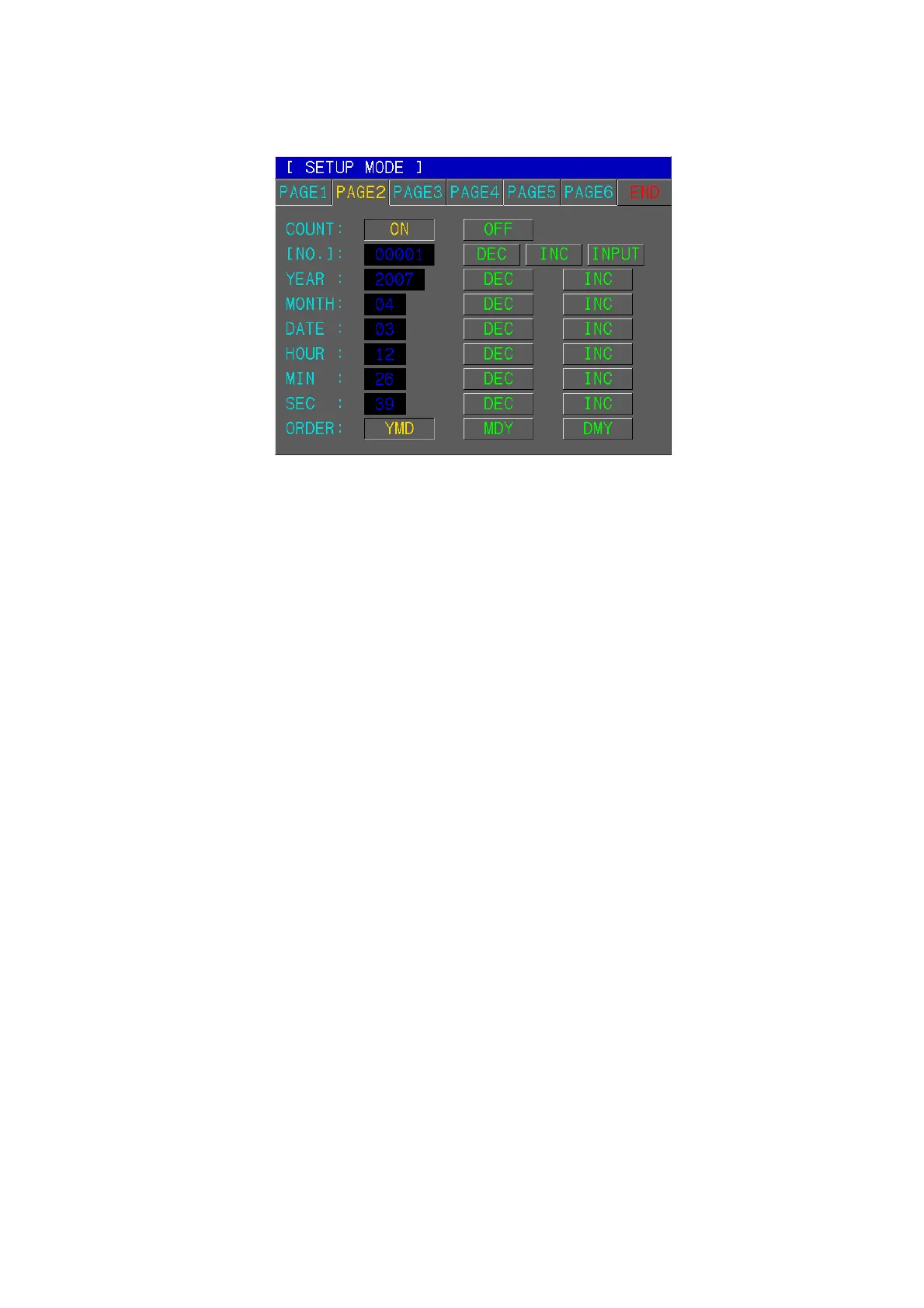
(2) Serial Number, Time and date
[How to Change the Page]
Press one of six tab buttons on the upper side of display.
[How to Change the Item]
Pressing any button on display yields the selection of related item.
[How to Change the Contents]
Press any un-pressed button on display. The selected button will be displayed in
pressed button and the content will be changed.
NOTE: There are some contents to be changed in the other way. And such
procedures will be instructed under the description of each item.
[How to Enter the Measurement Mode]
Press END button to quit the SETUP mode and enter the Measurement mode.
[Items]
COUNT To select whether using the serial number or not.
[NO.] Setting of the serial number
Pressing DEC or INC button renders the serial number to be decreased or
increased by “1”.
Pressing INPUT button enables you input number from Dialog Box.
DATE Time and date
Pressing DEC or INC button renders the related item to be decreased or
increased by “1”.
2001 ~ 2099 : Year
01 ~ 12 : Month
01 ~ 31 : Day
00 ~ 23 : Hour
00 ~ 59 : Minutes
ORDER Order of displaying the date



 To Next Page