!
Warm tips: All remote controllers have been calibrated when manufacturing.
Remote controller calibration is requested only if pilots find that the remote
controller control sticks are not working normally.
Attention: Please do not power on your aircraft when calibrate the control stick for the
remote controller.
OFF ON
A B A B
Mode
OFF ON
A B A B
Mode
OFF ON
A B A B
Mode
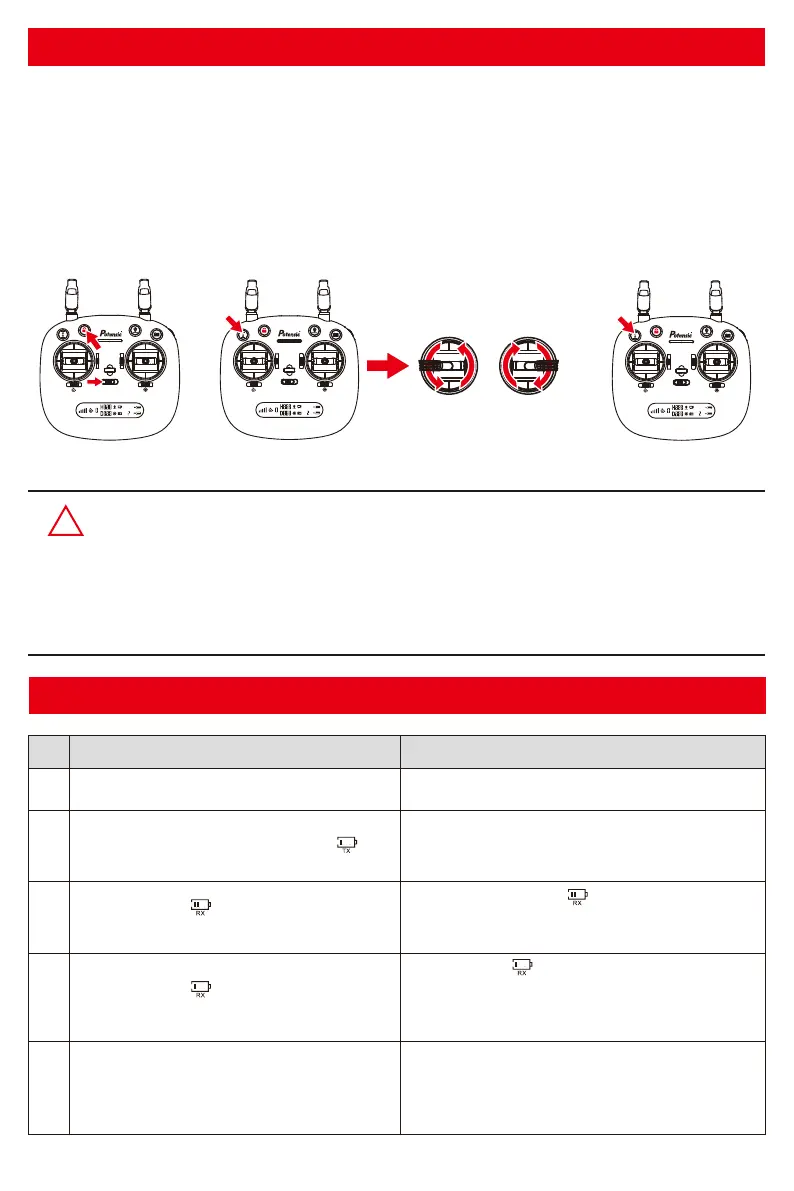
Remote controller control stick calibration
Step 1. Keep pressing the red locking button and turn on the remote controller (indicated as pic.1)
at the same time;
Step 2. Press the calibration button for 3 seconds, the remote controller will make 3 beep sounds and
the indicator light of the remote controller turns from flashing quickly to slowly. Then maximum
rotate both of the left and right control stick to any direction for 2 circles (indicated as pic.2);
Step 3. Then, again, press the calibration button for 3 seconds. The remote controller will send out 3
beep sounds and the indicator light of the remote controller turns from flashing slowly to quickly,
which means that the control stick calibration is completed (indicated as pic.3).
Remote controller status indicator
No.
1
2
3
4
5
Remote controller status
Indicator lights flash quickly.
Signal strength on LCD screen is less than
two grids or no displaying; and the remote
controller makes steady beep...beep...beep
sound.
The remote controller is under signal connection
status.
The remote controller is in low voltage status.
Please change a full charged battery.
1.The distance between aircraft and remote
controller is so long that the signal is weak.
2.The battery of drone is removed after it
connects to the remote controller.
Description
Indicator lights flash slowly with steady beep..
beep sound and the battery legend “ ”on
LCD screen flashing.
Battery legend “ ” on LCD screen is as
shown, with steady beep..beep...beep sound.
Battery is running out “ ” ; the aircraft will return
when the altitude is over 100m or the distance is
over 300m.
Battery legend “ ” on LCD screen is as
shown, with steady long beep sound.
Battery is low “ ” ; the aircraft will return when
the altitude is over 15m or the distance is over
15m; if either the flying altitude or flying distance
is less than 15m, the aircraft will land to the spot.
Pic. 1 Pic. 2 Pic. 3
-11-



 To Next Page