!
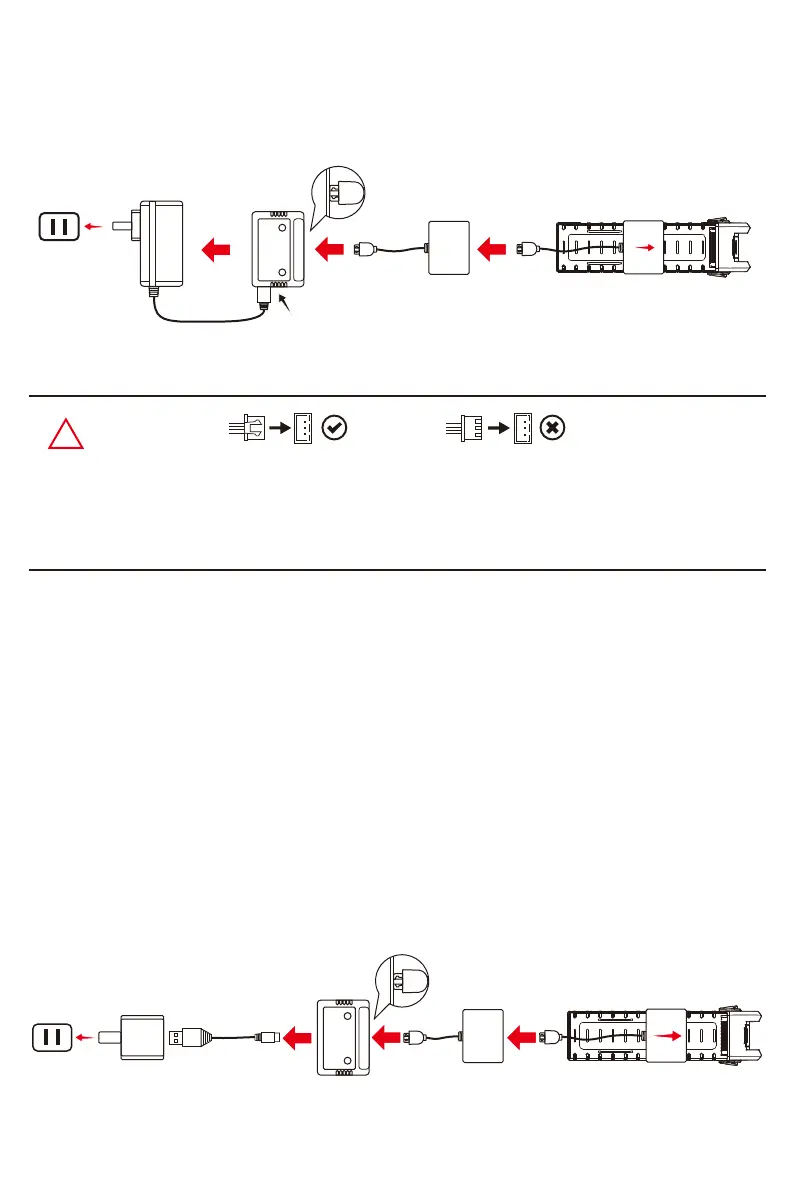
●The battery plug should be connected correctly with face up (but not upside down) when
plug into the balance charger; Failure to do so will result in battery cannot charge or charger
damaged.
●We recommend using 5V-2A adaptor for charging.
Warm tips:
● When charging is proceeding, the green light keeps flashing and the red light keeps solid on;
● When charging is finished, both of the green light and red light keep solid on;
● If the battery and charging converter is not connected with the balance charger, but the balance
charger is connected with the power adaptor, the red light keeps solid on and the green light is off;
● Once there is any malfunction, the red light will be solid on and the green light will keep flashing
rapidly.
● When charging is proceeding, the green light keeps flashing and the red light keeps solid on;
● When charging is finished, both of the green light and red light keep solid on;
● If the battery and charging converter is not connected with the balance charger, but the balance
charger is connected with the power adaptor, the red light keeps solid on and the green light is off;
● Once there is any malfunction, the red light will be solid on and the green light will keep flashing
rapidly.
Step 1: Make sure that the power adaptor is connected with the power outlet (indicated as Pic. 1);
Step 2: Connect the balance charger to the power adaptor by plug-in the USB cable accordingly
(indicated as Pic. 2);
Step 3: Insert the white plug of the charging converter face up into the socket of the balance charger
(indicated as Pic. 3);
Step 4: Slide the charging converter onto the battery from the middle position and insert the pins into
the battery plug to start charging (indicated as Pic. 4).
Full charging time takes about 7 hours.
How to charge the battery with charging device B:
Charging converter BatteryPower adaptor Balance charger
Pic. 1 Pic. 2
Pic. 3
Pic. 4
Charging converter BatteryUSB cable Balance charger
Pic. 2
Power adaptor
(not included)
Pic. 1 Pic. 3 Pic. 4 Pic. 5
USB
-5-



 To Next Page