12 | CHARGE Installation & Owner’s Guide
OPERATION Instructions
Here’s all the information you’ll need on the functions, safe use, and maintanence of your CHARGE™ unit. If you
have questions, contact our Customer Service Team at 1 + (813) 689-9932 option 2 or visit our website at
www.power-pole.com.
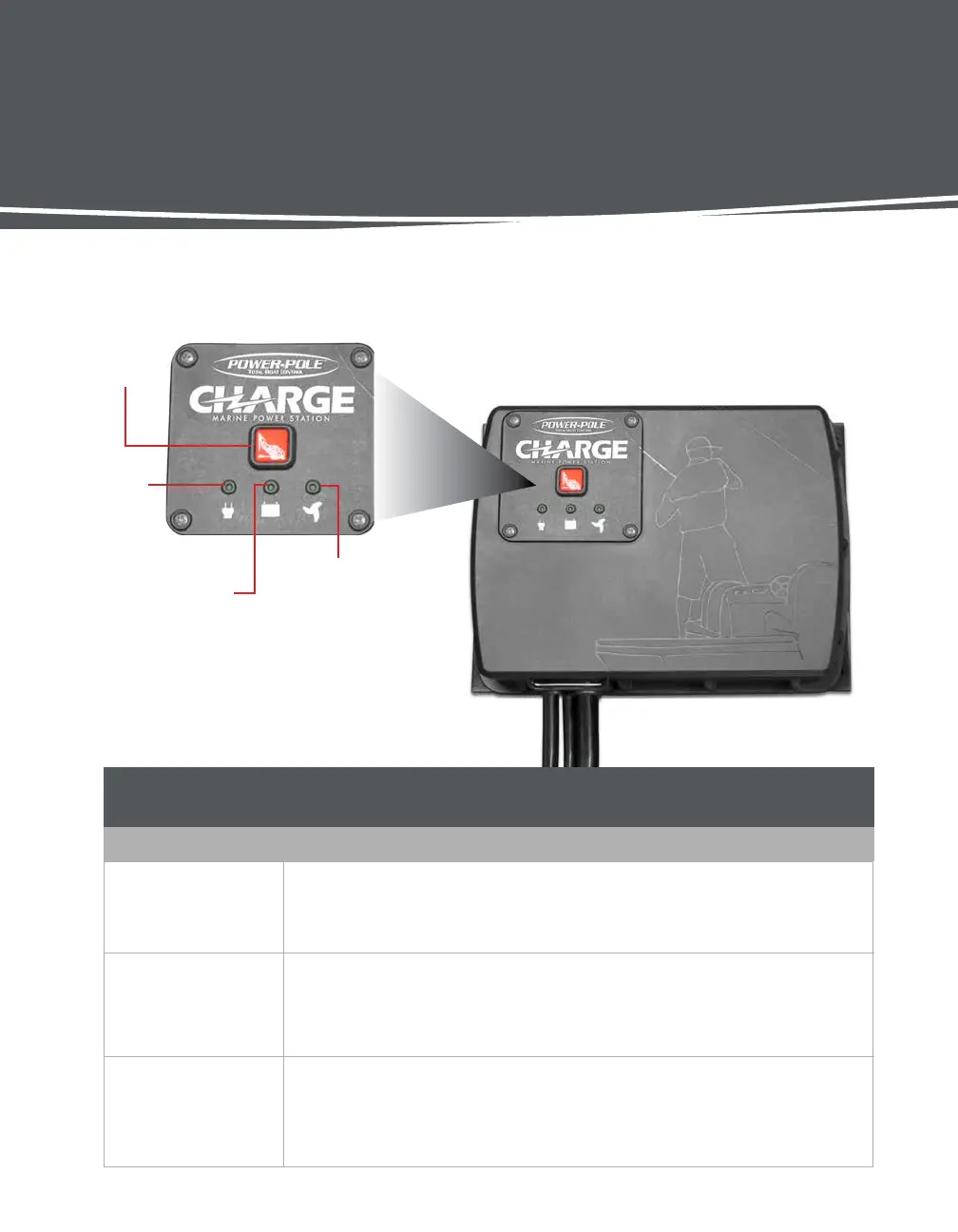
GETTING TO KNOW the CHARGE™ Marine Power Management Station
Status
LED
Engine Battery LED
Trolling Motor Battery
LED
Program
Button
LED INDICATOR GUIDE
LED
READOUT
Status
LED
RED: System fault (fault is logged in app)
GREEN/AMBER FLASHING: Charging via shore power
SOLID GREEN: All batteries charged, ready to fish
BLINKING GREEN: CHARGE™ is in Fishing Mode
Engine Battery
LED
OFF: Not being charged
SOLID GREEN: Fully charged/in Maintenance Mode
BLINKING RED: Disconnected, fuse blown, improperly connected or low voltage
SOLID AMBER: Charging
Trolling Motor
Battery LED
OFF: Not being charged
SOLID GREEN: Fully charged/in Maintenance Mode
BLINKING RED: Disconnected, fuse blown, improperly connected or low voltage
SOLID AMBER: Charging


 To Next Page