13
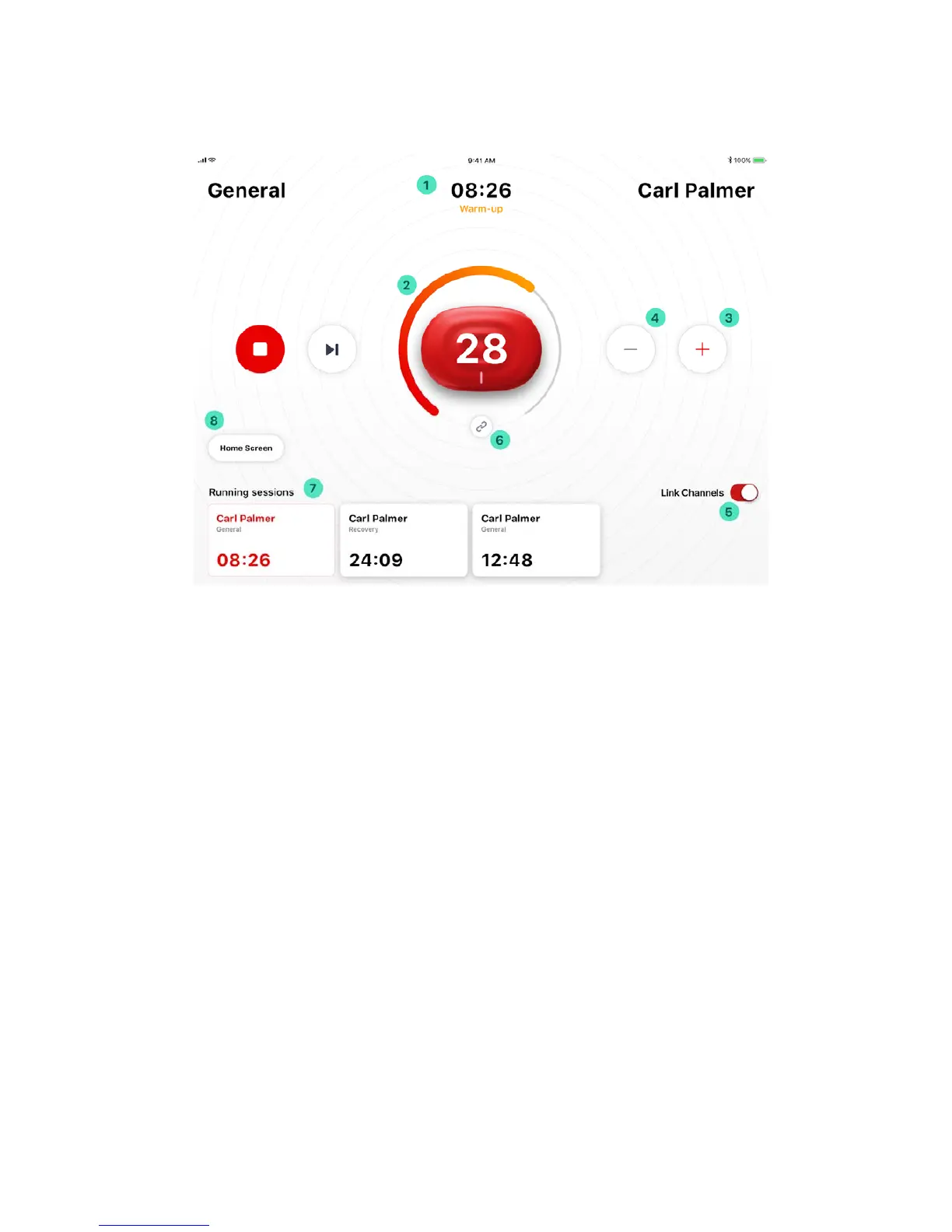
Header Indicator (1) displays the remaining time for the total stimulation session, current stimulation phase
(if applicable), name of the stimulation program and stimulation phase (if applicable), and name of the patient
(if applicable).
Contraction/Rest Indicator (2) – for the stimulation programs (and individual phases) involving muscle
contractions, helps to understand time between and during contraction and rest intervals.
Intensity Adjustment controls – Tap on Intensity Increase (or “+”) (3) and Intensity Decrease (or “-“) (4)
buttons an accurate adjustment, or hold either button down for a faster adjustment.
Device-level Intensities Lock (6) and Channel-level Intensities Lock controls (5) synchronize intensity
changes either a) between PowerDot PD-02 devices (this applies only to the two-device Duo stimulation
mode) or (b) between two stimulation channels of individual PowerDot PD-02 device.
Both controls are enabled by default and can be used to fine-tune the intensity of your current stimulation
session. However, it’s best to use them only when you really need them (e.g. to address muscle imbalance).
Use Stop, Pause, Resume, Skip Phase controls to control the flow of the stimulation session. Skip Phase
control is only applicable to stimulation programs which are comprised of multiple and skippable stimulation
phases (e.g. such as Performance Strength program).
Switch Session Control (7) - allows you to switch between actively running stimulation sessions (on a
different patients). When switching between sessions, your iPad will be disconnecting from PowerDot PD-
02(s) used in currently active session and re-connecting to PowerDot(s) being used in the newly selected
session.
Home Screen Control (8) – helps you to navigate back to PowerDot Doctor App Main Menu screen, so you
could select another patient and initiate a new stimulation session.


 To Next Page