25 2000Wi OM
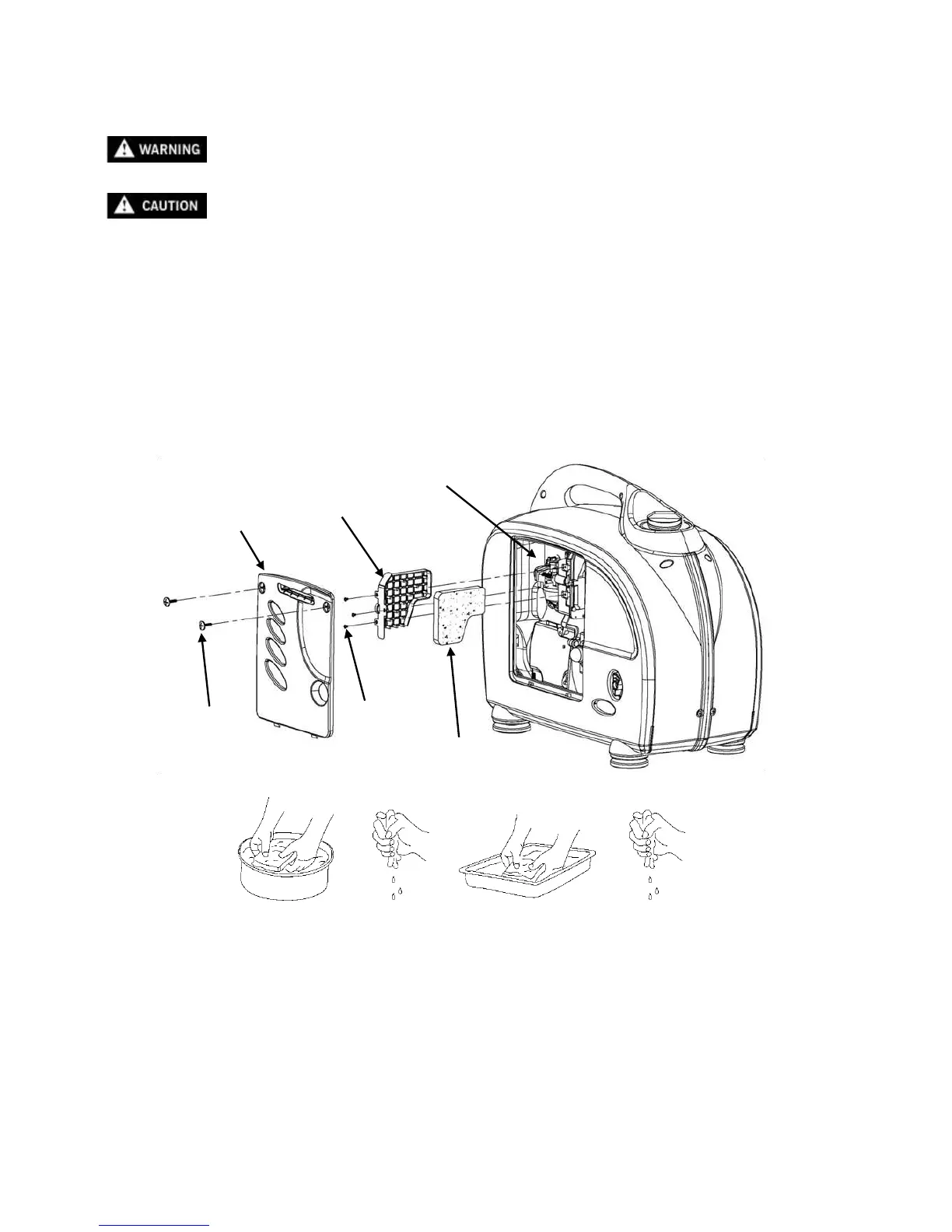
5.4 Air cleaner service
A dirty air cleaner will restrict air flow to the carburetor. To prevent carburetor malfunction, service the air cleaner
regularly. Service more frequently when operating the generator in extremely dirty areas.
Do not use gasoline or low flash point solvents for cleaning. They are flammable and
explosive under certain conditions.
Never run the generator without the air cleaner, otherwise rapid engine wear may result.
1. Loosen the panel screws and remove the side maintenance panel.
2. Remove three air cleaner retaining screws. Remove the air cleaner cover and check the air cleaner
element. Clean or replace the element if necessary.
3. Wash the element in a non-flammable or high flash point solvent and dry it thoroughly.
4. Soak the element in clean engine oil and squeeze out the excess oil.
5. Reinstall the air cleaner element and the air cleaner cover. Tighten the cover screws securely.
6. Reinstall the maintenance cover and tighten the screws securely.


 To Next Page