12--2
Powerware 9330 (10 kVA--40 kVA) Installation and Operation
164201300 REV. G 061502
3
2
1
5
4
7
6
9
8
TXD
RXD
DSR
RETURN
DTR
CTS
RTS
NOT USED
SERIAL PORT (DB--9)
NOT USED
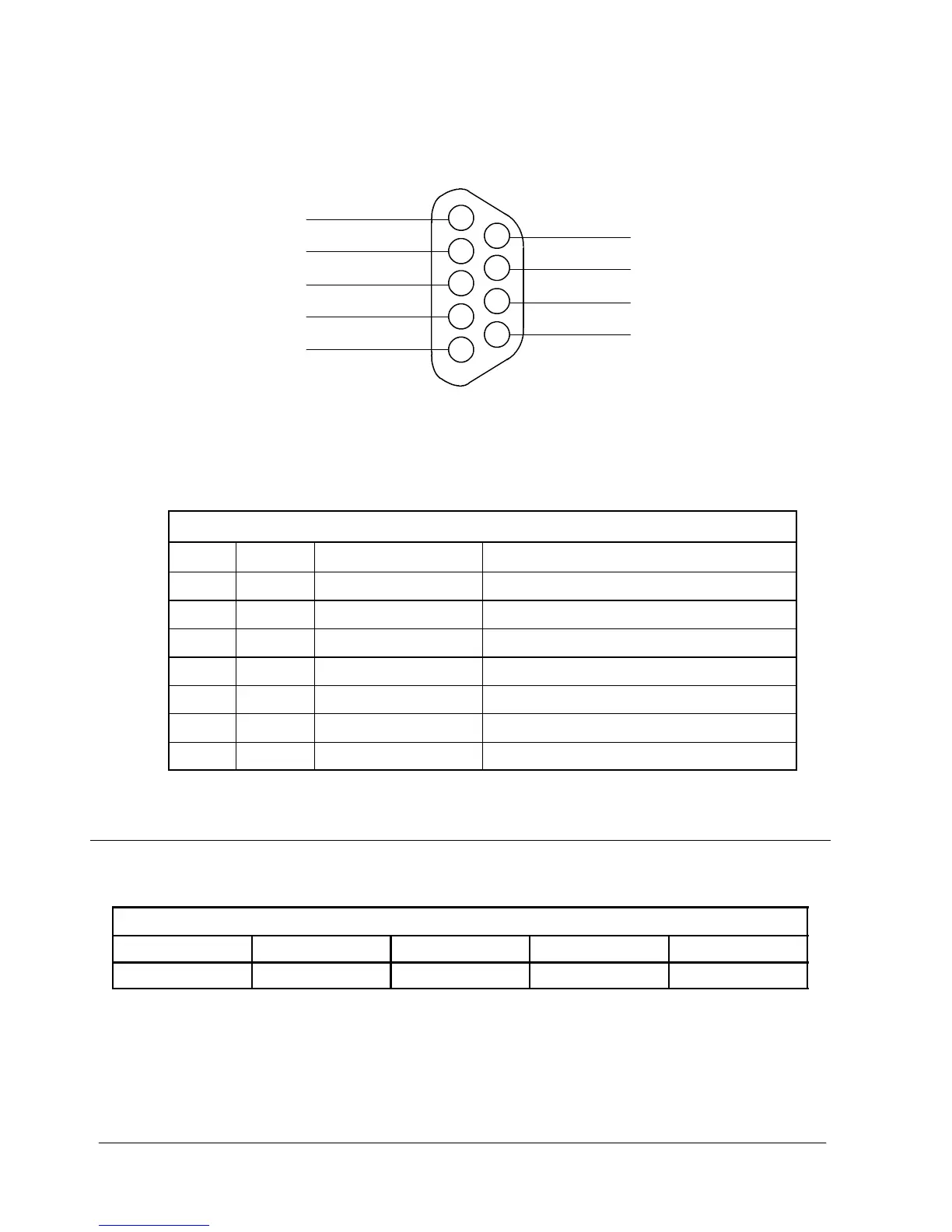
Figure 12 ---1. Serial Port Pin Assignments
Ta b l e 1 2 --- 1 . P i n A s s i g n m e n t s f o r S e r i a l P o r t ( D B --- 9 )
Pin # Symbol Description Comments
2 TXD Transmit Data Input to UPS
3 RXD Receive Data Output from UPS
4 DSR Data Set Ready
5 RTN Return
6 DTR Data Terminal Ready
7 CTS Clear to Send
8 RTS Ready t o Send
12.4 Configuring the Serial Ports
Table 12---2 lists the default configuration settings for the serial communications
port.
Table 12---2. Serial Communications Port
Baud Data Bits Stop Bit Parity Handshaking
9600 8 1 No Disabled
The serial port is pre-configured and can not be changed.
Terminal Mode and Remote Notification Mode (refer to Chapter 13, “Remote
Notification) are available using the serial communications port.



 To Next Page