5
3
Initial Installation
• Do not directly connect the transceiver to an AC outlet.
• Use the optional DC Power Adapter (MBXRPA) to connect
the transceiver to a regulated power supply.
• Do not substitute a cable with smaller gauge wires.
BASE STATION OPERATION
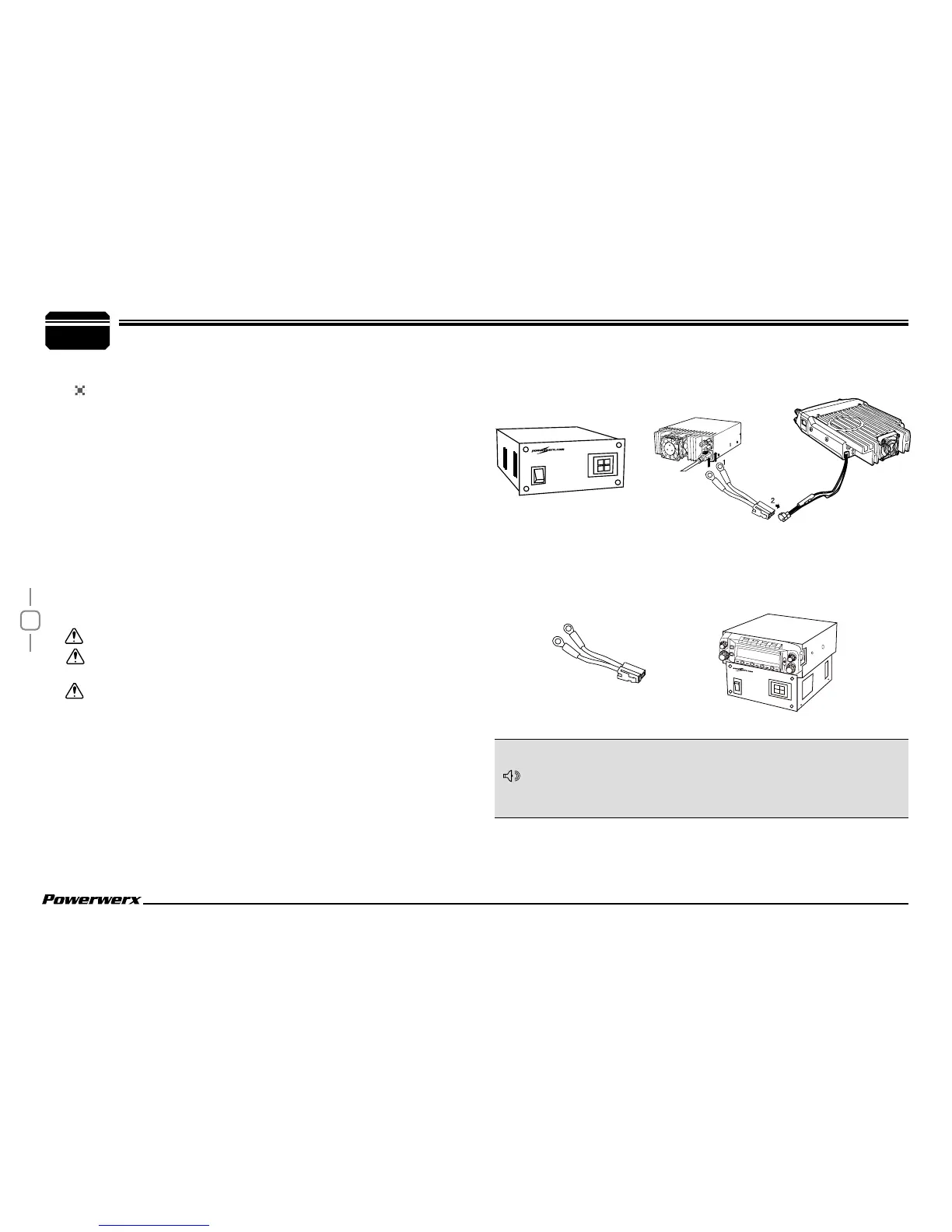
In order to use this transceiver for fixed base station operation,
you will need an optional SS-30DV DC power supply and optional
Base Station Enclosure (not included). Please contact your local
dealer for these items.
Before connecting the DC power to the transceiver, be sure to
switch the transceiver and the DC Power Supply OFF.
Do not plug the DC Power Supply into an AC outlet until you
make all connections.
Power Supply (SS-30DV)
DC Power Adapter
(MBXRPA)
Power Supply
(SS-30DV)
1.
Connect the optional DC Power Adapter (MBXRPA) to the
regulated DC Power Supply and ensure that the polarities are
correct. (Red: positive, Black: negative).
2.
Connect the transceiver's DC power connector to
the connector on the DC Power Adapter (MBXRPA).
Press the connectors rmly together until the locking tab clicks.
NOTE
Red
Black
Base Station Radio
Enclosure (MBXCOVR)
Includes Power Adapter (MBXRPA)
L
O
W
V
/
M
H
M
S
C
N
S
E
T
T
V
/
S
O
L
V
/
M
H
M
SC
N
L
OW


 To Next Page