8
DB-750X
4
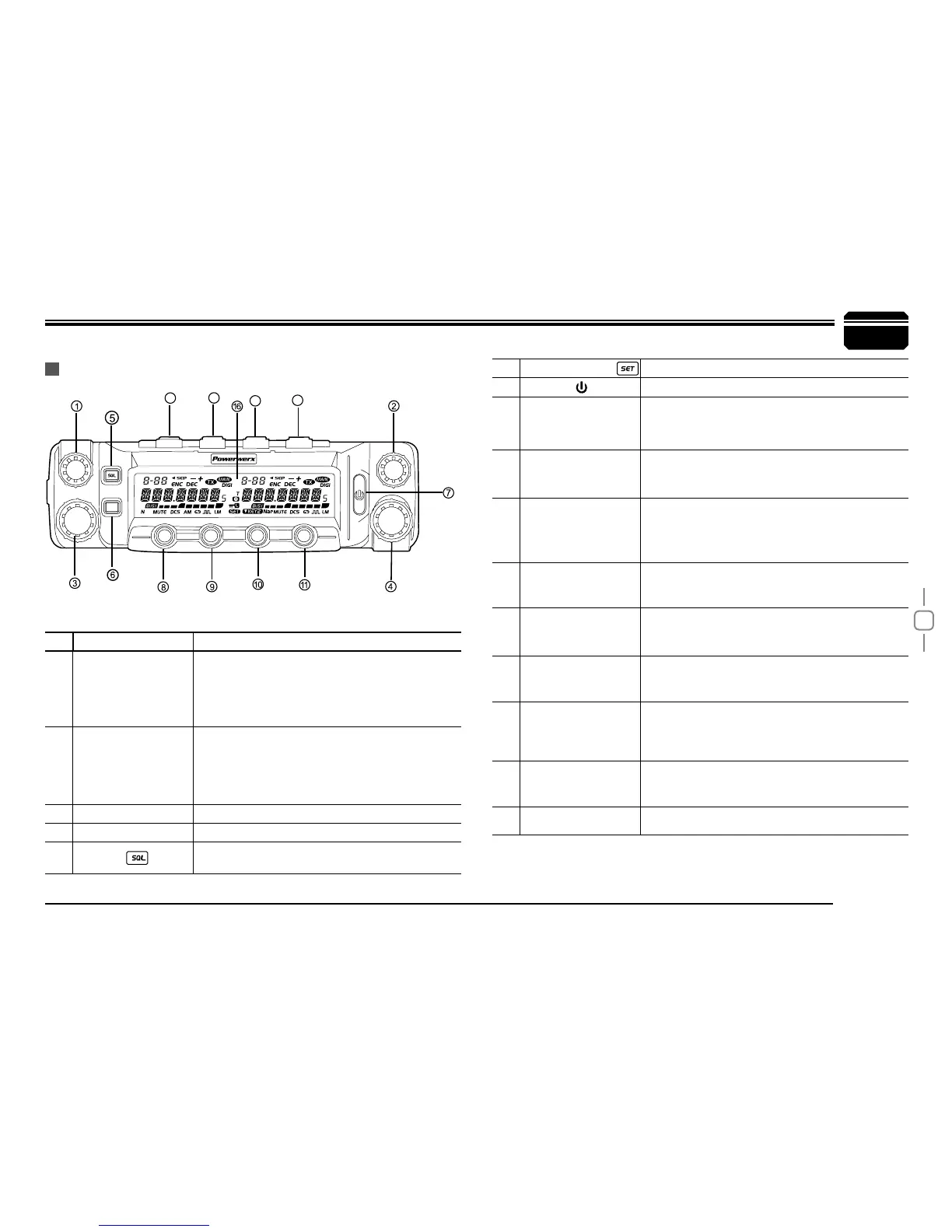
• Basic Functions
NO. KEY FUNCTION
1 Left Dial Knob
Rotate it to choose frequency /channel. Press
it to set the left band as "Main Band"; In VFO
mode, press it to choose the frequency band;
In function setup as conrm key; in scan mode,
rotate it to change scan direction
2 Right Dial Knob
Rotate it to choose frequency /channel. Press
it to set the right band as "Main Band"; In VFO
mode, press it to choose the frequency band;
In function setup as conrm key; in scan mode,
rotate it to change scan direction
3 Left Volume Knob Adjust left band volume level.
4 Right Volume Knob Adjust right band volume level.
5 Squelch
Press this key and hold to adjust squelch while
either turning left dial knob or right dial knob
Getting Acquainted
FRONT PANEL
6 Function set Key
In standby, press this key to enter function menu
7
Press it to power On /Off the transceiver
8 Bottom
[
LOW
]
Key
In standby press it to change H/L power for
left band channel. Long press it to turn On/Off
Frequency Reverse
Function
9 Bottom
[
V/M]
Key
In standby, press it to switch left band channel
mode and VFO mode. Long press it to set Wide/
Narrow band.
10 Bottom
[
HM
]
Key
In standby, press it to switch left band HOME
channel and normal channel. Long press it to
enter dual watch of VFO channel and current
channel.
11 Bottom
[
SCAN
]
Key
In standby, press it to start left band channel or
frequency scan.In channel mode, hold it to set
current channel scan skip.
12 Top
[
LOW
]
Key
In standby press it to change H/L power for
right band channel. Long press it to turn On/Off
Frequency Reverse Function
13 Top
[
V/M
]
Key
In standby, press it to switch
right band
channel
mode and VFO mode. Long press it to set Wide/
Narrow band.
14 Top
[
HM
]
Key
In standby, press it to switch
right band
HOME
channel and normal channel. Long press it to
enter dual watch of VFO channel and current
channel.
15 Top
[
SCAN
]
Key
In standby, press it to start
right band
channel or
frequency scan.In channel mode, hold it to set
current channel scan skip.
16 LCD
For channel, frequency and function display
setup.
12
13
14
15
LOW
VOL
VOL
V/M
HM
SCN
SET
MHzREF TONE SUB


 To Next Page