10
DB-750X
4
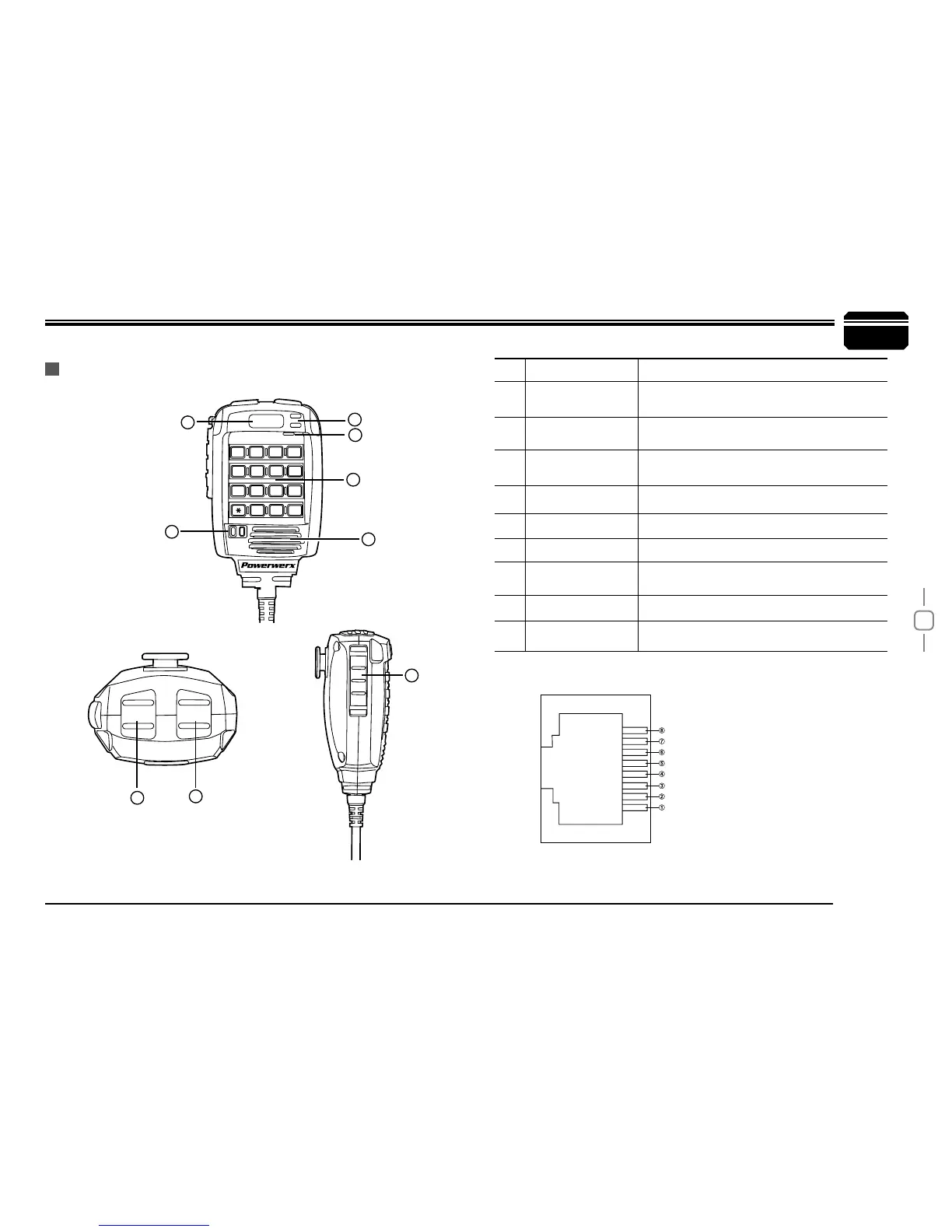
MIC Connector Diagram (in the front view of connector)
Getting Acquainted
MICROPHONE
Key Pad Serial Data
+5V
DOWN
UP / SPKR AUDIO OUT
MIC GND
MIC
PTT
GND
NO. KEY FUNCTION
1 UP
Increase frequency, channel number or
setting value.
2 DOWN
Decrease frequency, channel number or
setting value.
3 PTT Press the PTT (Push-To-Talk) key to transmit.
4 Number Key Input VFO frequency or DTMF dial out etc.
5 A/B band Choose left band or right band as Main band
6 Band indicator The indicator light on for Main band.
7 TX/RX indicator
Light green while receiving, Light red while
transmitting.
8 MIC Speak here during transmission.
9
Speaker
Option to hear speaker thru microphone.
1
2
3
5
6
7
8
4
DN
UP
1
4
78
9
0
#
5
6
2
3
PA
MIC
PB
A
B
A
A/B
B
PC
PD
MAIN
9


 To Next Page