12780 San Fernando Road, Sylmar, California 91342 | www.semcopackaging .com | Email: semcoinfo@PPG.com
|
21
12. Troubleshooting (cont.)
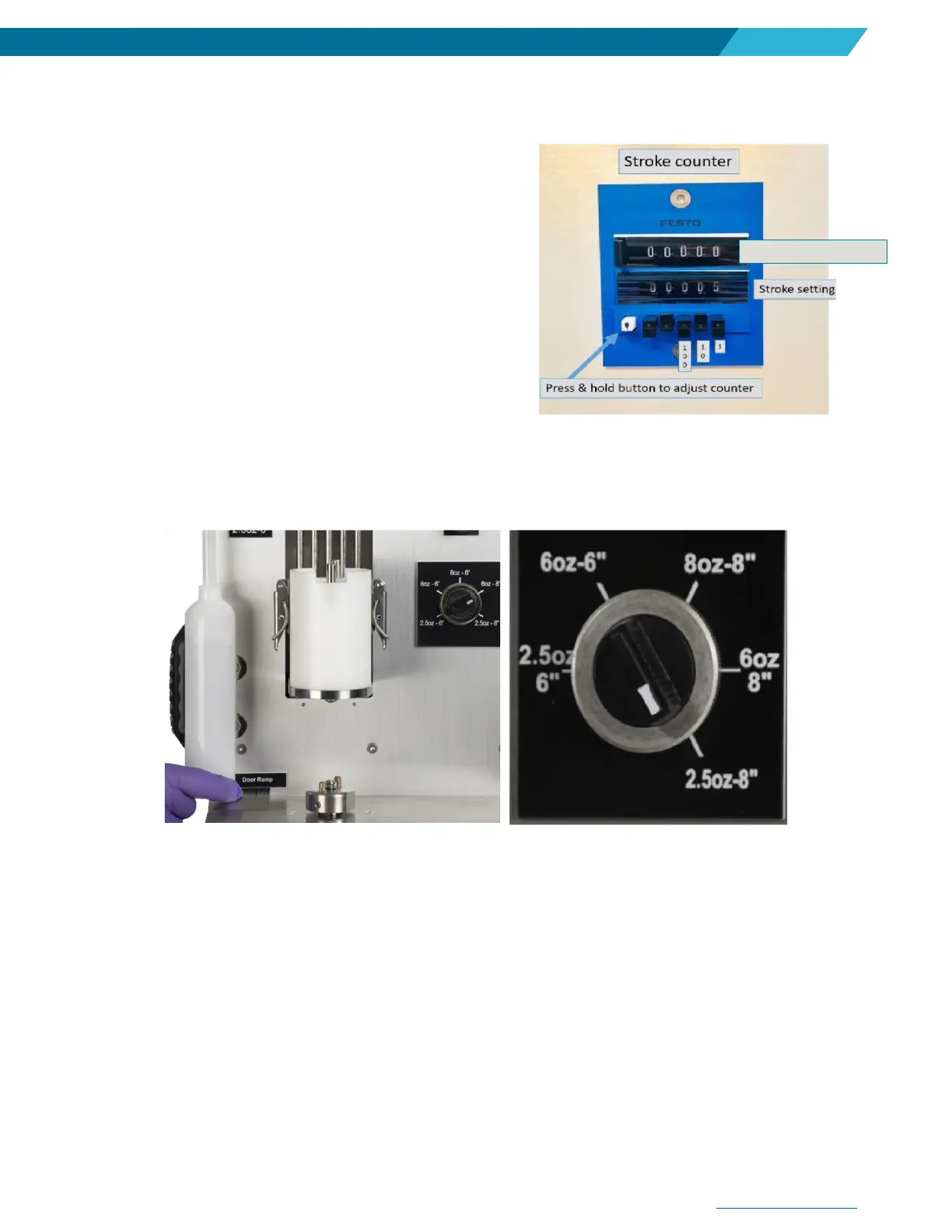
4. Ensure cycle counter dial is set to a number GREATER
than ‘0’. To set, press down white button and then press
in corresponding back buttons.
5. If none of these actions resolve the issue, please contact
your local application support center (ASC) for technical
support.
Issue: Machine starts operating, but stalls in the ‘UP’
position.
1. Check to make sure you have the proper configuration of the Semkit package you are trying to mix.
Utilize the Semkit package ruler on the left-hand side of the machine by pulling the dasher rod of the
Semkit all the way to the top of the cartridge and placing on the door ramp to identify the proper type of
Semkit package. Then, turn the Semkit package configuration switch accordingly.
2. Ensure that the safety door pin is properly engaging the safety switch when the front door is closed.
3. Cartridge dasher rod (on Semkit package) may be over threaded. If the dasher rod can’t be easily
unthreaded from the cartridge, this may be the problem. Continue with another cartridge and restart
mixer.
4. Sensor locations on the main cylinder may have moved or sensor has failed. See Calibration procedure
(Section 10).
5. If none of these actions resolve the issue, please contact your local application support center (ASC) for
technical support.


 To Next Page