BACK TO CONTENTS
-
+
POWER
Designed and Handcrafted in the U.S.A.
QBASS
0
+
18
QBASS
REMOTE
8
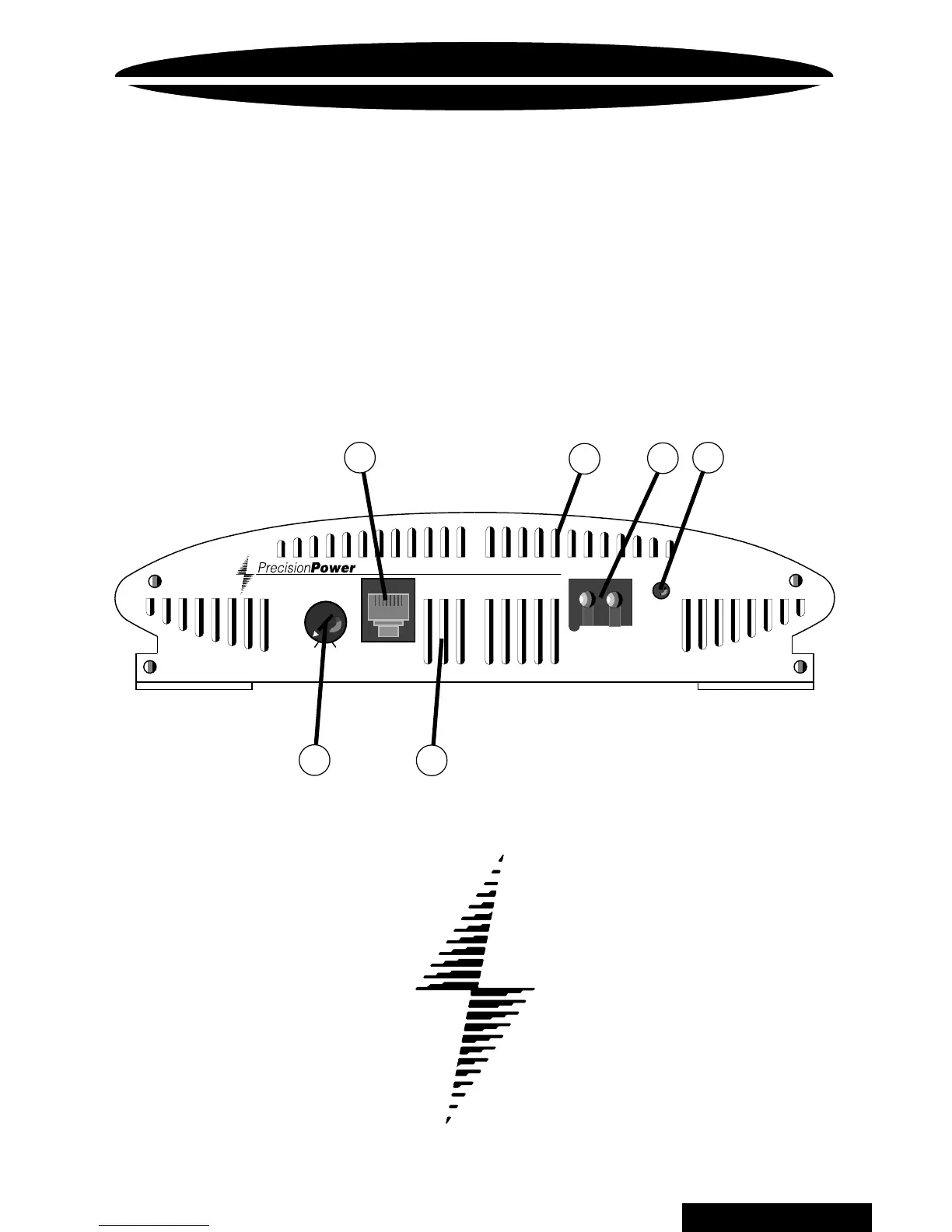
ENDPLATE DIAGRAM
2400 / 2600 / 21400
23
4
1
6
5
1.
Q
BASS REMOTE
™ plug in
Plug in the data cable from the optional
Q
BASS REMOTE
™
dash mount level control here.
(This will bypass the amplifier's on board
Q
BASS
control)
2. COOLING VENTS (see page 13).
3. POWER / GROUND
POWERLOCK
After you have securely connected your power and ground wires, plug in the
Power / Ground
POWERLOCK
connector here (see page 7).
4. POWER indicator
A green light indicates that the amplifier is on.
5.
Q
BASS
™
Level
Turn this control clockwise to boost the
Q
BASS PLUS
™
circuit by up to 18dB.
6. FORCED AIR INTAKE VENTS (see page 13).



 To Next Page