BACK TO CONTENTS
2
QBASS
PLUS
™
Q
BASS PLUS
™
On
PC2400, PC2600
and
PC21400
amplifiers, we've
taken bass control to a higher level with
Q
BASS PLUS
™
.
The two
Q
BASS
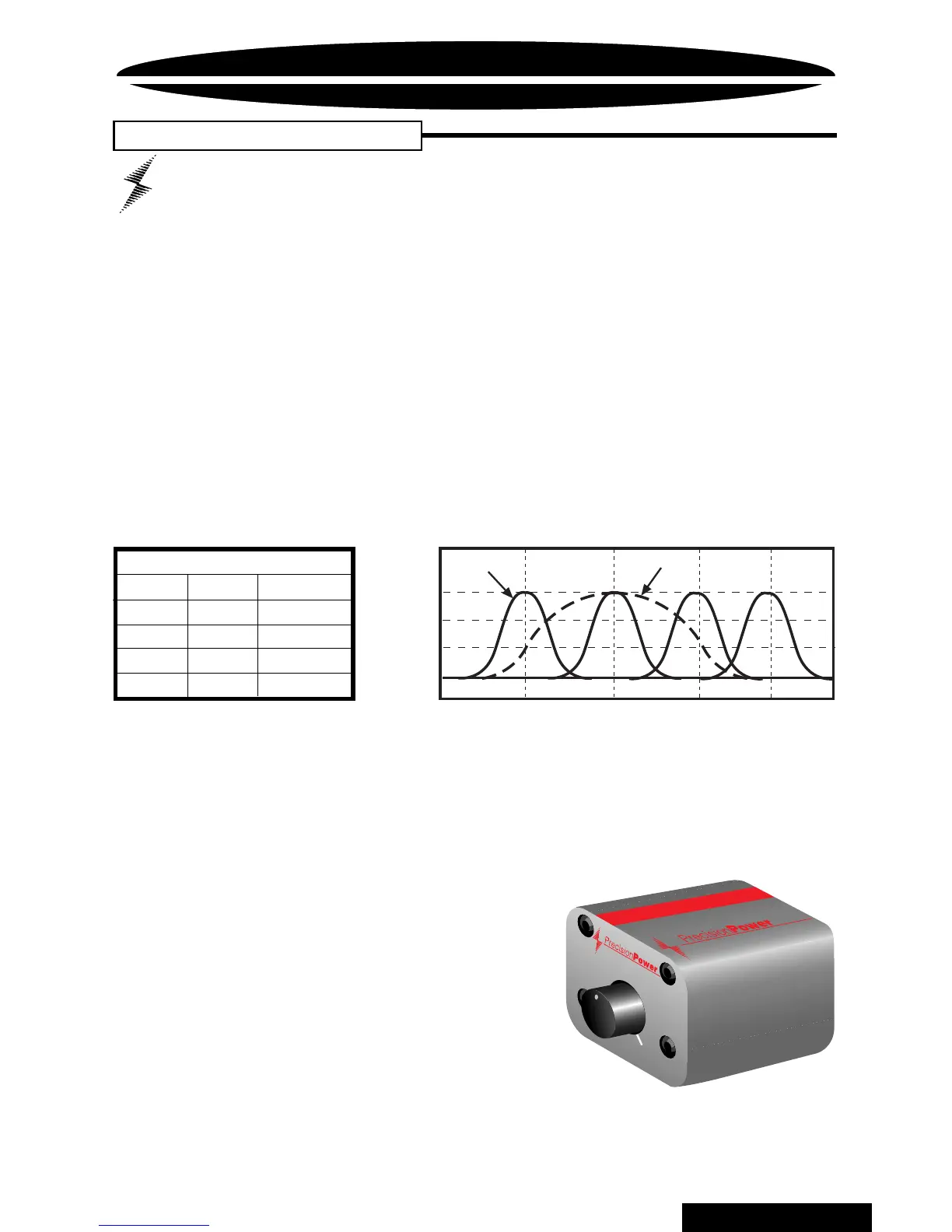
switches (labeled 1 and 2) on the front
end of the amplifier allow you to select one of four
frequency centers - 30Hz, 36Hz, 44Hz and 60Hz. The Q
SELECT switch determines the width of boosted
frequencies. A 'Q' of 2 (switch out) will give you a wide
boost while a 'Q' of 4 will boost a narrow range of
frequencies (See chart below). On the rear end panel
you will find the
Q
BASS
™
level control and the plug-in for
an optional
Q
BASS REMOTE
™
dash mounted level
control. Adjust the level control clockwise for up to 18dB
of boost at your selected frequency and Q.
Optional
Q
BASS REMOTE
™
This boost control can be mounted in the
dash and will supersede the boost
control on the endplate.
Optional
Q
PORT
™
expansion
module allows one boost control
to operate multiple amplifiers. Each
Q
PORT
™
has outputs for four amplifiers
as well as another
Q
PORT
™
for greater
expansion. See your Authorized
PrecisionPower
Dealer for more information!
Q
BASS PLUS
™
QBASS™
Settings
1 2 Freq.
IN IN 30Hz
IN OUT 36Hz
OUT IN 44Hz
OUT OUT 60Hz
+18dB
+6dB
0dB
30Hz
36Hz
44Hz
60Hz
Q = 4
Q = 2
+12dB
CAUTION:
Q
BASS PLUS
™
should only be used in systems with
strong subwoofers. 18dB is a lot of bass boost and could damage full
range speakers.
QBASS
0
+18
Q
BASS REMOTE
™
Designed and handcrafted in the USA
™



 To Next Page