Studio One Artist Quick Start
Monitor Mixing in Studio One
Quantum 2626
Owner’sManual
6.4 Monitor Mixing in Studio One Studio One的监听混音
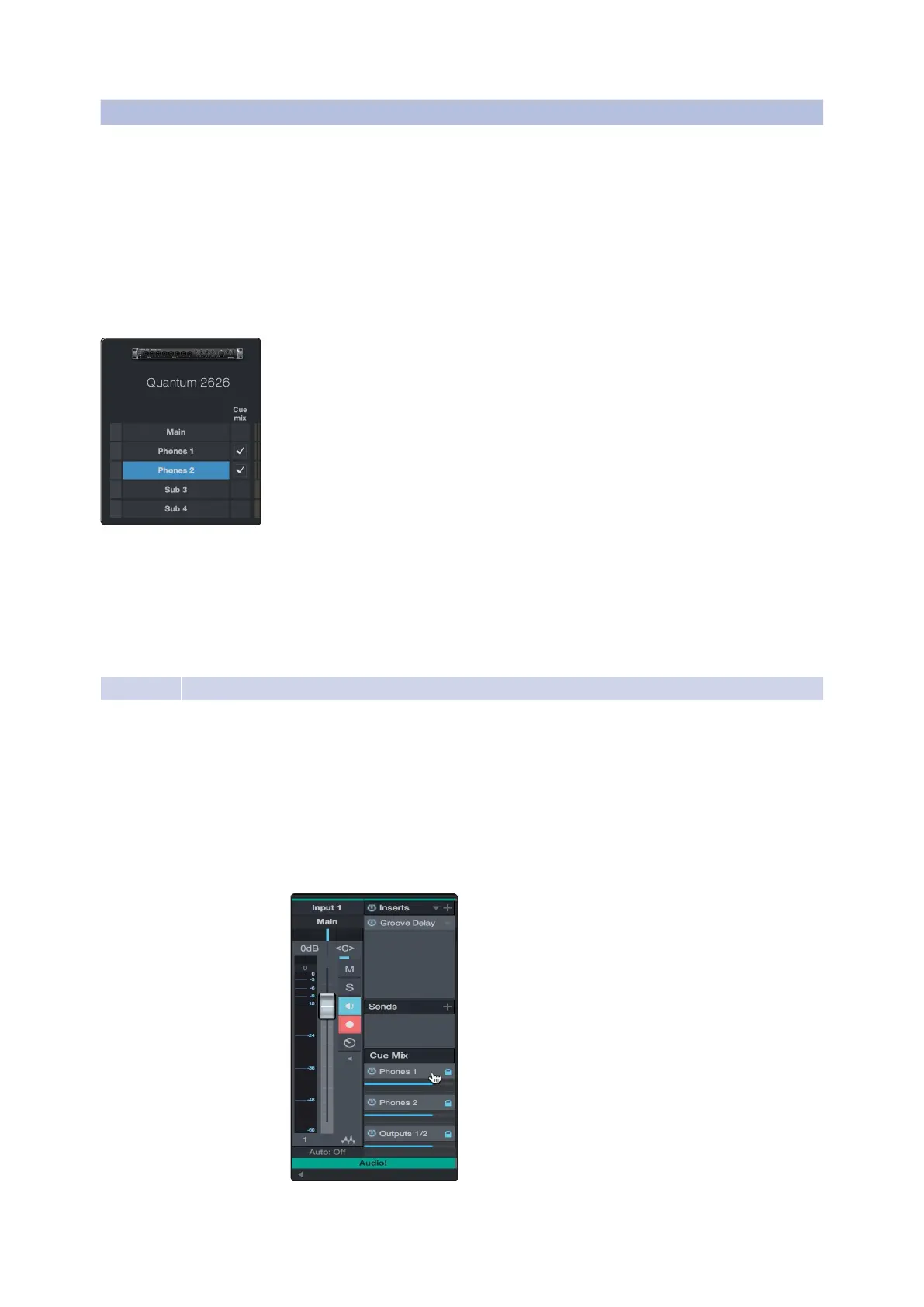
You can set up monitor mixes with your Quantum 2626 interface using
Studio One’sunique CueMix feature.This feature takes overthe monitor mix
controlsoftware foryour Quantum 2626 interfaceand provideslevel and pan
control from within Studio One.Simply designate a pair or pairs of outputs as
a cue mix, and you’ll find the Cue Mix controls in your Studio One mixer.
你可以使用
Studio One
独特的功能
Cue Mix
来设置
Quantum 2626
接口的
监听混音。这个功能接管了
Quantum 2626
接口的监听混音控制软件,
并在
Studio One
中,提供电平和摇摄控制。只需指定一对或几对输出
作为
Cue Mix
监听混音,你就可以在
Studio One
混音器中,找到
Cue
Mix
控制。
You can create a cue mix and send it to any output on your Quantum
(Mains, Headphones, General Purpose, ADAT, or S/PDIF). You
simply need to create an output bus and enable Cue Mix.
你可以创建一个
Cue Mix
监听混音,并将其发送到
Quantum
的任何输出
(主电源、耳机、通用、
ADAT
或
S/PDIF
)。你只需要创建一个
输出总线并启用
Cue Mix
监听混音。
PowerUser Tip:
It is possible to designate the main output as a cue mix. This is
helpful if you often record yourself and require quick access to monitoring for
live inputs. When the main output is designated as a Cue Mix, a button will
appear on any audio channel, with an assigned audio input in the Console,
below the Mute, Solo, Record, and Monitor buttons.
用户提示 :
可以将主输出指定为 监听混音。如果你经常自己录音,并且需
要快速访问现场输入的监听,这很有帮助。当主输出被指定为监听混音时,
在任何音频通道上都会出现一个按钮,在控制台里,有一个指定的音频输
入,在
“
Mute”, “ Solo”, “Record”,
和
“Monitor
”
按钮下面。
6.4.1
Cue Mix Functions
Once youhave createda cue mix output, you will notice a special Send object
in the channels of the Console.This Send object is called a CueMix object.
一旦你创建了一个监听混音输出,控制台的通道中,你会注意到有一
个特殊的
” Send”
发送对象。这个发送对象被称为
Cue Mix
对象。
In the Small Console view, Cue Mix objects appear in the far left column
of the extended channel.
在
Small Console
视图中,
Cue Mix
对象出现在扩展通道的最左边一栏。















 To Next Page