StudioOneArtistQuickStart
Creating a New Song
2.
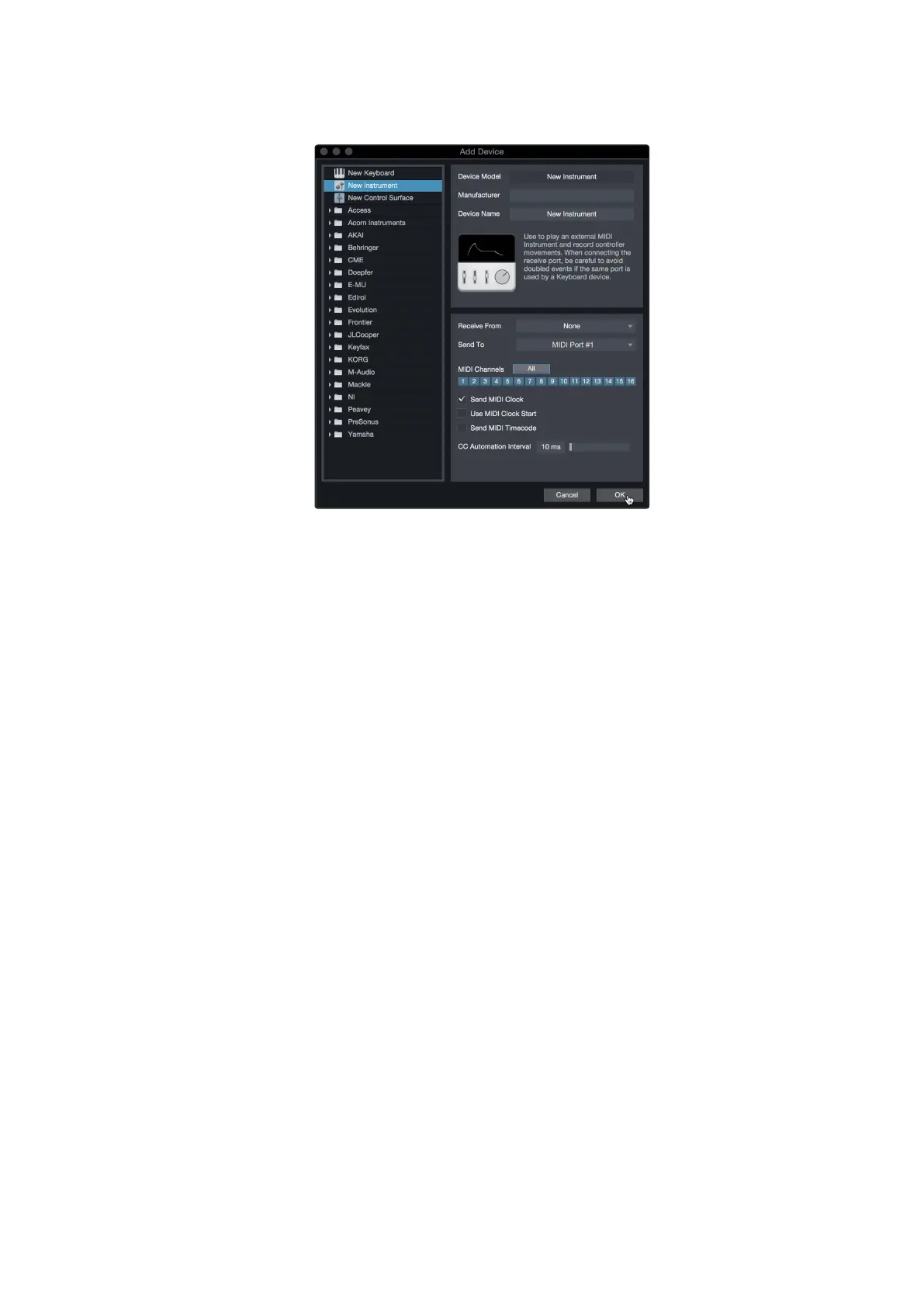
Select your deviceinthe menu ontheleft.Ifyour deviceis notlisted,
selectNewInstrument.Atthispoint youcancustomizethenameof
your keyboard by enteringthe manufacturer and devicenames.
在左侧 菜单中 选择 您 的设 备 。 如果 您 的设 备没有 列出, 请选择 New
Instrument。此时,您可以通过输入制造商和设备名称来定制键盘名称
3.
Specify which MIDI channels will be used to communicate with this sound
module. For most purposes, you should select all MIDI channels. If you are
unsureofwhich MIDI channelsto select, wesuggestyouselect all16.
指定哪个MIDI通道将被用来与这个声音模块通信。在大多数情况下,您
应该选择所有的MIDI通道。如果您不确定要选择哪些MIDI通道,我们建
议您选择全部16个。
4.
Inthe SendTomenu, select the MIDI interface output fromwhich Studio One
Artist will send MIDI data to your sound module. Click “OK”and close the External
Devices window.Youare nowready to start recordingin Studio One Artist.
The rest of this Quick Start Guide will go over how to
set up a Song and will discuss some general workflow
tips for navigating through the Studio One Artist
environment.
4.在Send To菜单中,选择MIDI接口输出,Studio One Artist将从中发送
MIDI数据到你的声音模块。单击“确定”并关闭外部设备窗口。现在你可
以开始在Studio One Artist中录音了。
本快速入门指南的其余部分将介绍如何设置一首歌,并将讨论一些在
Studio One Artist环境中导航的通用工作流提示。















 To Next Page