StudioOneArtistQuickStart
Creating a New Song
4.3
Creating a New Song
Nowthatyou’veconfiguredyouraudioandMIDIdevices,let’screate
a new Song. We’ll start by setting up your default audio I/O.
现在您已经配置了音频和MIDI设备,让我们创建一个新的
Song。我们将开始设置您的默认音频I/O。
1.
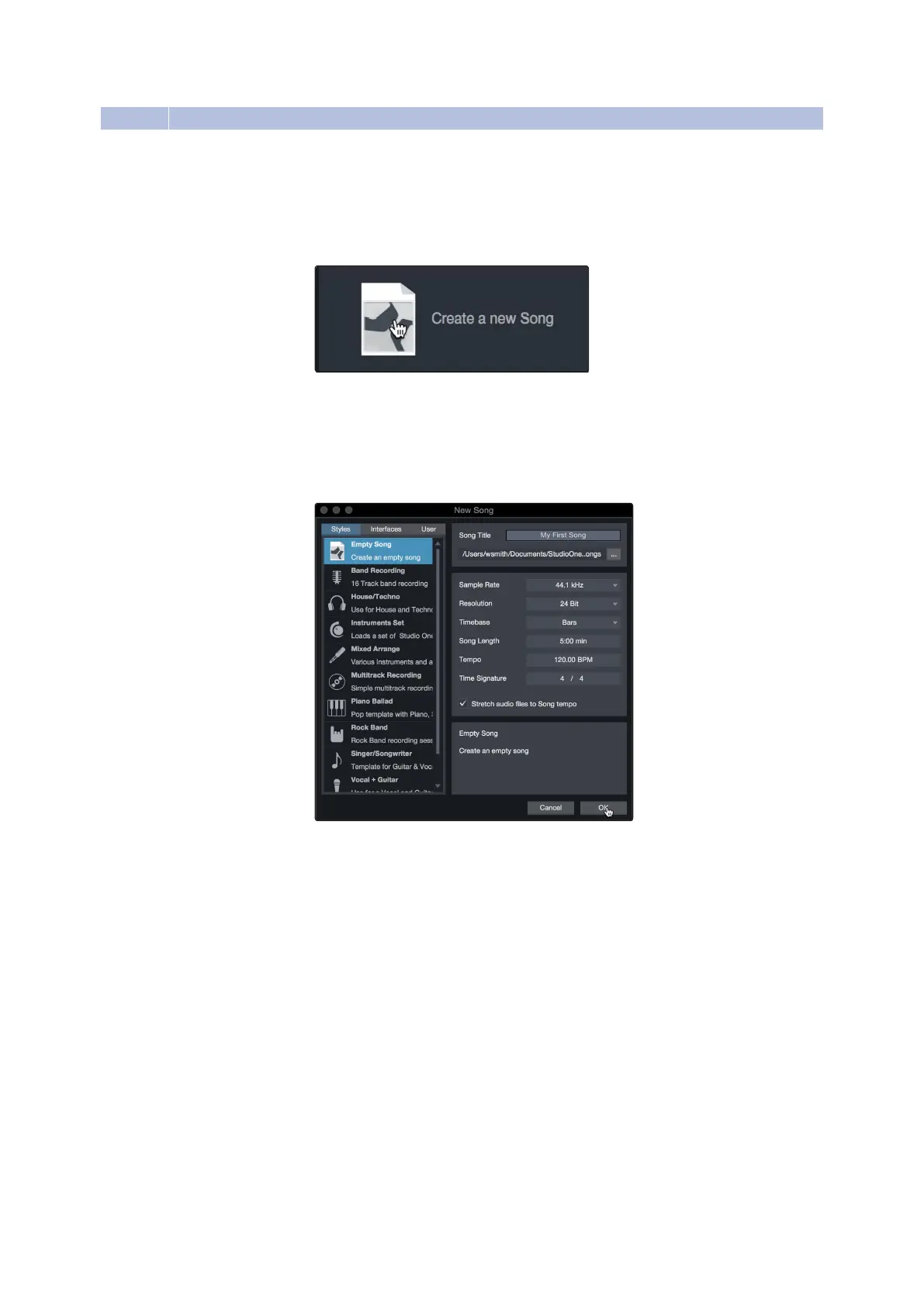
From the Start page, select“Create a New Song.”
1. 从开始页面,选择“创建一首新歌”。
2.
In the New Song window,name your Song and choose the directory in
which you’dlike it saved.You’llnoticea list of templateson theleft. These
templates provide quick setups for a variety of devices and recording
situations.The section will describe creating a Song from an empty session
在New Song窗口中,为歌曲命名并选择希望保存它的目录。您会注意到
左侧有一个模板列表。这些模板为各种设备和记录情况提供了快速设置。
这一节将描述从一个空会话创建一个Song。
3.
Select“Empty Song”from the Templates list. At this point, you should give
yourSonganameandselectyourpreferredsamplerateandbitdepthfor
recordingandplayback.Youcanalsosetthelength ofyourSongandthe
type of time formatyou would like the timeline to follow (notation bars,
seconds, samples, or frames). Click the OK button when you are finished.
PowerUser Tip:
Ifyou plan to import loops into your Song, makesure that the Stretch
Audio Files to Song Tempo option is selected.This will automatically import loops at the
correcttempo.
从模板列表中选择“空歌”。此时,您应该为Song指定一个名称,并选择录制
和播放所需的首选采样率和位深度。您还可以设置Song的长度和希望时间轴
遵循的时间格式类型(注释条、秒、样本或帧)。完成后单击OK按钮。
高级用户提示
:
如果您计划将循环导入到歌曲中,请确保选择了“拉伸音频文
件到歌曲节奏”选项。这将以正确的速度自动导入循环。















 To Next Page