StudioOneArtistQuickStart
Creating a New Song
4.3.2 Creating Audio and Instrument Tracks 创建音频和音轨
1.
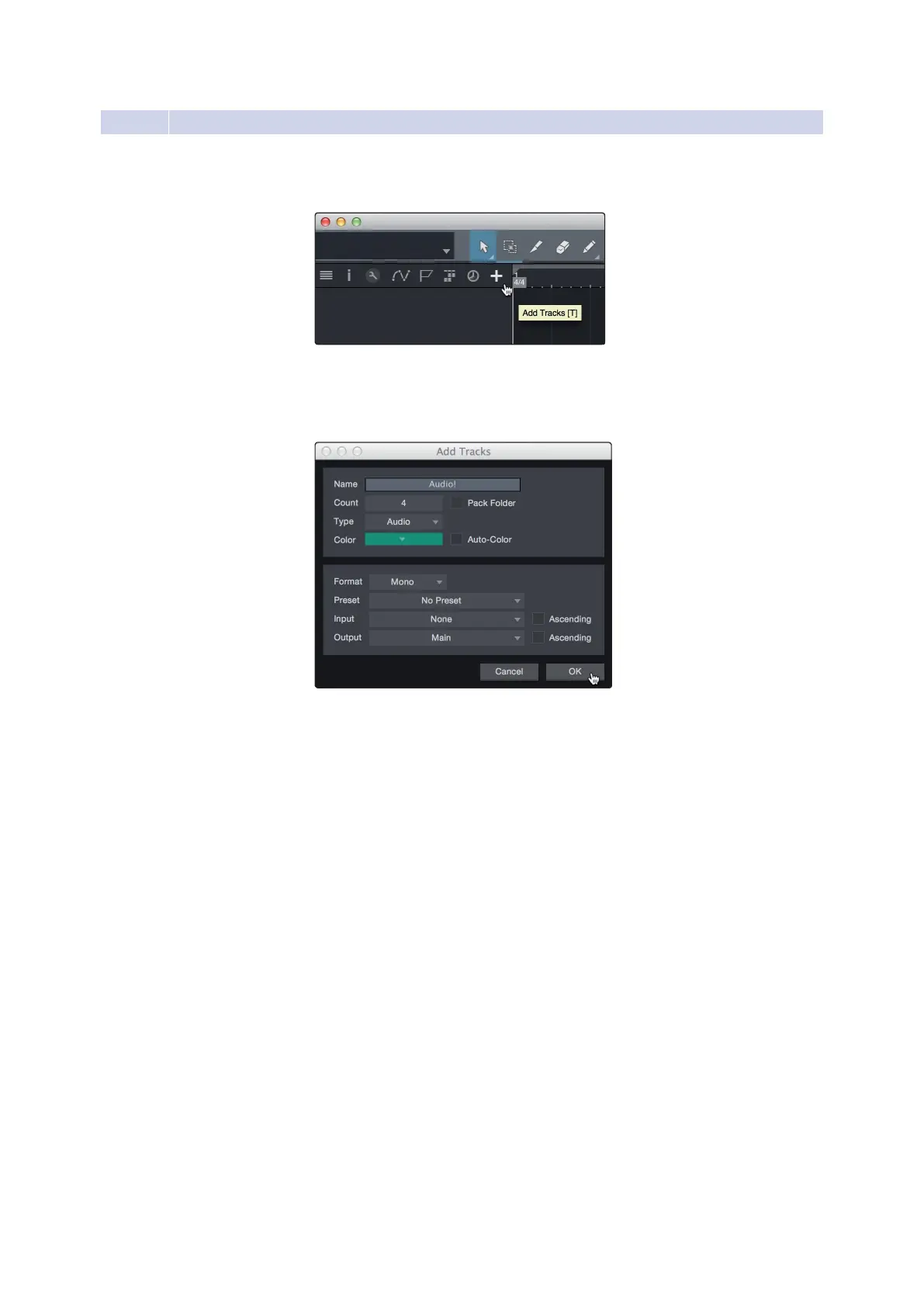
In the upper left corner of the Arrange window, you will notice
severalbuttons.Thebutton furthestto therightisthe AddTracks
button. Click on this button to open the AddTrackswindow.
2.
IntheAddTrackswindow,youcancustomizethetracknameand
color,addapresetrackofeffects,andset the physicalsourcefor
the input and output of your audio tracks. Most important, you
can select the number and type of tracks you’dlike to create.
1.在Arrange窗口的左上角,您将注意到几个按钮。最右边的按钮是Add
Tracks按钮。单击此按钮打开“添加轨道”窗口。
2.在“添加音轨”窗口中,您可以自定义音轨名称和颜色,添加一个预设的效
果机架,并为您的音轨的输入和输出设置物理源。最重要的是,你可以选
择你想要创建的曲目的数量和类型。















 To Next Page