Pressure Systems, Inc. NetScanner™ System (9016, 9021, & 9022) User’s Manual
www.PressureSystems.com
4 - 9
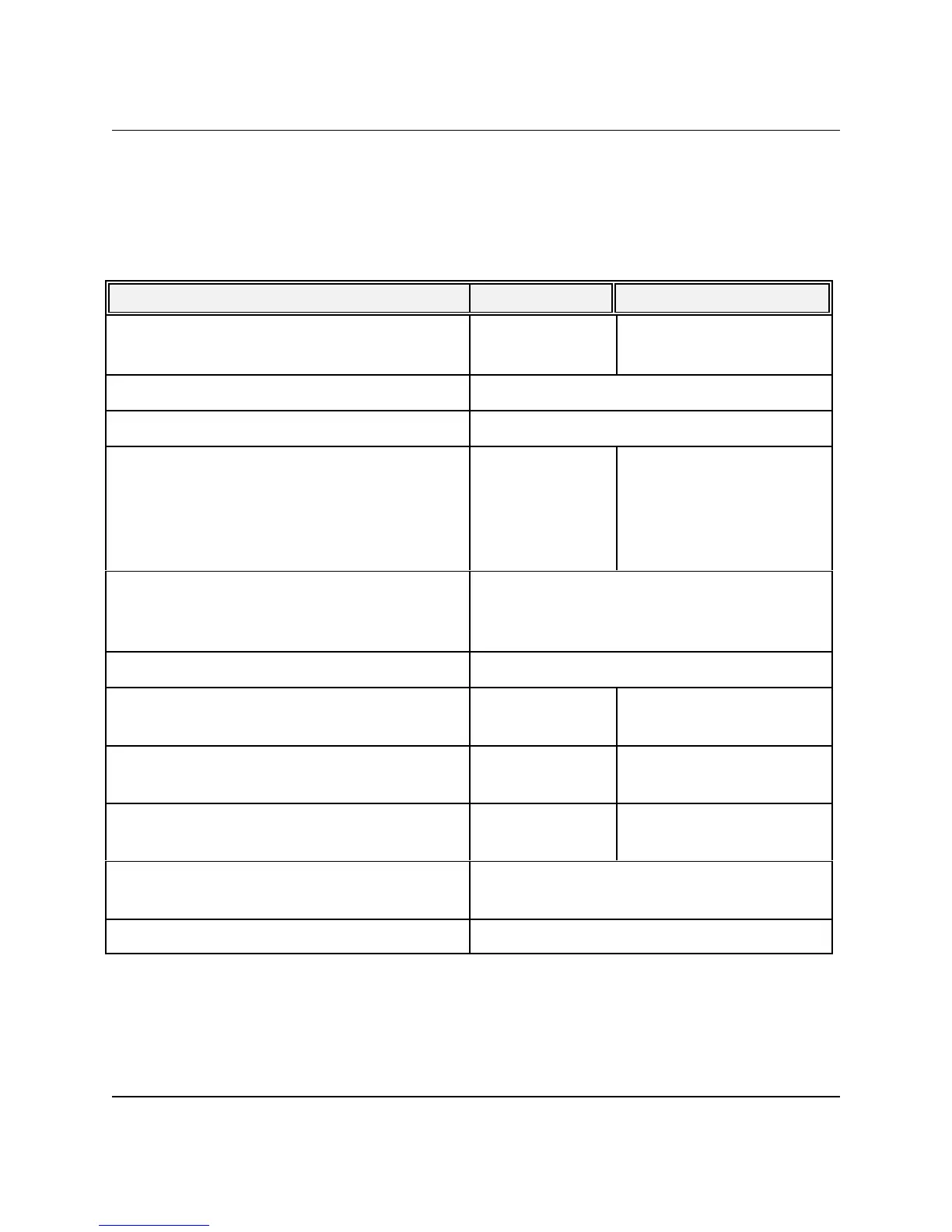
Following is a simple, step-by-step procedure for executing a specified-value span calibration of
a 9016, 9021, or 9022 Intelligent Pressure Scanner. For Models 9021/9022, skip the steps that
manipulate valves as denoted by the double asterisk (**). For the purposes of this example, it will
be assumed that an upscale pressure of 14.9800 psi is available from a dead weight tester for the
calibration of 15 psi internal transducers. All sixteen channels are 15 psi full scale.
Description 9016 Command 9021/9022 Command
Ensure that valves are in RUN/CAL mode
(default)
[w1200] **
… normal data acquisition
Perform Re-zero calibration first
See Section 4.2.2
Place the module calibration manifolds into
the CAL position if this is the desired
pressure application input. The RUN position
may be a better choice for modules with
transducers having different ranges.
[w0C01] for
CAL
[w0C00] for
RUN
**
With a deadweight tester, apply 14.9800psi
to the appropriate module CAL and CAL
REF inputs [or optionally to RUN inputs]
Delay for settling of pneumatic inputs
Verify measured data reads near expected full
scale
[rFFFF0] [r0FFF0]
Instruct module to calculate new gain
coefficients for all 16 channels
ZFFFF 14.98 Z0FFF 14.98
Place calibration manifold back into the RUN
position
w0C00 **
Store new gain coefficients to transducer non-
volatile memory
w09
… continue normal data acquisition


 To Next Page