EN • 6
ENGLISHFRANCAISNEDERLANDSESpAñoLITALIANoDEuTSCH
664Y2300.C
DIRECTIONS FOR USE
Your system must be checked once a year by an approved
installer or maintenance company.
During operation, the burner starts automatically as soon as
the boiler temperature drops under the required set point and
it stops as soon as the boiler reaches that temperature.
The central heating circuit must be pressurized (see in the
chapter “Installation” how to define the system pressure).
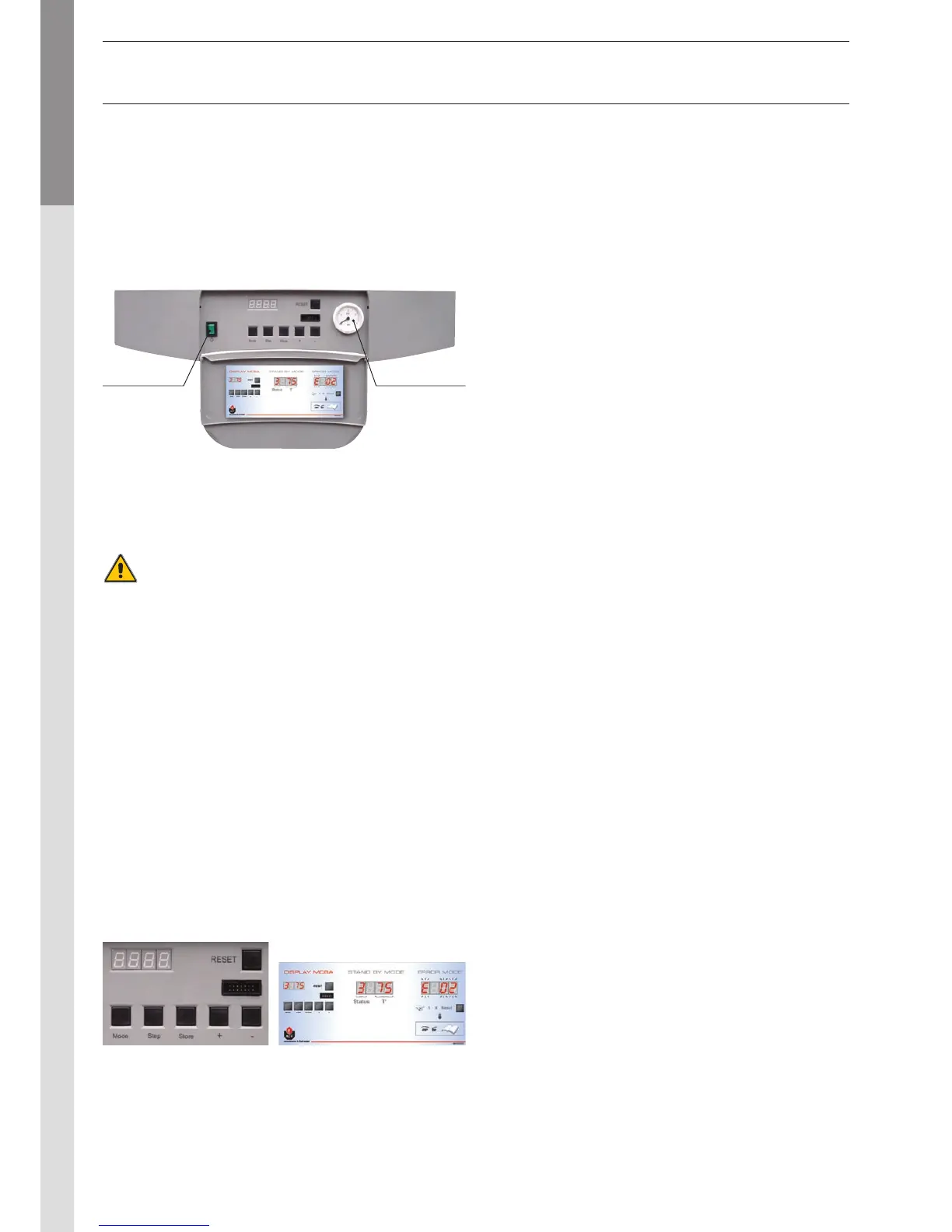
The pressure indicator is located on the right-hand side of the
display.
The CH pressure must be a minimum of 1 bar and must be
checked by the end user on a regular basis. If the pressure
drops under 0.5 bar, the integrated water pressure switch
blocks the appliance until the pressure in the system returns
to a level above 0.8 bar. The connection for a fill valve is
provided underneath the appliance. The installer can also fit
the system with a separate valve. Make sure that the appliance
is powered off when filling the system. TTo do this, toggle the
Start/Stop switch located on the left of the screen to Off. (see
the Control panel).
For more information, please ask your installer when the system
is delivered.
A safety valve is provided at the underneath of the appliance.
If the system pressure exceeds 3 bars, this valve opens and
drains the water from the system. In this case, please contact
your installer.
SETTING THE PARAMETERS
(Hot water temperature)
- Press : The screen displays PARA.
- Press : the first character is 1 and the last two characters
give the current hot water temperature setting.
- To change this temperature, press + or - until the last two
digits show the desired temperature value.
- Press Store to save the new temperature setting.
- Press twice to return to Pilot mode (normal operating
mode).
(hot water)
- Press : The screen displays PARA.
- Press twice: the first character is 2 and the last two
characters give the current setting:
= disabled; = enabled.
- To change this parameter, press + or - until the screen
displays the desired value:
= disabled; = enabled.
- Press Store to save.
- Press twice to return to Pilot mode (normal operating
mode).
(heating)
- Press : The screen displays PARA.
- Press three times: the first character is 3 and the last
two characters give the current setting:
= disabled; = enabled.
- To change this parameter, press + or - until the screen
displays the desired value:
= disabled; = enabled.
- Press Store to save.
- Press twice to return to Pilot mode (normal operating
mode).
(maximum temperature for the heating circuit)
- Press : The screen displays PARA.
- Press four times: the first character is 4 and the last
two characters give the current central heating temperature
setting.
- To change this temperature, press + or - until the last two
digits show the desired temperature value.
- Press Store to save the new temperature setting.
- Press twice to return to Pilot mode (normal operating
mode).
The temperature setting for the appliance and the safety
functions for its various parts are continuously monitored by
a regulator controlled by a microprocessor (the MCBA). In the
event of a fault, this MCBA disables the appliance and displays
an error code: the screen flashes displaying E as the first
character, followed by the error code.
To reset the appliance:
- Press "Reset" on the screen.
- Contact your installer of the fault happens again.
uSERS GuIDE
Start/Stop
switch
Pressure
gauge
Also see the user label located inside the valve on the control
panel:


 To Next Page