page
10
Home Bakery
2001 ABM8 rev.0
•
••
•
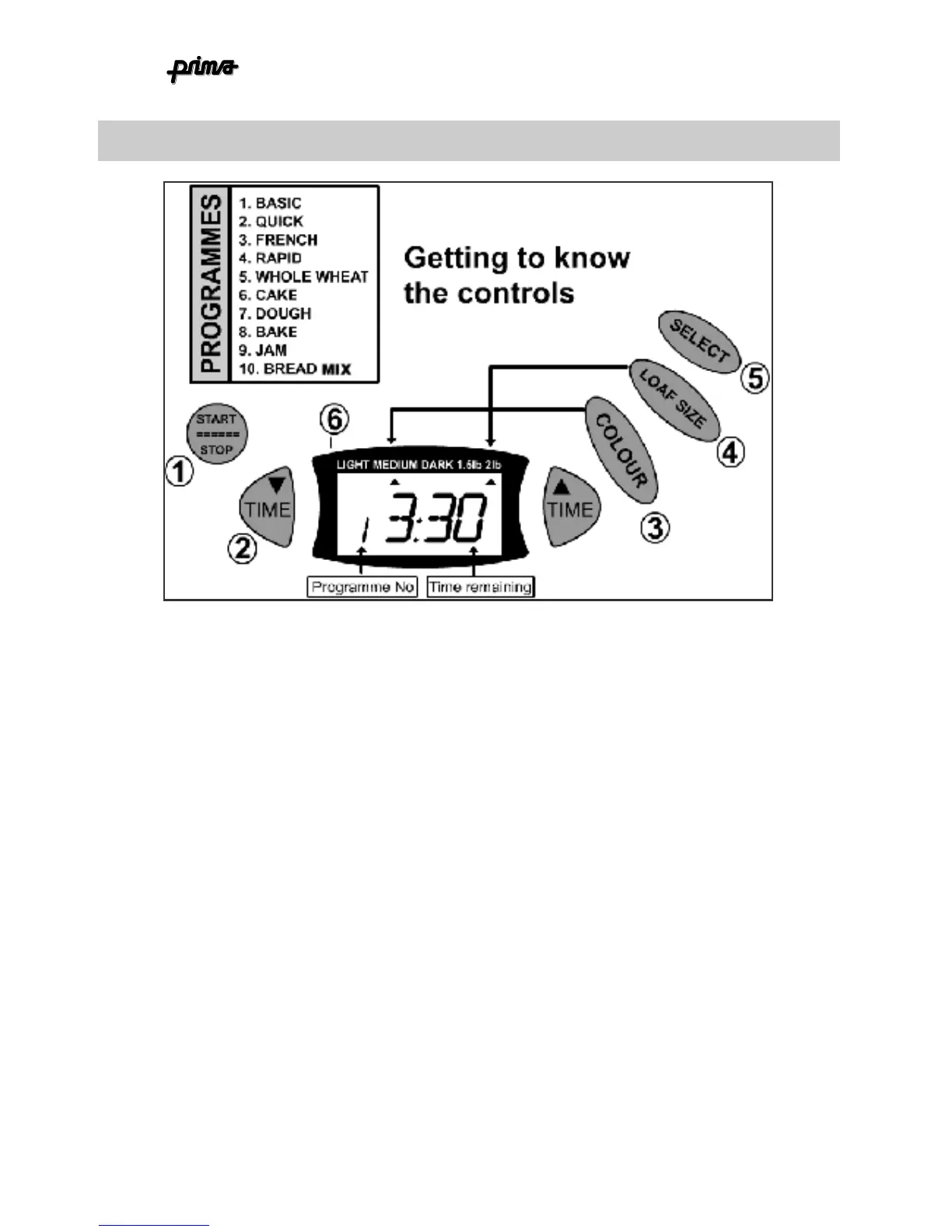
THE CONTROLS 16
1.
START/STOP button
. Starts the programme (of course). To stop the programme
part way through you need to press and hold this button for 3 seconds. After
which, the machine will reset to programme 1.
2.
Time selector
. For use when setting the delay timer (see section of timer operation
3.
Colour
. Press to select crust colour between light, medium & dark. The arrow on
the display (6) will point to the colour you have selected.
NB: crust colour cannot
be changed in ‘BREADMIX’ mode.
4.
Loaf size
. Select between 1.5lb and 2lb loaf size. The small arrow will move to
indicate your current selection.
5.
Select.
Main selector control. Press to cycle through each programme. The
programme number is shown on the display (6)
6.
Display.
Shows time remaining, programme selected, crust colour and loaf size.



 To Next Page