65
4E Printing from Other Programs
Since this Printer uses a standard Windows printer driver you can print from any application
you would like. There are just a few things to remember that will make it much easier.
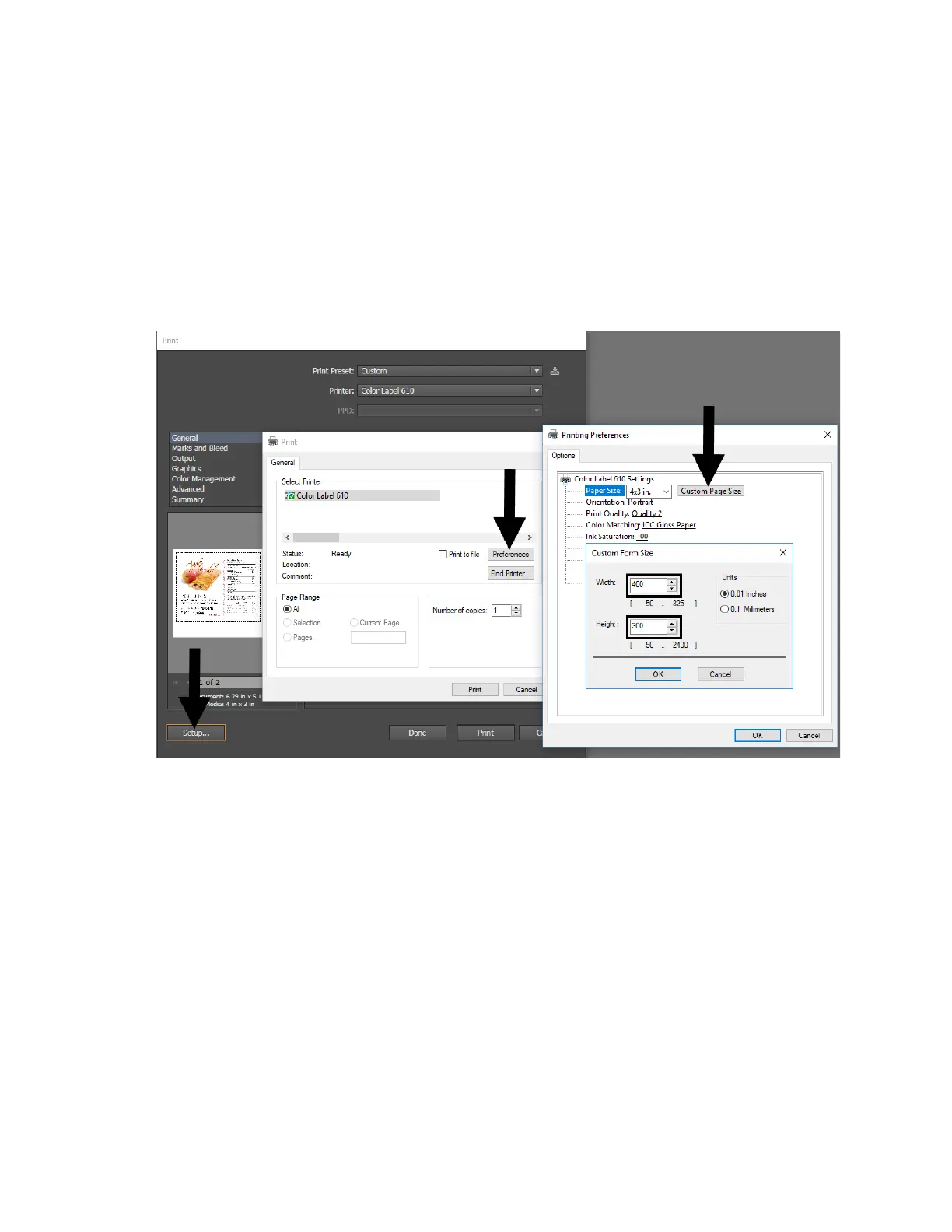
1. Set the Page Size in the Driver. BarTender automatically prompts you for the size of the
print. When printing from any other program, you must do this manually. Before you
print, simply set the custom page size just as you would set print quality in the printing
preferences. In the example below, the page size is 3.3” x 3.3” so the custom page size
is set to 330 x 330 (displayed in .01 inch units).
2. Check the image or document size. The image size or document size set in Illustrator
should match the Page Size set in the driver. If you have set your page size to 3” x 3”
but your image is actually 4” x 3” the printer driver will automatically shrink your image
to fit inside the 3” x 3” space. The result is that the actual printed page is 3” x 2.25”.
Avoid this by setting your document size or image size to match the page size.
3. Choose the right printing program. There are many different applications that are
capable of printing to the Eddie. However, there are only a few that are ideal printing
applications. For example, Adobe Illustrator is an excellent design program but is not
always the best printing program.



 To Next Page