Overview
231
Text Position
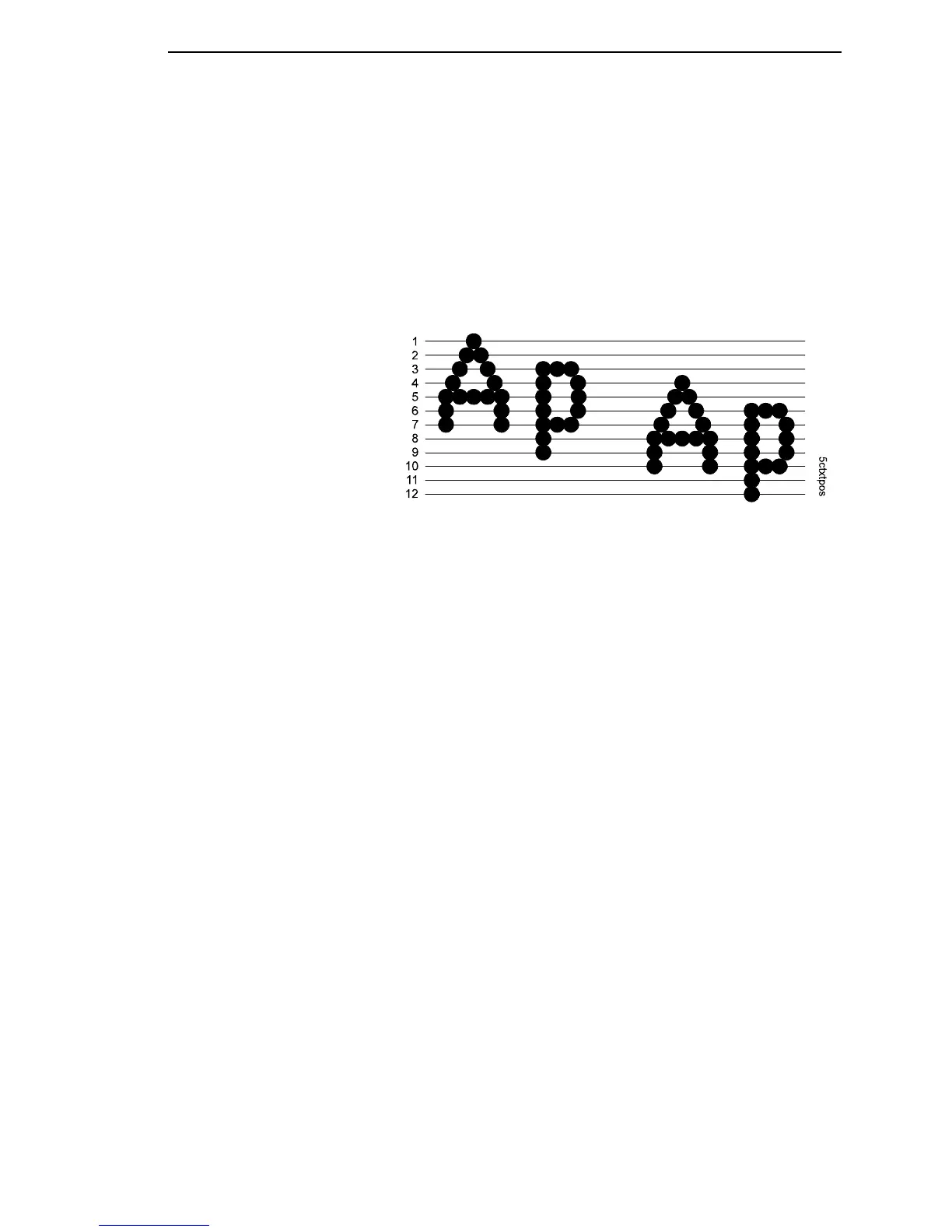
Specifies where the text will be positioned in the line space.
• Top of Line. Text is positioned at the top of the line space.
• Bottom of Line (the default). Text is positioned as if it were at the bottom
of a 6 lpi line space. The following example shows both Top of Line and
Bottom of Line text positions:
Top Margin
Defined in linespaces, starting from line zero at the top of the page and
incrementing from the top down.
The range is 0-451 linespaces, and the factory default is 0 linespaces.
Translate Table
• Default (the default). The option is disabled. The table is not stored in the
real translation table until the option is enabled.
• Downloaded. The option is enabled. The LU3 Translation Table is
loaded from the buffer into the permanent table.
Translation Tbl (Coax, TN3270)
Prints out SCS and DSC/DSE tables of the coax interface's current character
set. This operation is valid only when the coax interface is selected as the
current interface.
Translation Tbl (SPC Coax)
Prints out a table of the coax interface's current character set. This operation
is valid only when the coax interface is selected.
Top of Line Space
Dot
Row
Bottom of 8 LPI Line Space
Bottom of 6 LPI Line Space
Text Position
Top of Line
Text Position
Bottom of Line
Emulation Submenus















 To Next Page