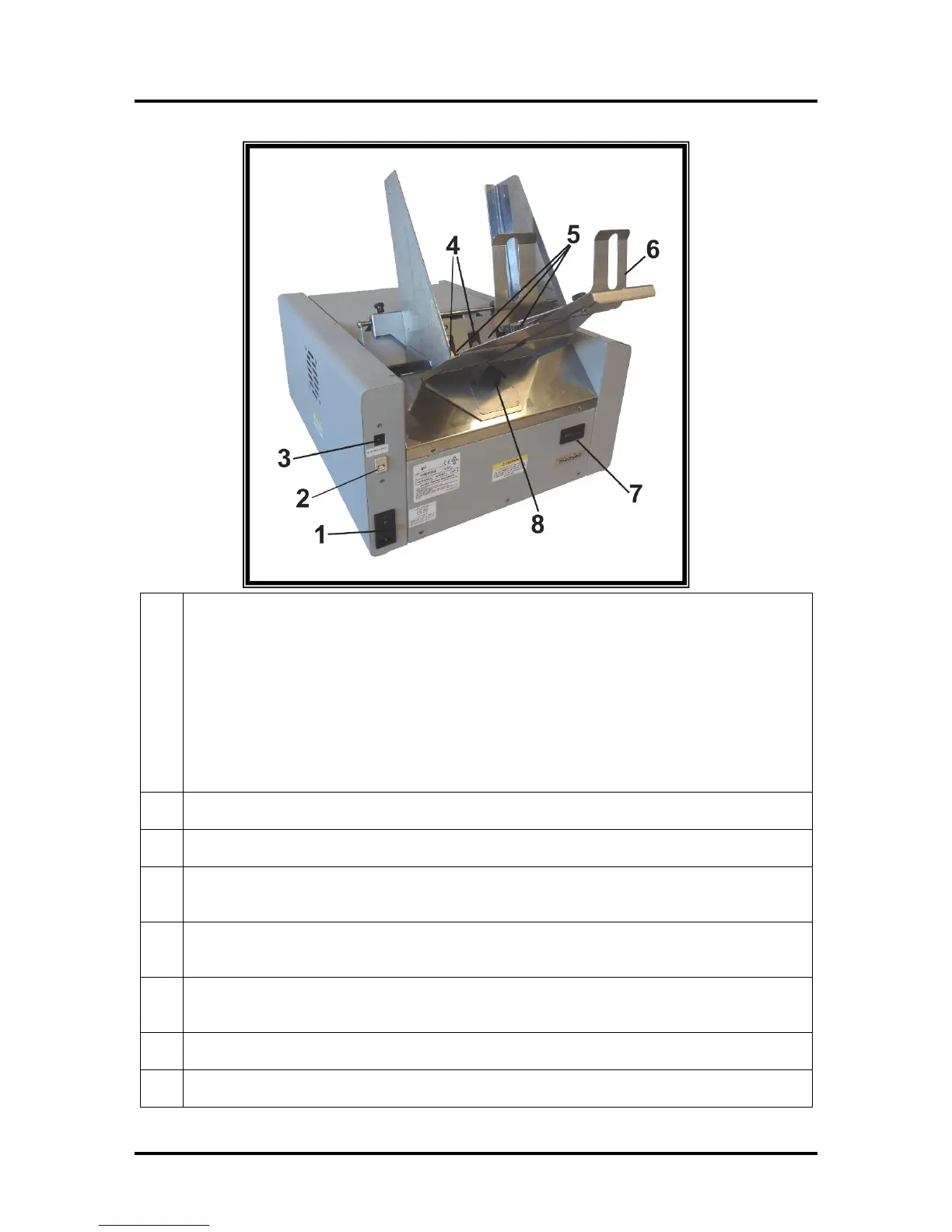
Main Power Switch, Receptacle and Fuse – Plug in AC power cord here. Switch turns main
power on or off. Fuse provides over-current protection. Fuse rating: 2.5A, 250V, slow blow.
CAUTION: Make sure power cord is disconnected from printer before checking/replacing fuse.
WARNING: Press the ON/OFF Button, located on control panel, to properly shut-down the print
engine. Wait until all control panel lights turn off, before you turn off the main power switch.
Tip: Starting with S/N 100027598; to power-up the print engine you must press the control
panel’s ON/OFF button after turning ON the Main Power Switch. In earlier units, the print
engine would automatically power-up after turning on the main power switch.
Sheet Separators – Used to separate a single piece of media from the stack. There are four sheet
separators on this printer.
Feed Rollers – Delivers the bottom piece of media, from the stack, through the separation area
and under the forwarding rollers. There are eight feed rollers on this printer.


 To Next Page