GP4000 Series Hardware Manual
137
Panel Mounting Procedure
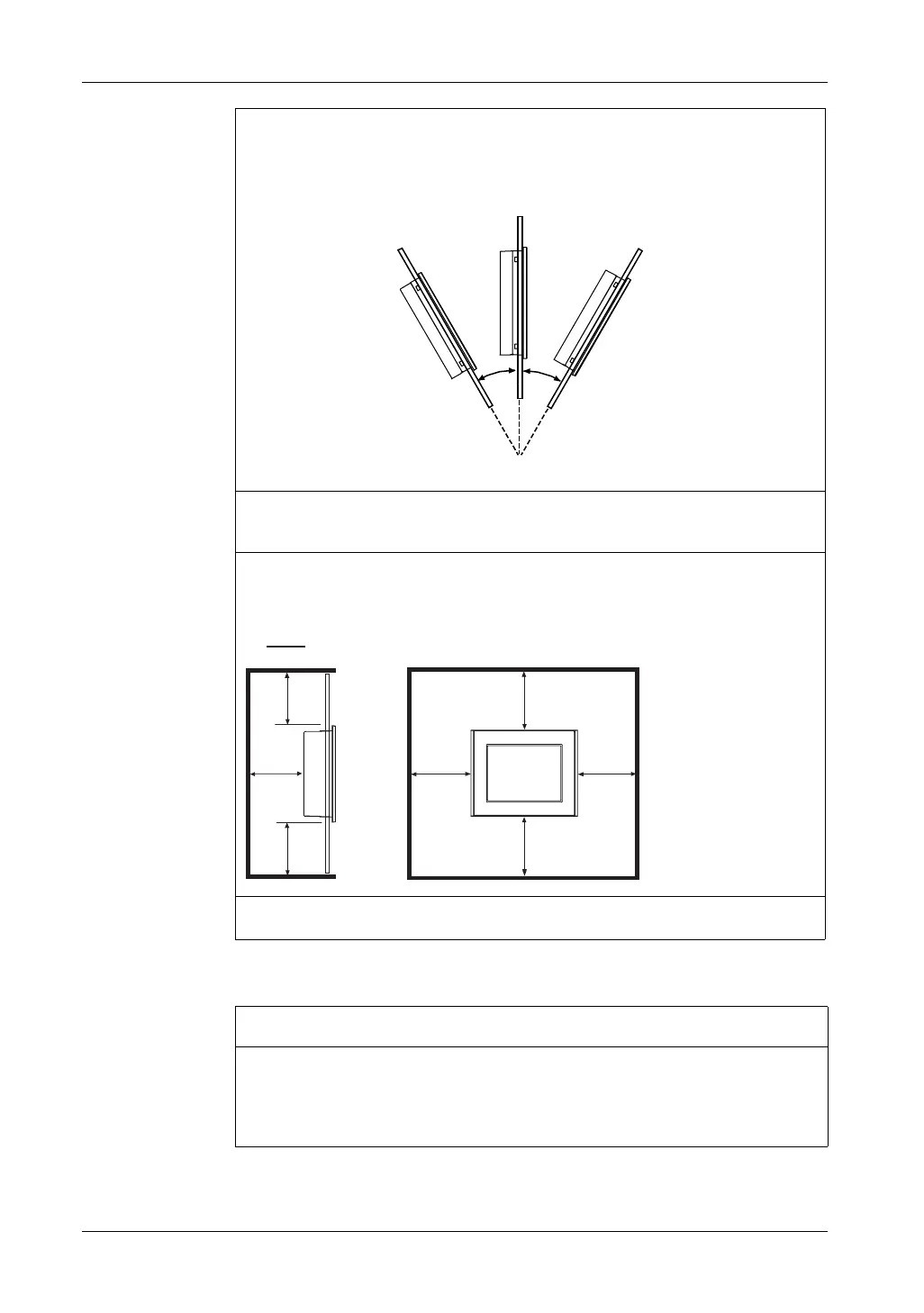
When installing the GP unit in a slanted position, the GP unit face should not incline more
than 30°.
When installing the GP unit in a slanted position with an incline more than 30°, the ambient
temperature must not exceed 40 °C (104 °F). You may need to use forced air cooling (fan,
A/C) to ensure the ambient operating temperature is 40°C or less (104 °F or less).
For easier maintenance, operation and improved ventilation, install the GP unit at least
100 mm (3.94 in.) away from adjacent structures and other equipment as shown in the
following illustration:
The holes on the rear of the GP unit (except GP-4200 Series) do not correspond to VESA
75 mm standards. Do not attach the GP unit to a commercial-type VESA arm.
R
RUOHVV
mm
in.
100
3.94
100
3.94
100
3.94
100
3.94
100
3.94
100
3.94
100
3.94
NOTICE
PANEL UNSTEADY WHEN UNSECURED
Keep GP unit stabilized in the panel-cut while you are installing or removing the
screw fasteners.
Failure to follow these instructions can result in equipment damage.





 To Next Page