11
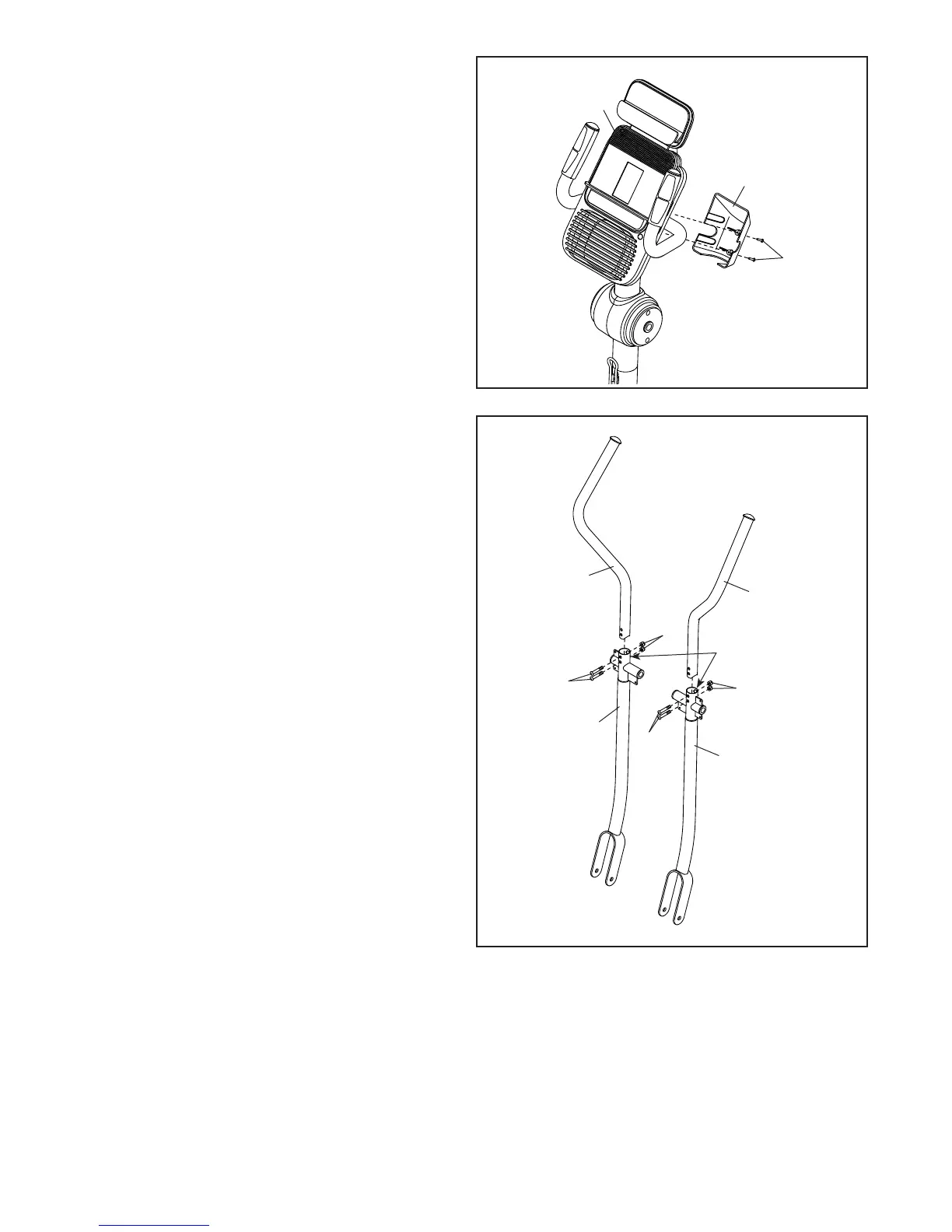
12. Attach the Upright Cap (4) to the Console (5)
with two M4 x 16mm Round Head Screws (101).
12
5
4
101
13
12
8
9
11
78
78
79
79
D
13. Identify the Right Upper Body Arm (8) and the
Right Upper Body Leg (11) and orient them as
shown.
Insert the Right Upper Body Arm (8) into the
Right Upper Body Leg (11).
Attach the Right Upper Body Arm (8) with two
M8 x 41mm Bolts (78) and two M8 Jam Nuts
(79). Make sure that the Jam Nuts are in the
hexagonal holes (D) in the Right Upper Body
Leg (11).
Attach the Left Upper Body Arm (9) to the
Left Upper Body Leg (12) in the same way.




 To Next Page