EasyManua.ls Logo

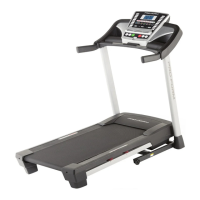
Pro-Form 795 Treadmill - User Manual

Pro-Form 795 Treadmill
36 pages
Print Icon
To Next Page IconTo Next Page
Loading...
!!
"#$%&'!()*+#$
!,#-&'
!"#$%&'"(&)*+,-./00(1&
2$345%&'"(&&&&&&&&&&&&&&&&&&&&&&&&&&&&&&&&&&&&&&
.$%/#!/0#!1#$%&'!2)*+#$!%2!/0#!13&-#!
&+45#!64$!$#6#$#2-#7
&&&&678+9:'
;$5#&5%%&<3$=5>?4"@A&5@#&4@A?3>=B
?4"@A&4@&?C4A&D5@>5%&E$F"3$&>A4@G&
?C4A&$H>4<D$@?(&25I$&?C4A&D5@>5%&
F"3&F>?>3$&3$F$3$@=$(
82J;K2&!7'87,
LLL(<3"F"3D(="D
M8J2+9:'2N
86!94)!0&5#!:)#1/%421;!4$!%6!3&$/1!
&$#!<&*&=#<!4$!*%11%2=;!O:&':+&
6:'+76+&+PJ&2+:;JQ&<%$5A$&
="@?5=?&6>A?"D$3&653$(
9!):;+7'+R&)%$5A$&3$G4A?$3&?C4A&
<3"#>=?&SA$$&?C$&%4D4?$#&L5335@?T&
"@&?C$&E5=U&="I$3&"F&?C4A&D5@>5%V&
E$F"3$&="@?5=?4@G&6>A?"D$3&653$(
67,,&+:,,B*;JJR
0BWWWBXYYB0YYY
!"@(Z*34(&/&5(D(Z/&<(D(&!+
25?(&W&5(D(Z[&<(D(&!+
:'&+PJ&\J]R
LLL(<3"F"3DA$3I4=$(="D

Questions and Answers

  • S
    Sarah BuchananJul 26, 2025
    How to fix Pro-Form Treadmill that won't turn on?
    • J
      Jonathon WoodJul 26, 2025
      First, ensure the power cord is plugged into a surge suppressor, and the surge suppressor is plugged into a properly grounded outlet. Note that the treadmill is not compatible with GFCI-equipped outlets and may not be compatible with AFCI-equipped outlets. Also, make sure the key is inserted into the console after plugging in the power cord. Finally, check the power switch on the treadmill frame near the power cord. If it protrudes, wait five minutes, then press it back in to reset it.
  • S
    sarah39Jul 30, 2025
    What to do if Pro-Form 795 Treadmill power turns off during use?
    • J
      johnsonmarthaJul 30, 2025
      If your treadmill turns off during use, check the power switch and if it has tripped, wait five minutes before pressing it back in. Also, ensure the power cord is securely plugged in; if it is, unplug it, wait five minutes, and plug it back in. Finally, remove and reinsert the key from the console.
  • A
    allisoncampbellAug 3, 2025
    Why is my Pro-Form 795 walking belt slowing when I walk on it?
    • S
      Stanley LopezAug 3, 2025
      The walking belt may be slowing down because it is overtightened. To resolve this, remove the key and unplug the power cord. Use a hex key to turn both idler roller screws counterclockwise 1/4 of a turn. When properly tightened, you should be able to lift each edge of the belt 2 to 3 inches off the platform. Keep the belt centered. Plug the cord back in, insert the key, and run the treadmill for a few minutes. Repeat as needed. Also, ensure that you are not applying any silicone spray or other substances to the walking belt.
  • J
    Jeffrey SloanAug 8, 2025
    How to center a Pro-Form 795 Treadmill walking belt that is off-center or slips?
    • D
      devinclarkeAug 8, 2025
      If the walking belt is off-center, remove the key and unplug the power cord. If the belt has shifted left, turn the left idler roller screw clockwise 1/2 turn. If it has shifted right, turn the left idler roller screw counterclockwise 1/2 turn. Avoid overtightening. Plug in the power cord, insert the key, and run the treadmill for a few minutes, repeating until centered. If the belt slips, remove the key and unplug the power cord. Turn both idler roller screws clockwise 1/4 turn. When correctly tightened, you should be able to lift each edge 2 to 3 inches off the platform. Keep the belt centered. Plug in the power cord, insert the key, and walk on the treadmill for a few minutes, repeating until properly tightened.
  • J
    John WilliamsAug 12, 2025
    How to recalibrate the incline on a Pro-Form 795 Treadmill?
    • A
      Anita StevensAug 12, 2025
      To recalibrate the incline, hold down the Stop button and the Speed increase button, insert the key into the console, and then release the Stop button and the Speed increase button. Press the Stop button and then press the Incline increase or decrease button. The treadmill will automatically rise to the maximum incline level and then return to the minimum level. If the incline does not begin calibrating, press the Stop button again, and then press the Incline increase or decrease button again. When the incline is calibrated, remove the key from the console.
  • N
    Natasha JonesAug 16, 2025
    What to do if Pro-Form 795 Treadmill console displays stay lit after removing the key?
    • J
      Jacob HernandezAug 16, 2025
      If the console displays remain lit after removing the key, the demo mode is likely turned on. To turn it off, hold down the Stop button for a few seconds. If the displays are still lit, see THE INFORMATION MODE on page 23 to turn off the demo mode.
  • E
    Ebony BarkerAug 21, 2025
    What to do if the displays of the Pro-Form Treadmill console do not function properly?
    • M
      michellesmithAug 21, 2025
      Remove the key from the console and unplug the power cord. Remove the three #8 x 1/2" Screws (1) and the two #8 x 3/4" Screws (2). Carefully pivot the Motor Hood (65) off. Locate the Reed Switch (52) and the Magnet (50) on the left side of the Pulley (49). Turn the Pulley until the Magnet is aligned with the Reed Switch, ensuring the gap is about 1/8 in. (3 mm). Adjust the Reed Switch position by loosening the #8 x 3/4" Tek Screw (14), moving the switch slightly, and retightening the screw. Reattach the Motor Hood and run the treadmill to check the speed reading.

Summary

WARNING DECAL PLACEMENT

Warning Decal Locations and Purpose

Details the placement and importance of warning decals on the treadmill.

IMPORTANT PRECAUTIONS

Essential Safety Guidelines and Warnings

Lists crucial safety precautions for operating the treadmill, covering usage and environment.

BEFORE YOU BEGIN

Getting Started with Your Treadmill

Provides an overview and encourages reading the manual before use.

PART IDENTIFICATION CHART

Identification of Assembly Parts

Lists and illustrates small parts used for treadmill assembly.

ASSEMBLY

Step-by-Step Assembly Process

Guides users through the detailed steps required to assemble the treadmill.

OPERATION AND ADJUSTMENT

Connecting Power and Surge Protection

Explains how to properly connect the treadmill's power cord and use a surge suppressor.

CONSOLE OVERVIEW AND FEATURES

Understanding Console Functions and Displays

Details the console's features, including manual mode, onboard workouts, and iFit Live.

POWERING AND MANUAL MODE OPERATION

Turning On Power and Using Manual Mode

Instructions for powering on the treadmill and operating it in manual mode.

WORKOUT MODES AND PROGRAMS

Using Onboard Workouts

Guides on selecting and using the treadmill's programmed onboard workouts.

ADVANCED FITNESS FEATURES

Using iFit Live Workouts

Instructions for setting up and using iFit Live workouts for enhanced training.

PROFORM SYNC CONNECTIVITY

Connecting and Using ProForm Sync

Details how to connect and utilize the ProForm Sync for workout data management.

CONSOLE INFORMATION AND SETTINGS

Navigating the Information Mode

Explains how to access and adjust console settings like units, demo mode, and contrast.

AUDIO SYSTEM INTEGRATION

Connecting Audio Devices to the Console

Provides instructions for connecting personal audio players to the treadmill's sound system.

FOLDING AND MOVING THE TREADMILL

How to Fold and Lower the Treadmill

Step-by-step guide on folding and unfolding the treadmill for storage and use.

How to Move the Treadmill Safely

Instructions for safely moving the folded treadmill using its wheels.

TROUBLESHOOTING COMMON ISSUES

Power and Console Display Problems

Solutions for issues related to power not turning on or console displays remaining lit.

Performance and Display Malfunctions

Addresses problems like the power turning off during use or general display issues.

TROUBLESHOOTING CONTINUED

Incline and Walking Belt Speed Issues

Troubleshooting steps for incorrect incline changes or the walking belt slowing down.

WALKING BELT ADJUSTMENT

Centering and Tightening the Walking Belt

Guides on adjusting the walking belt to keep it centered and prevent slippage.

EXERCISE GUIDELINES

Determining Exercise Intensity and Training Zones

Explains how to find proper exercise intensity using heart rate and training zones.

Workout Structure and Frequency Recommendations

Provides guidance on warming up, cooling down, and recommended workout frequency.

ORDERING REPLACEMENT PARTS

How to Order Spare Parts

Instructions and required information for ordering replacement parts for the treadmill.

LIMITED WARRANTY INFORMATION

Understanding Product Warranty Terms

Details the warranty coverage, limitations, and registration requirements for the treadmill.

Pro-Form 795 Treadmill Specifications

General IconGeneral
BrandPro-Form
Model795 Treadmill
CategoryTreadmill
LanguageEnglish

Related product manuals