15
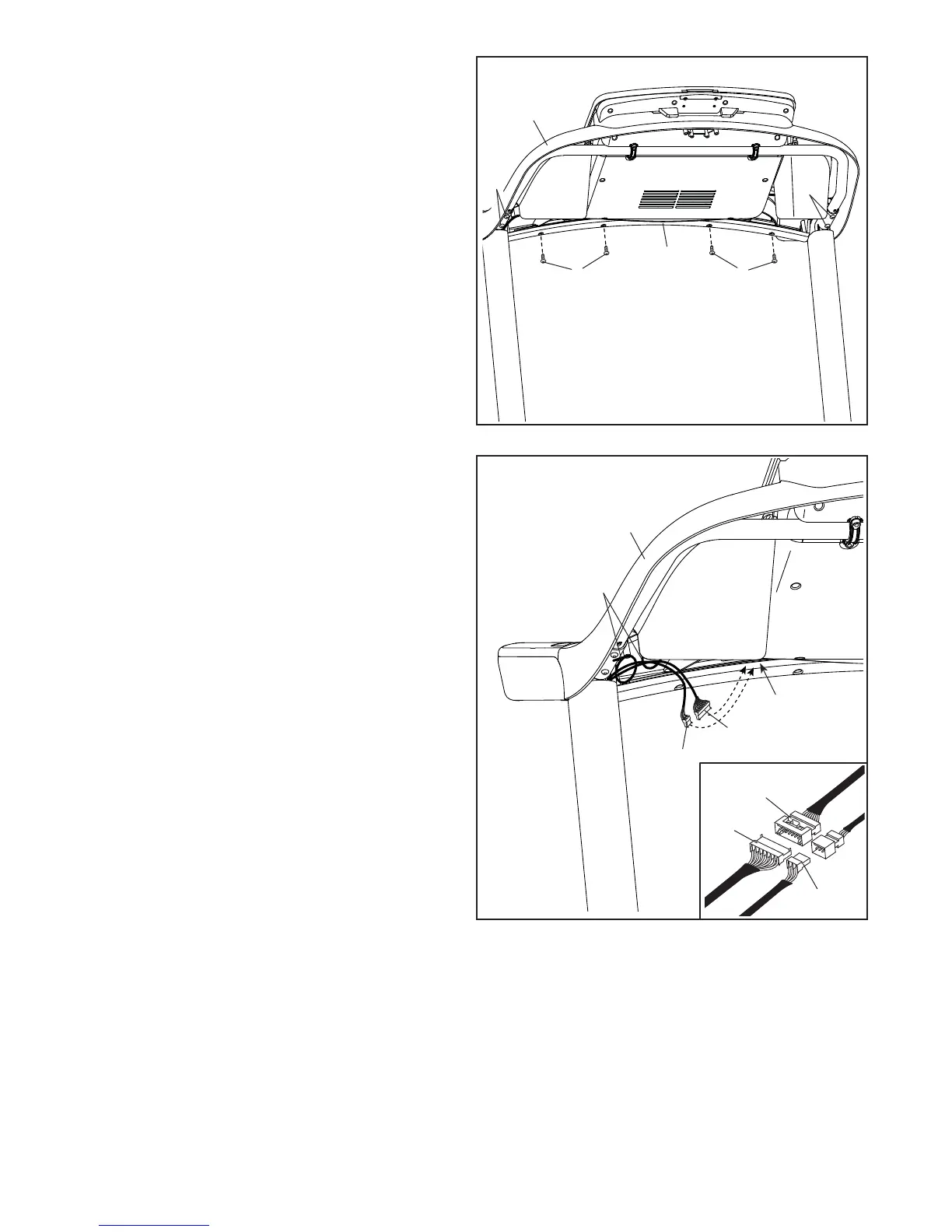
12. Attach the console assembly (K) to the Pulse
Crossbar (93) with four #8 x 1/2" Screws (1);
start all four Screws, and then tighten them.
Then, firmly tighten the four 5/16" x 3/4"
Screws (4).
12
93
K
4
1 1
4
13
K
81
81
L
M
J
J
M
13. Insert the Upright Wire (81) and the other wire
(J) through the two indicated looped ties (L) on
the console assembly (K).
See the inset drawing. Connect the Upright
Wire (81) and the other wire (J) to the con-
sole wires (M). The connectors should slide
together easily and snap into place. If they
do not, turn one connector and try again. IF
YOU DO NOT CONNECT THE CONNECTORS
PROPERLY, THE CONSOLE MAY BECOME
DAMAGED WHEN YOU TURN ON THE
POWER.
Insert all excess wires into the console assembly
(K). Then, pull the two ties (L) tight against the
wires, and cut off the ends of the ties.




 To Next Page