16
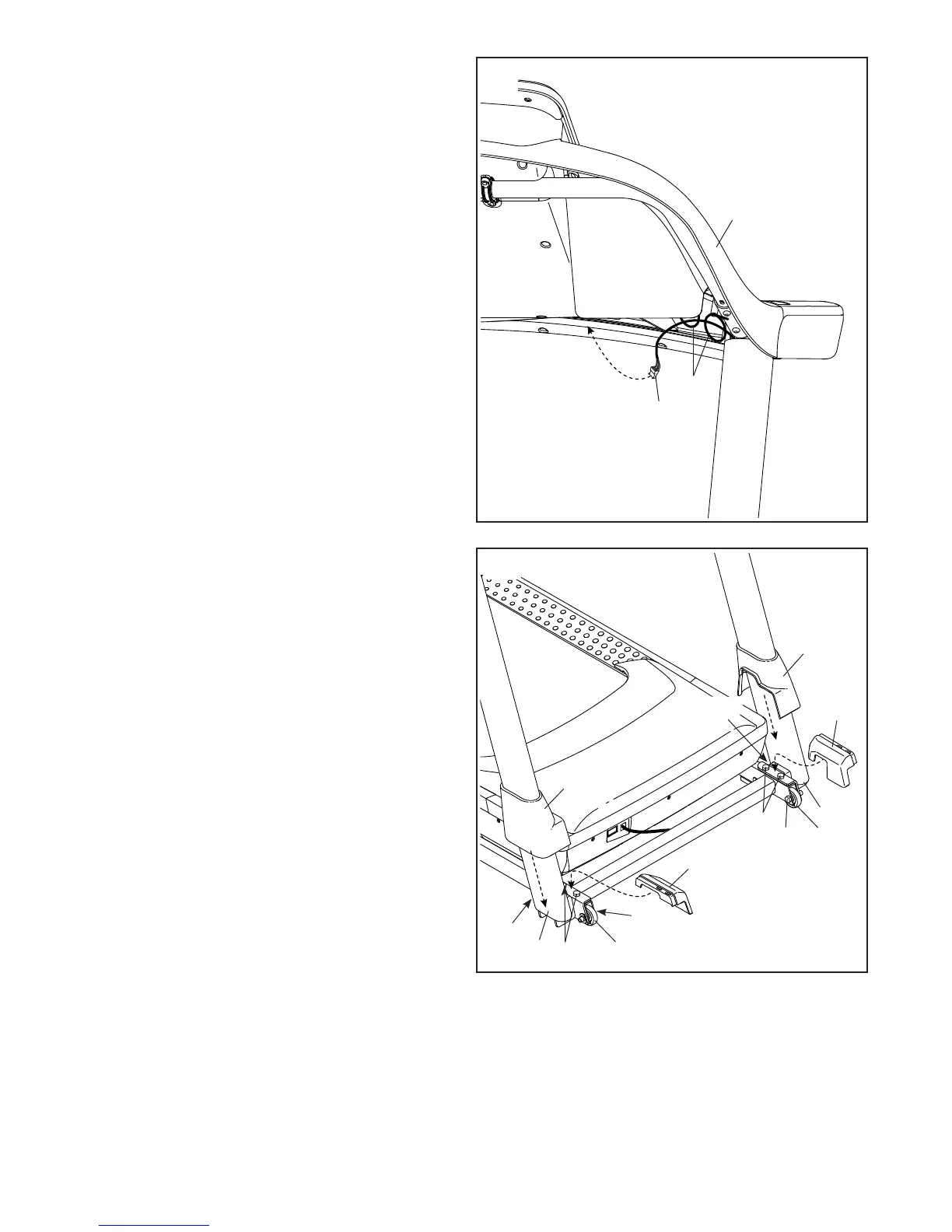
14. Insert the wire (J) on the left side through the two
indicated looped ties (L) on the console assem-
bly (K), and then connect the wire to the wire on
the console.
Insert all excess wires into the console assembly
(K). Then, pull the two ties (L) tight against the
wires and cut off the ends of the ties.
14
K
L
J
15. Firmly tighten the four 3/8" x 2 3/8" Screws
(7) and the two 3/8" x 1 1/4" Screws (63).
Next, tighten the two 3/8" x 1 3/4" Screws
(62); the Wheels (103) must turn freely.
Next, set the Left Inner Base Cover (100) onto
the lower end of the Left Upright (89). Slide the
Left Base Cover (82) downward until the two
Covers press together.
Then, set the Right Inner Base Cover (101) onto
the lower end of the Right Upright (90). Slide the
Right Base Cover (83) downward until the two
Covers press together.
100
83
82
62
89
7
7
63
62
101
63
15
90
103
103








 To Next Page