7
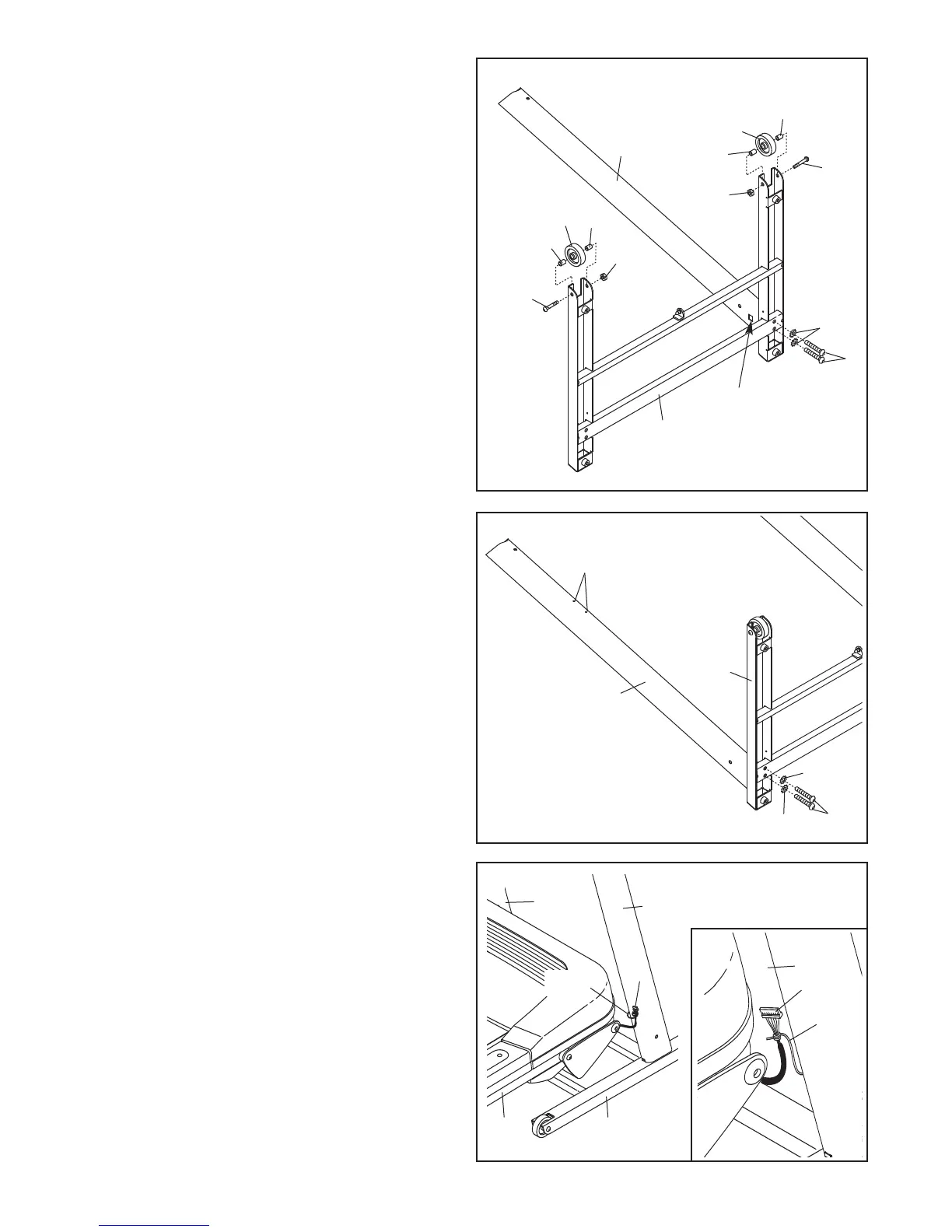
1. Make sure that the power cord is unplugged.
A
ttach a Wheel (95) to each side of the Base
(37) with a 3/8" x 3" Bolt (5), two Wheel Spacers
(
94), and a 3/8" Nut (31) as shown.
D
o not
overtighten the wheel Bolts; the Wheels
should turn freely.
Identify the Right Upright (39), which has a
square hole in the location shown.
Orient the Right Upright (39) and the Base (37)
as shown. Attach the Right Upright to the Base
with two 3/8" x 2 1/4" Bolts (4) and two 3/8" Star
Washers (6);
do not tighten the Bolts yet.
4
6
39
3. With the help of a second person, raise the
Uprights (38, 39) so the Base (37) is flat on the
floor as shown. Next, position the front of the
treadmill Frame (36) between the Uprights.
See the inset drawing. Locate the wire inside
the lower end of the Right Upright (39). Secure
the wire to the Upright Wire (69). Next, locate
the opposite end of the wire, which is extending
from the upper end of the Right Upright. Pull the
wire until the end of the Upright Wire is extend
-
ing from the top of the Right Upright.
2. Orient the Left Upright (38) as shown, and at-
tach it to the Base (37) with two 3/8" x 2 1/4"
Bolts (4) and two 3/8" Star Washers (6);
do not
tighten the Bolts yet.
37
38
6
6
Latch
Holes
2
1
Square Hole
3736
38
39
3
37
95
31
94
94
5
9
5
9
4
94
5
31
4
69
Wire
Wire
69
39









 To Next Page