34
MIG/MAG Function Setup Key - 3 -
Right Regulation Knob -
5 -
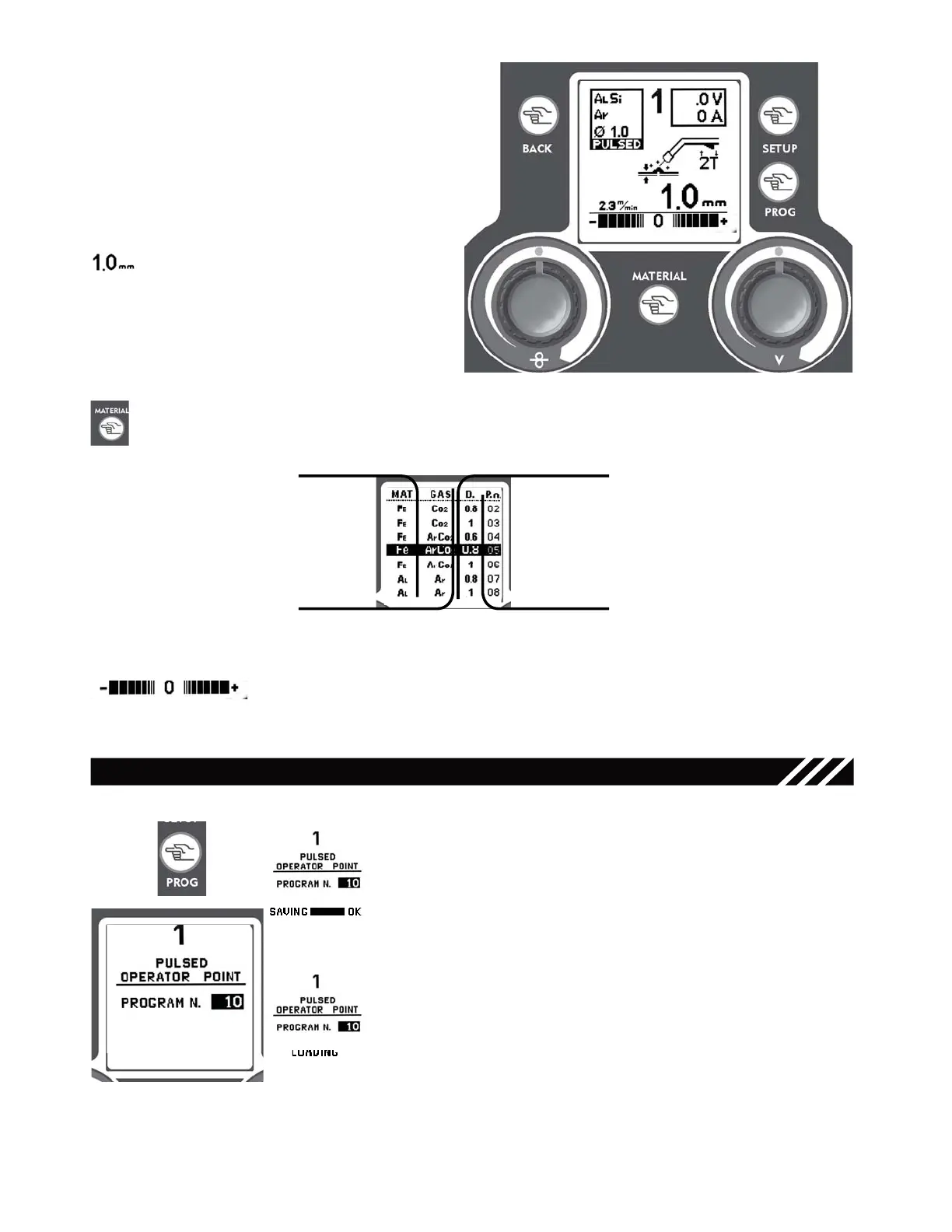
Use the Right Regulation Knob to adjust
the thickness of the material to be welded
(welding current) expressed in mm.
Note: thickness is refered to a fillet welding
Material Key - 6.2 -
Left Regulation Knob - 7 -
Use the Left Regulation Key to balance the wire speed in % (±40%) and increase or
decrease the arc lenght.
Material
GAS
Welding Wire Thickness
Program number
TIG AND MIG/MAG SETUPS SAVE & RECALL
Use the Prog Save & Recall Key to save and recall the parameters
set by the operator (refer to paragraphs 6.0, 6.2, 9.0 and 10.0).
To save the setup proceed as follows:
• Press the PROG Key - 4 -
• Turn the Right Regulation knob - 5 - to choose the program
number to save in.
• To save the program keep the PROG Key pressed, a beep and
a the wording “OK” will confirm the save.
To recall a saved program proceed as follows:
• Press the PROG Key - 4 -
• Turn the Right Regulation knob - 5 - to choose the desired
program number.
• Press the PROG Key - 4 -, the wording “LOADING” will confirm
the program loading.
Use the Mode Key - 1 - to go back to the MIG/MAG main screen.
Prog Save & Recall Key - 4 -
Press the Setup Key - 3.2 - in MIG/MAG Mode to
access the parameters’ setup screen .
Use the Right Regulation Knob
- 5 -
to select
the “Synergy ON” Mode for normal welding or
“PULSED” Mode for pulsed welding.
Use the Mode Key - 1 - to go back to the MIG/
MAG main screen. Refer to paragraph 7 for the
other parameters’ setting.
Use the Material Key to view the Synergic Welding Curves available on the unit.
Turn the Right Regulation Key - 5 - to choose the desired Synergic Curve, suitable to the type of wire
and to the gas going to be used for welding; to confirm your choice simply press the Mode Key - 1
- to go back to the main screen.
Once selected a Synergic Curve, Slope, BBT, Inductance, Wire Speed Balance and Material thickness
settings go back to their default values.
Figure 17
Figure 18
3
5
6.2
7
2
1
Figure 16
15



 To Next Page