Thermostat Quick ReferenceThermostat Quick Reference
Temporary and Permanent Hold Feature
Understanding Your Thermostats Staging:
This thermostat controls 2 stages of heating. For reasons of energy
eciency the thermostat will try to maintain your comfort setting
using only 1 stage. If the 2nd stage is necessary it will be used and
you will see Stage 2 in the display.
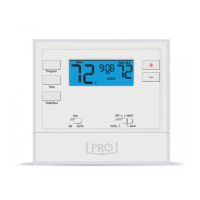
Permanent Hold: If you press the HOLD button on the left of your
screen, you will see HOLD appear to the right of the ambient
temperature in the display. The thermostat will now permanently
stay at this setpoint and can be adjusted using the or keys.
To Return to Running Schedule: Press the RUN button on the left
of your screen to exit either temporary or permanent hold.
(If using programming)
Temporary Hold: If you press the or at this time until the
next scheduling period starts. The temperature will remain at this
setpoint temporarily until next time period.







 To Next Page