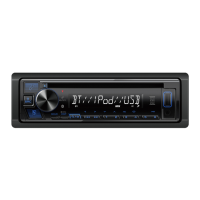
This document describes the ProAudio PP107233 CD-Receiver, an in-car audio system designed for playing CDs, USB devices, and iPod/iPhone.
Function Description
The ProAudio PP107233 is a CD-receiver that supports various audio sources including:
- CDs: Plays audio CDs, MP3, WMA, WAV, and FLAC files from CD-R/CD-RW/CD-ROM discs.
- USB Devices: Connects to USB mass storage class devices to play MP3, WMA, WAV, and FLAC files.
- iPod/iPhone: Compatible with various iPod touch, iPod classic, iPod nano, and iPhone models (3G to 6S Plus, SE) for audio playback and control.
- AUX Input: Allows connection of portable audio players via a 3.5 mm (1/8") stereo mini plug.
- Tuner: Features an FM/AM tuner for radio reception.
The unit offers a range of audio settings for sound customization, including an EQ PRO with preset equalizers (DRIVE EQ, TOP40, POWERFUL, ROCK, POPS, EASY, JAZZ, NATURAL, USER), bass boost, loudness control, and subwoofer settings (level, phase, LPF). It also includes a "Sound Reconstruction" feature to create realistic sound by compensating for high-frequency components lost in audio data compression.
Important Technical Specifications
Tuner (FM):
- Frequency Range: 87.9 MHz – 107.9 MHz (200 kHz space)
- Usable Sensitivity (S/N = 26 dB): 8.2 dBf (0.71 µV/75 Ω)
- Quieting Sensitivity (DIN S/N = 46 dB): 17.2 dBf (2.0 µV/75 Ω)
- Frequency Response (±3 dB): 30 Hz – 15 kHz
- Signal-to-Noise Ratio (MONO): 64 dB
- Stereo Separation (1 kHz): 40 dB
Tuner (AM):
- Frequency Range: 530 kHz – 1700 kHz (10 kHz space)
- Usable Sensitivity (S/N = 20 dB): 29 dBµ (28.2 µV)
CD Player:
- Laser Diode: GaAIAs
- Digital Filter (D/A): 8 times over sampling
- Spindle Speed: 500 rpm – 200 rpm (CLV)
- Wow & Flutter: Below measurable limit
- Frequency Response (±1 dB): 20 Hz – 20 kHz
- Total Harmonic Distortion (1 kHz): 0.01%
- Signal-to-Noise Ratio (1 kHz): 105 dB
- Dynamic Range: 90 dB
- Channel Separation: 85 dB
- MP3 Decode: Compliant with MPEG-1/2 Audio Layer-3
- WMA Decode: Compliant with Windows Media Audio
USB:
- USB Standard: USB 1.1, USB 2.0 (Full speed)
- File System: FAT12/16/32
- Maximum Supply Current: DC 5 V 1.0 A
- MP3 Decode: Compliant with MPEG-1/2 Audio Layer-3
- WMA Decode: Compliant with Windows Media Audio
- WAV Decode: Linear-PCM
- FLAC Decode: FLAC file (Up to 48 kHz/16 bit)
Audio:
- Maximum Output Power: 50 W x 4
- Full Bandwidth Power: 22 W x 4 (at less than 1% THD)
- Speaker Impedance: 4 Ω – 8 Ω
- Tone Action (Bass): 100 Hz ±8 dB
- Tone Action (Middle): 1.0 kHz ±8 dB
- Tone Action (Treble): 12.5 kHz ±8 dB
- Preout Level/Load: 2 500 mV/10 kΩ
- Preout Impedance: < 600 Ω
Auxiliary:
- Frequency Response (±3 dB): 20 Hz – 20 kHz
- Input Maximum Voltage: 1000 mV
- Input Impedance: 30 kΩ
General:
- Operating Voltage: 12 V DC battery
- Installation Size (W×H×D): 182 mm x 53 mm × 158 mm (7-3/16" × 2-1/16″ × 6-1/4")
- Net Weight (includes Trimplate, Mounting Sleeve): 1.3 kg (2.9 lbs)
Usage Features
Basic Operation:
- Power On/Off: Press SRC to turn on, press and hold to turn off.
- Volume Adjustment: Turn the volume knob.
- Source Selection: Press SRC repeatedly to cycle through sources (Tuner, CD, USB, iPod, AUX, Standby).
- Display Information: Press DISP repeatedly to change the information shown on the display (e.g., source name, clock, track/artist info, playing time, folder/file name).
- Clock and Date Setting: Access via the [FUNCTION] menu to set time (12H/24H format) and date (DD/MM/YY or MM/DD/YY format).
Tuner Features:
- Band Selection: Press BAND (or #FM+/*AM– on remote) to select FM1/FM2/FM3/AM.
- Station Search: Use ◄◄/►►I (or ◄◄/►►I (+) on remote) for automatic or manual station search (AUTO1, AUTO2, MANUAL).
- Preset Stations: Store up to 18 FM and 6 AM stations by pressing and holding number buttons (1-6). Select stored stations by pressing number buttons.
- Direct Access Tuning (Remote Control): Enter frequency directly using number buttons.
- Auto Memory: Automatically memorize 6 stations with good reception.
- Mono Set: Improve FM reception by sacrificing stereo effect.
CD/USB/iPod Features:
- Disc Insertion: Insert a disc into the loading slot; playback starts automatically.
- USB/iPod Connection: Connect USB devices or iPod/iPhone via the USB input terminal. Source changes automatically.
- Playback Control: Play/pause (6/ENTII), reverse/fast-forward (◄◄/►►I), select track/file (◄◄/►►I), select folder (▲/▼).
- Repeat Play: Press 4 repeatedly to select repeat modes (TRACK REPEAT, ALL REPEAT, FILE REPEAT, FOLDER REPEAT, REPEAT OFF).
- Random Play: Press 3 repeatedly to select random modes (DISC RANDOM, RANDOM OFF, FOLDER RANDOM, ALL RANDOM).
- Music Drive Selection (USB): Choose between internal/external memory of a smartphone or multiple drive devices.
- Control Mode (iPod): Select [MODE ON] to control iPod/iPhone from the device itself, or [MODE OFF] to control from the unit.
- File Search:
- From Folder/List: Browse and select files using the volume knob.
- Quick Search: Browse through long lists quickly.
- Skip Search (iPod): Skip through lists at a preset ratio (0.5%, 1%, 5%, 10%).
- Alphabet Search (iPod): Search for files by the first character.
- Direct Music Search (Remote Control): Enter track/file number directly.
Audio Settings:
- EQ PRO: Customize sound settings (Bass CTR FRQ, Bass Level, Bass Q Factor, Bass Extend, Mid CTR FRQ, Mid Level, Mid Q Factor, Tre CTR FRQ, Tre Level).
- Preset EQ: Select from various preset equalizers (DRIVE EQ, TOP40, POWERFUL, ROCK, POPS, EASY, JAZZ, NATURAL, USER).
- Fader/Balance: Adjust front/rear and left/right speaker output balance.
- Volume Offset: Adjust initial volume level for each source.
- LPF Subwoofer: Set low-pass filter frequency for subwoofer (THROUGH, 85HZ, 120HZ, 160HZ).
- Sub-W Phase: Select subwoofer phase (REVERSE 180°, NORMAL 0°).
- Sound Reconstruction: Enhance audio quality by restoring high-frequency components.
Display Settings:
- Dimmer: Dims illumination. Can be set to ON/OFF or DIMMER TIME (set ON/OFF times).
- Brightness: Adjust brightness level (LVL00 to LVL31) for different zones.
- Text Scroll: Set display information to scroll once (ONCE), repeat (AUTO), or OFF.
- Clock Display: Show clock time on display even when unit is off.
Maintenance Features
Installation/Connection:
- Unit Installation/Removal: Use extraction keys to install or remove the unit.
- Wiring Connection: Detailed diagram for connecting power (Ignition, Battery, Earth), speakers (front/rear), subwoofer, antenna, steering remote control, and mute control.
- Battery Replacement (Remote Control): Replace CR2025 coin/button cell battery.
Troubleshooting:
- Sound Issues: Check volume, cords, connections, speaker wire insulation.
- Error Messages:
- "MISWIRING CHECK WIRING THEN PWR ON": Check speaker wire insulation.
- "PROTECTING SEND SERVICE": Send unit for service.
- "NO DISC": Insert playable disc.
- "TOC ERROR": Clean disc, insert properly.
- "NA FILE": Ensure media contains supported audio files.
- "COPY PRO": Playing copy-protected file.
- "NO DEVICE": Connect USB device, change source.
- "NO MUSIC": Connect USB device with playable audio files.
- "READ ERROR": Copy files/folders again, reset USB device.
- "NA DEVICE" (iPod/USB): Check connections.
- "iPod ERROR": Reconnect/reset iPod.
- Unit Not Working: Reset the unit (page 4).
- Incorrect Characters: Unit displays uppercase letters, numbers, limited symbols. Check display language setting.
- Poor Radio Reception: Connect antenna firmly.
- Disc Ejection Issues: Press and hold to forcibly eject disc. If problem persists, reset unit.
- Noise Generation: Skip track or change disc.
Important Notes:
- Do not operate functions that distract from safe driving.
- Do not ingest remote control battery (chemical burn hazard). Keep away from children.
- Adjust volume to hear outside sounds.
- Back up important data; no responsibility for data loss.
- Avoid metallic objects inside the unit.
- Do not leave remote control in hot places.
- Use only specified battery type for replacement.
- USB devices: Cannot connect via USB hub. Cable length should not exceed 5 m. Must be 5 V and not exceed 1.0 A.
- iPod/iPhone: Some functions may not operate depending on OS version.
- Unplayable discs: Non-round, colored/dirty, non-finalized, 8 cm CDs.

 Need help?
 General

 To Next Page